SQL Server database unit testing
This topic describes how to create unit tests and use different methods to manage and execute tests using dbForge Studio for SQL Server, the command-line interface, and PowerShell cmdlets.
Database unit testing
Database unit testing ensures that individual database objects, such as procedures, functions, or triggers, work correctly in isolation and that code changes do not cause errors.
In SQL Server, you can use the tSQLt framework to write unit tests as T‑SQL stored procedures. tSQLt organizes tests into test classes, which are implemented as database schemas. Each test is a stored procedure whose name usually begins with test and runs in its own transaction. This ensures that tests are isolated and don’t affect actual data.
dbForge Studio for SQL Server provides the Unit Test tool to create, run, and analyze these tests visually.
What unit tests can verify
With the tSQLt framework, you can:
- Verify query values and results.
- Verify the table structure.
- Verify the existence of database objects.
- Verify the presence or absence of errors.
- Compare tables and result sets.
- Isolate dependencies by substituting tables, functions, and procedures.
- Verify constraints and triggers.
Verification methods
You can use the following verification methods when running unit tests in dbForge Studio for SQL Server.
- Assertions – Validate that the result of executing a procedure, function, or query matches the expected result.
- Expectations – Verify code behavior when errors are expected and when no errors should occur.
- Dependency isolation – Tests procedures, functions, and database logic in isolation without modifying actual data or structure.
Assertions
The table describes the assertions.
| Method | Description |
|---|---|
| AssertEquals | Verifies whether two values are equal. |
| AssertNotEquals | Verifies whether two values are not equal. |
| AssertEqualsString | Verifies whether two string values are equal. |
| AssertEqualsTable | Compares the contents of two tables. |
| AssertEqualsTableSchema | Compares the structure of two tables, including columns and data types. |
| AssertEmptyTable | Verifies that a table contains no rows. |
| AssertObjectExists | Verifies whether a specified database object exists. |
| AssertObjectDoesNotExist | Verifies whether a specified database object does not exist. |
| AssertResultSetsHaveSameMetaData | Verifies that two result sets have the same structure. |
| AssertLike | Verifies whether a string matches a specified LIKE pattern. |
| Fail | Forces the test to fail immediately with an error. |
Expectations
The table describes the expectations.
| Method | Description |
|---|---|
| ExpectException | Verifies that the test raises an exception. If no exception is raised, the test fails. |
| ExpectNoException | Verifies that the test does not raise an exception. If an exception is raised, the test fails. |
Dependency isolation
The table describes the dependency isolation methods.
| Method | Description |
|---|---|
| FakeTable | Creates a temporary fake table instead of the real one, which enables tests to run without modifying actual data. |
| FakeFunction | Replaces a function with a test version to control its behavior during testing. |
| SpyProcedure | Tracks whether a procedure was called and how many times it was executed. |
| ApplyConstraint | Applies a constraint, such as FOREIGN KEY, to a fake table. |
| ApplyTrigger | Applies a trigger to a fake table for testing purposes. |
| RemoveObject | Temporarily removes a database object during a test. |
| RemoveObjectIfExists | Removes a database object only if it exists. |
Example: How to perform unit testing using dbForge Studio for SQL Server
This example explains how to create and run unit tests based on assertions, expectations, and dependency isolation using dbForge Studio for SQL Server, command-line interface, and PowerShell scripts.
Prerequisites
For this example, run the following scripts:
- Create the Sales database and tables with data.
Click to open the script
CREATE DATABASE Sales;
GO

USE Sales;
GO

-- Customers
CREATE TABLE dbo.customers
(
customer_id INT IDENTITY PRIMARY KEY,
customer_name NVARCHAR(100),
email NVARCHAR(200)
);
GO

-- Products
CREATE TABLE dbo.products
(
product_id INT IDENTITY PRIMARY KEY,
product_name NVARCHAR(100),
price DECIMAL(10,2)
);
GO

-- Orders
CREATE TABLE dbo.orders
(
order_id INT IDENTITY PRIMARY KEY,
customer_id INT,
order_date DATE
);
GO

-- Order Items
CREATE TABLE dbo.order_items
(
order_item_id INT IDENTITY PRIMARY KEY,
order_id INT,
product_id INT,
quantity INT
);
GO

-- Function
CREATE FUNCTION dbo.fn_get_discount (@customer_id INT)
RETURNS DECIMAL(5,2)
AS
BEGIN
RETURN 0.10;
END;
GO

-- Procedure
CREATE PROCEDURE dbo.sp_create_order
@customer_id INT
AS
BEGIN
INSERT INTO dbo.orders(customer_id, order_date)
VALUES(@customer_id, GETDATE());
END;
GO

-- Trigger
CREATE TRIGGER trg_orders_insert
ON dbo.orders
AFTER INSERT
AS
BEGIN
PRINT 'Order created';
END;
GO

ALTER TABLE dbo.orders
ADD CONSTRAINT FK_orders_customers
FOREIGN KEY (customer_id) REFERENCES dbo.customers(customer_id);
GO

USE master;
- Create tests for the test_assertions test class.
Click to open the script
USE Sales;
GO

EXEC tSQLt.NewTestClass 'test_assertions';
GO

--------------------------------------------------
-- AssertEmptyTable
--------------------------------------------------
CREATE PROCEDURE test_assertions.[test AssertEmptyTable]
AS
BEGIN
EXEC tSQLt.FakeTable 'dbo.orders';
EXEC tSQLt.AssertEmptyTable 'dbo.orders';
END;
GO

--------------------------------------------------
-- AssertEquals
--------------------------------------------------
CREATE PROCEDURE test_assertions.[test AssertEquals]
AS
BEGIN
DECLARE @expected INT = 10;
DECLARE @actual INT = 10;

EXEC tSQLt.AssertEquals @expected, @actual;
END;
GO

--------------------------------------------------
-- AssertEqualsString
--------------------------------------------------
CREATE PROCEDURE test_assertions.[test AssertEqualsString]
AS
BEGIN
EXEC tSQLt.AssertEqualsString 'Hello', 'Hello';
END;
GO

--------------------------------------------------
-- AssertEqualsTable
--------------------------------------------------
CREATE PROCEDURE test_assertions.[test AssertEqualsTable]
AS
BEGIN
CREATE TABLE expected (id INT);
CREATE TABLE actual (id INT);

INSERT INTO expected VALUES (1);
INSERT INTO actual VALUES (1);

EXEC tSQLt.AssertEqualsTable 'expected', 'actual';
END;
GO

--------------------------------------------------
-- AssertEqualsTableSchema
--------------------------------------------------
CREATE PROCEDURE test_assertions.[test AssertEqualsTableSchema]
AS
BEGIN
CREATE TABLE expected (id INT, name NVARCHAR(50));
CREATE TABLE actual (id INT, name NVARCHAR(50));

EXEC tSQLt.AssertEqualsTableSchema 'expected', 'actual';
END;
GO

--------------------------------------------------
-- AssertNotEquals
--------------------------------------------------
CREATE PROCEDURE test_assertions.[test AssertNotEquals]
AS
BEGIN
EXEC tSQLt.AssertNotEquals 5, 10;
END;
GO

--------------------------------------------------
-- AssertObjectExists
--------------------------------------------------
CREATE PROCEDURE test_assertions.[test AssertObjectExists]
AS
BEGIN
EXEC tSQLt.AssertObjectExists 'dbo.customers';
END;
GO

--------------------------------------------------
-- AssertObjectDoesNotExist
--------------------------------------------------
CREATE PROCEDURE test_assertions.[test AssertObjectDoesNotExist]
AS
BEGIN
EXEC tSQLt.AssertObjectDoesNotExist 'dbo.table_not_exists';
END;
GO

--------------------------------------------------
-- AssertResultSetsHaveSameMetaData
--------------------------------------------------
CREATE PROCEDURE test_assertions.[test AssertResultSetsHaveSameMetaData]
AS
BEGIN
CREATE TABLE t1 (id INT, name NVARCHAR(50));
CREATE TABLE t2 (id INT, name NVARCHAR(50));

EXEC tSQLt.AssertResultSetsHaveSameMetaData
'SELECT * FROM t1',
'SELECT * FROM t2';
END;
GO

--------------------------------------------------
-- AssertLike
--------------------------------------------------
CREATE PROCEDURE test_assertions.[test AssertLike]
AS
BEGIN
EXEC tSQLt.AssertLike 'Hel%', 'Hello';
END;
GO

--------------------------------------------------
-- Fail
--------------------------------------------------
CREATE PROCEDURE test_assertions.[test Fail example]
AS
BEGIN
EXEC tSQLt.Fail 'Forced failure example';
END;
GO
USE master;
- Create tests for the test_expectations test class.
Click to open the script
USE Sales;
GO

EXEC tSQLt.NewTestClass 'test_expectations';
GO

--------------------------------------------------
-- ExpectException
--------------------------------------------------
CREATE PROCEDURE test_expectations.[test ExpectException]
AS
BEGIN
EXEC tSQLt.ExpectException;

SELECT 1/0;
END;
GO

--------------------------------------------------
-- ExpectNoException
--------------------------------------------------
CREATE PROCEDURE test_expectations.[test ExpectNoException]
AS
BEGIN
EXEC tSQLt.ExpectNoException;

SELECT 1;
END;
GO
USE master;
- Create tests for the test_isolation test class.
Click to open the script
USE Sales;
GO

EXEC tSQLt.NewTestClass 'test_isolation';
GO

--------------------------------------------------
-- FakeTable
--------------------------------------------------
CREATE PROCEDURE test_isolation.[test FakeTable]
AS
BEGIN
EXEC tSQLt.FakeTable 'dbo.customers';

INSERT INTO dbo.customers(customer_name)
VALUES('Test Customer');

DECLARE @cnt INT;
SELECT @cnt = COUNT(*) FROM dbo.customers;

EXEC tSQLt.AssertEquals 1, @cnt;
END;
GO

--------------------------------------------------
-- FakeFunction
--------------------------------------------------
CREATE FUNCTION dbo.fn_get_discount_fake (@customer_id INT)
RETURNS DECIMAL(5,2)
AS
BEGIN
RETURN 0.50;
END;
GO

CREATE PROCEDURE test_isolation.[test FakeFunction]
AS
BEGIN
EXEC tSQLt.FakeFunction
'dbo.fn_get_discount',
'dbo.fn_get_discount_fake';

DECLARE @d DECIMAL(5,2);
SELECT @d = dbo.fn_get_discount(1);

EXEC tSQLt.AssertEquals 0.50, @d;
END;
GO

--------------------------------------------------
-- ApplyConstraint
--------------------------------------------------
CREATE PROCEDURE test_isolation.[test ApplyConstraint]
AS
BEGIN
EXEC tSQLt.FakeTable 'dbo.customers';
EXEC tSQLt.FakeTable 'dbo.orders';

EXEC tSQLt.ApplyConstraint 'dbo.orders', 'FK_orders_customers';

INSERT INTO dbo.customers(customer_id, customer_name)
VALUES (1, 'John');

EXEC tSQLt.ExpectException;

INSERT INTO dbo.orders(customer_id, order_date)
VALUES (999, GETDATE());
END;
GO

--------------------------------------------------
-- SpyProcedure
--------------------------------------------------
CREATE PROCEDURE test_isolation.[test SpyProcedure]
AS
BEGIN
EXEC tSQLt.SpyProcedure 'dbo.sp_create_order';

EXEC dbo.sp_create_order 1;

DECLARE @cnt INT;
SELECT @cnt = COUNT(*)
FROM dbo.sp_create_order_SpyProcedureLog;

EXEC tSQLt.AssertEquals 1, @cnt;
END;
GO

--------------------------------------------------
-- ApplyTrigger
--------------------------------------------------
CREATE PROCEDURE test_isolation.[test ApplyTrigger]
AS
BEGIN
EXEC tSQLt.FakeTable 'dbo.orders';
EXEC tSQLt.ApplyTrigger 'dbo.orders', 'trg_orders_insert';
END;
GO

--------------------------------------------------
-- RemoveObjectIfExists
--------------------------------------------------
CREATE PROCEDURE test_isolation.[test RemoveObjectIfExists]
AS
BEGIN
EXEC tSQLt.RemoveObjectIfExists 'dbo.temp_table';
END;
GO

--------------------------------------------------
-- RemoveObject
--------------------------------------------------
CREATE PROCEDURE test_isolation.[test RemoveObject]
AS
BEGIN
CREATE TABLE dbo.temp_remove(id INT);

EXEC tSQLt.RemoveObject 'dbo.temp_remove';

EXEC tSQLt.AssertObjectDoesNotExist 'dbo.temp_remove';
END;
GO
USE master;
Create and run unit tests
In this scenario, you create SQL Server unit tests that verify the behavior of stored procedures based on the three verification methods: assertions, expectations, and dependency isolation.
To create and run unit tests:
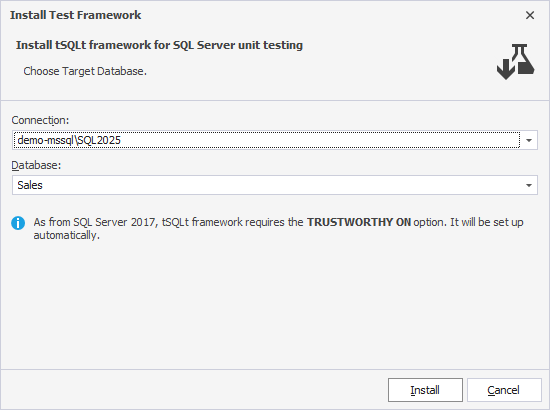
1. Install the tSQLt framework in the database you want to use for testing.
2. Create unit tests for assertion tests:
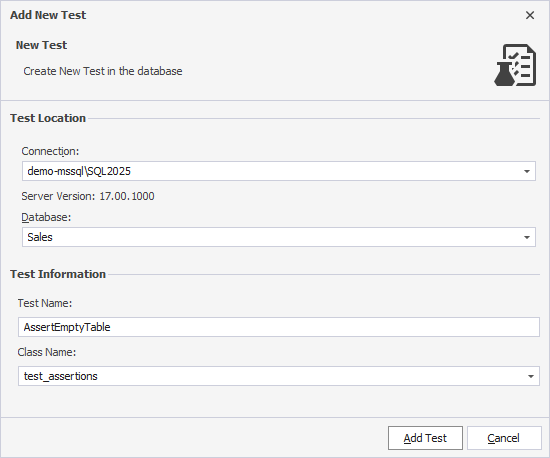
2.1. In Database Explorer, right-click the required database and select Unit Test > Add New Test.
2.2. In Connection, select the server where the database is hosted.
2.3. In Database, select the database you want to use for testing.
2.4. In Test Name, enter the test name.
2.5. In Class Name, enter the class name, for example, test_assertions.
2.6. Click Add Test, then click Finish.
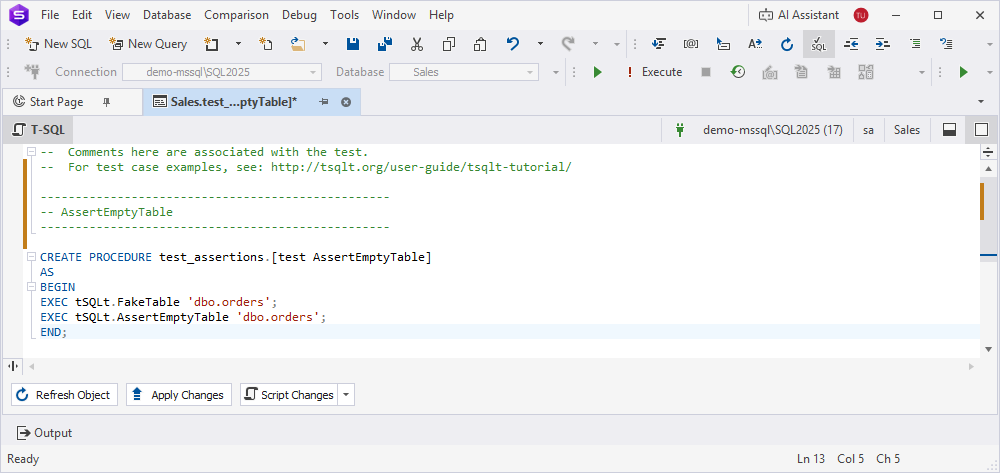
2.7. In SQL Editor that opens, enter the T-SQL code of the unit test, for example:
--------------------------------------------------
-- AssertEmptyTable
--------------------------------------------------
CREATE PROCEDURE test_assertions.[test AssertEmptyTable]
AS
BEGIN
EXEC tSQLt.FakeTable 'dbo.orders';
EXEC tSQLt.AssertEmptyTable 'dbo.orders';
END;
GO
2.8. Execute the script.
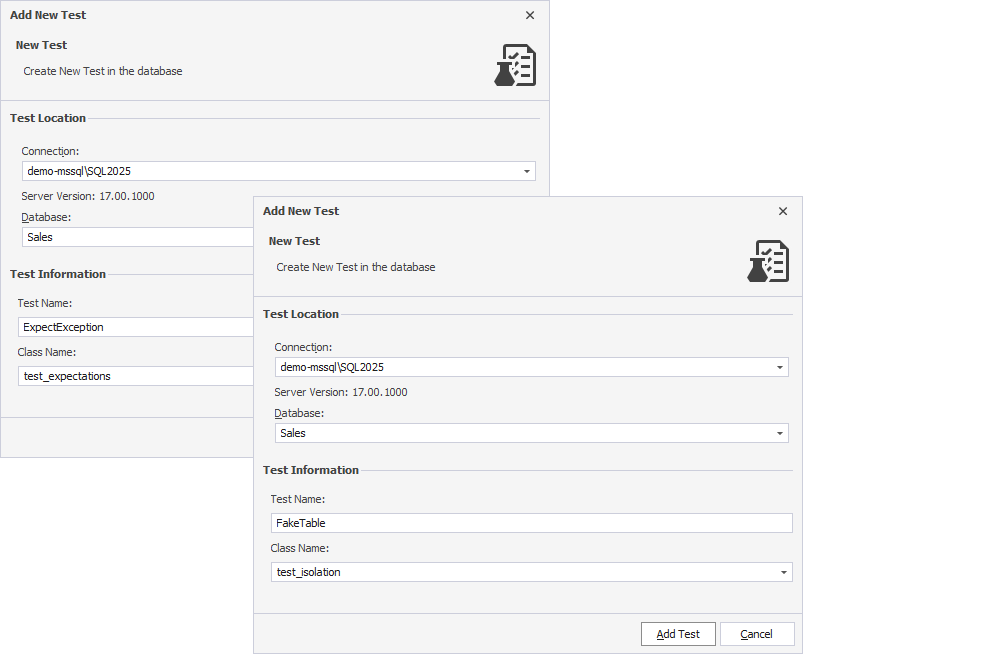
3. Repeat step 2 for each unit test you want to create.
- For expectation tests, enter test_expectations in Class Name.
- For dependency isolation tests, enter test_isolation in Class Name.
Note
After you create a test and assign it to a test class, for example, test_assertions, that class automatically appears in Class Name. You can then select it when creating additional tests.
Tip
To create unit tests in bulk, open SQL Editor and select the required connection and database. Then run the corresponding scripts from Prerequisites.
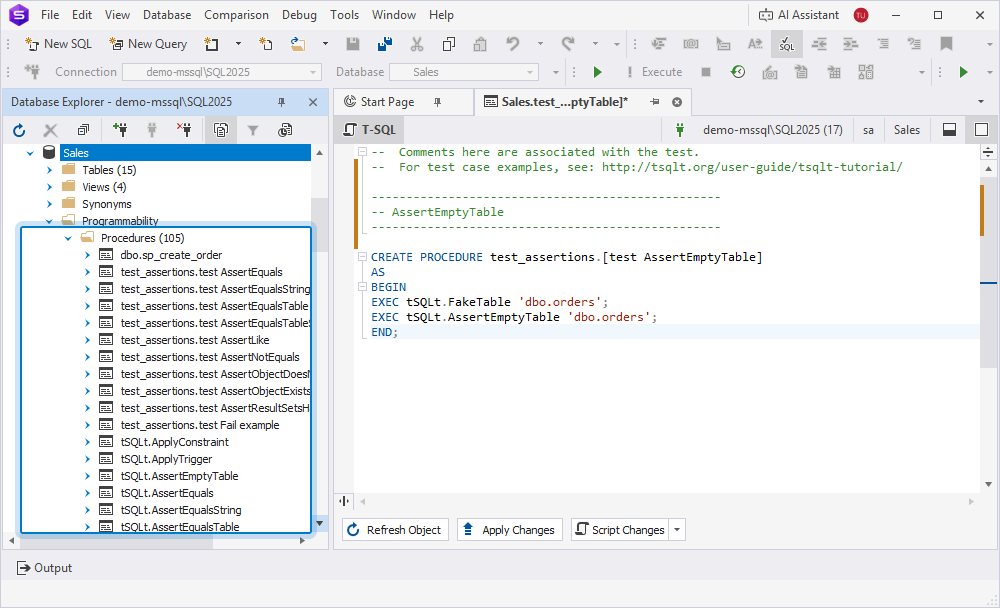
The created unit tests appear under Programmability > Procedures.
4. Run unit tests:
4.1. In Database Explorer, right-click the required database and select Unit Test > View Test List.
4.2. In Test List Manager, select the connection and the database.
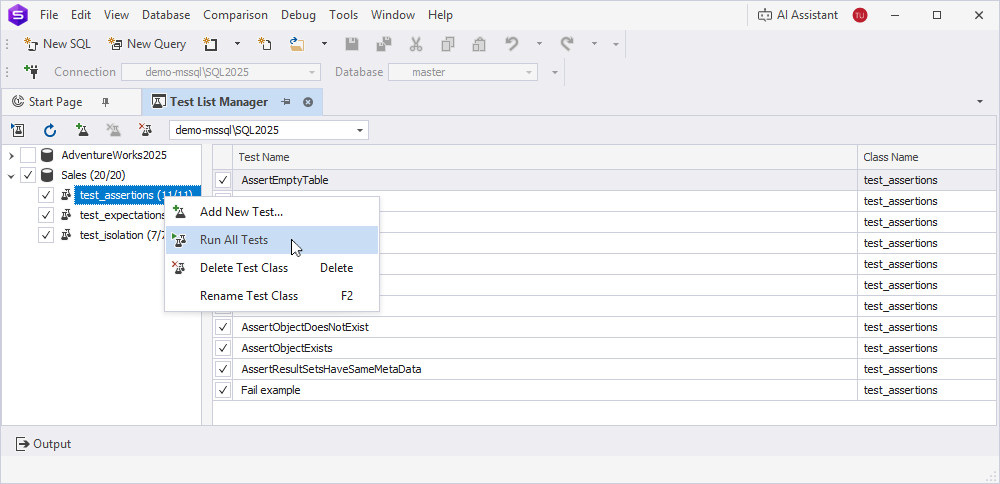
4.3. To run all tests, right-click the database and select Run All Tests. To run the tests of a specific test class, right-click the test class and select Run All Tests.
To run a specific test, in the grid, right-click the test and select Run Selected Test(s).
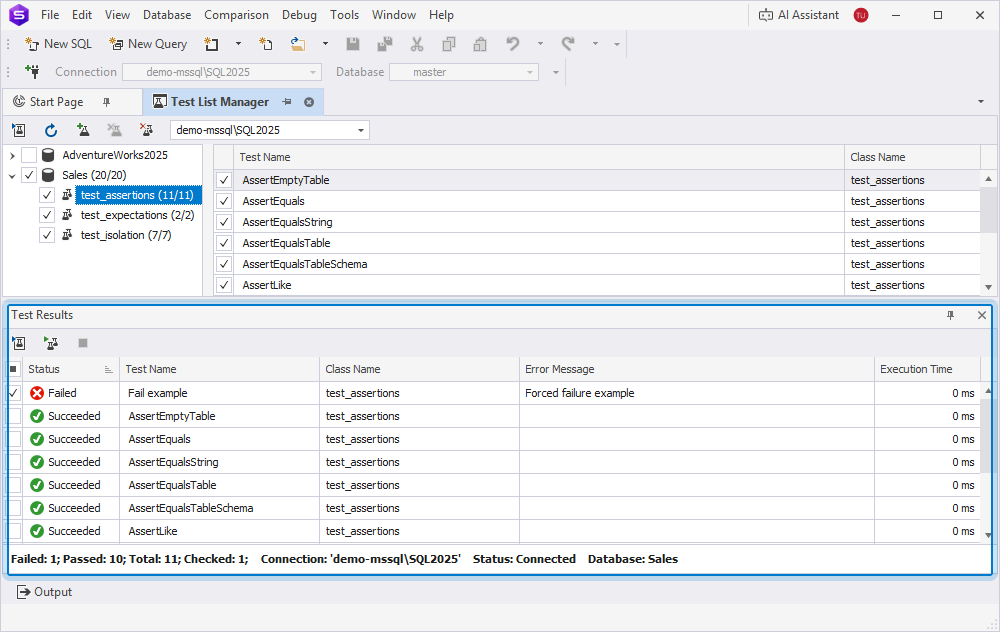
The Test Results pane opens and displays test run results, including their status, execution details, and errors (if any).
Automate unit test execution from the command line
dbForge Studio for SQL Server provides the command-line interface that lets you automate the execution of unit tests from the command line.
To automate test execution:
1. Open the Command Prompt as an administrator.
2. Navigate to the installation folder of dbForge Studio for SQL Server.
cd C:\Program Files\Devart\dbForge Studio for SQL Server
Note
If you installed dbForge Studio as part of the dbForge Edge bundle, the full path to the installation folder is:
C:\Program Files\Devart\dbForge Edge\dbForge Studio for SQL Server
3. Run the commands using the /testsupport parameter. Replace the sample values with your own values.
- Run tests from the specified classes.
dbforgesql.com /testsupport /connection:"Data Source=demo-mssql\SQL2025;Initial Catalog=Sales;User ID=sa;Password=yourPass" /class:"test_assertions,test_expectations"
- Run all tests.
dbforgesql.com /testsupport /connection:"Data Source=demo-mssql\SQL2025;Initial Catalog=Sales;User ID=sa;Password=yourPass"
- Run specific tests and save the results to an XML file.
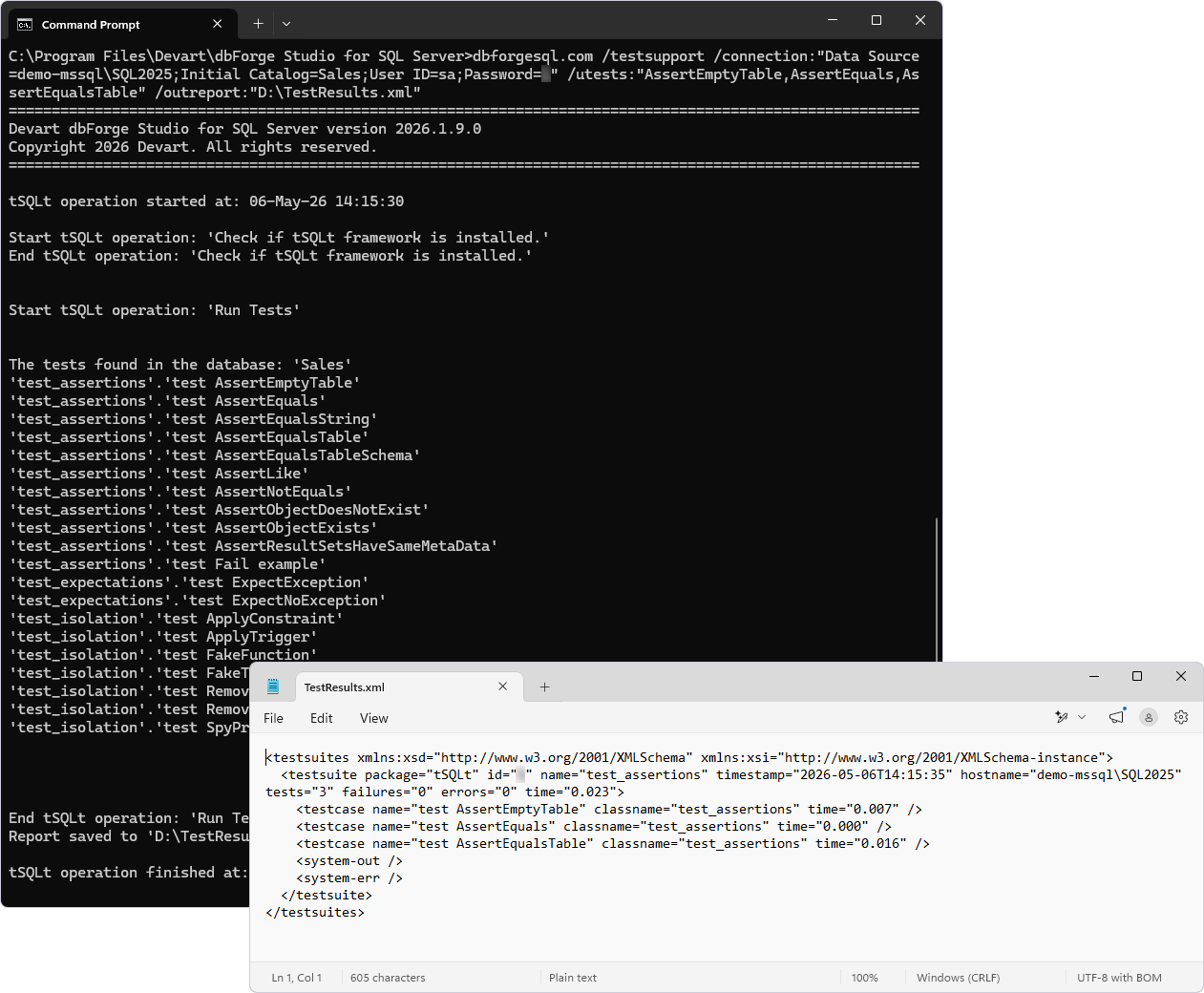
dbforgesql.com /testsupport /connection:"Data Source=demo-mssql\SQL2025;Initial Catalog=Sales;User ID=sa;Password=yourPass" /utests:"AssertEmptyTable,AssertEquals,AssertEqualsTable" /outreport:"D:\TestResults.xml"
The table describes the parameters used with the commands.
| Name | Description |
|---|---|
/connection:"Data Source=demo-mssql\SQL2025;Initial Catalog=Sales;User ID=sa;Password=yourPass" |
Specifies the connection string. |
/class:"test_assertions,test_expectations" |
Specifies comma-separated test classes. If you don’t specify them, tests from all classes are run. |
/utests:"AssertEmptyTable,AssertEquals,AssertEqualsTable" |
Specifies comma-separated unit tests. |
/outreport:"D:\TestResults.xml" |
Specifies the output report file name and extension. If you don’t specify a file, the result will be printed to the console. |
Create and run unit tests using the PowerShell cmdlets
You can also automate the creation and execution of unit tests using the PowerShell Invoke-DevartExecuteScript and Invoke-DevartDatabaseTests cmdlets.
Prerequisites
- Install dbForge DevOps Automation for SQL Server.
- Use a PowerShell version 3.0 or later.
- Install the tSQLt framework for the database where you want to run unit tests.
Create and run unit tests
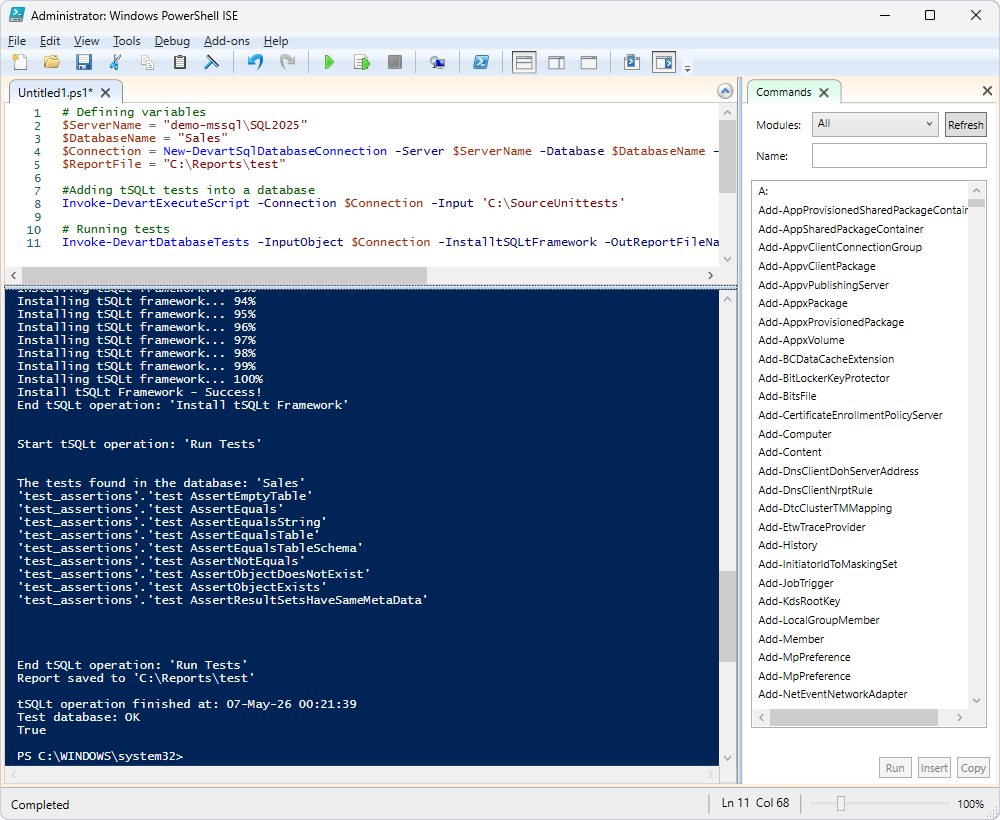
1. Open Windows PowerShell ISE as an administrator.
2. Enter the following PowerShell script and replace the sample values with your own values.
# Defining variables
$ServerName = "demo-mssql\SQL2025"
$DatabaseName = "Sales"
$Connection = New-DevartSqlDatabaseConnection -Server $ServerName -Database $DatabaseName -UserName sa -Password yourPassword
$ReportFile = "C:\Reports\test"

# Creating tSQLt tests in the database
Invoke-DevartExecuteScript -Connection $Connection -Input 'C:\SourceUnittests'

# Running tests
Invoke-DevartDatabaseTests -InputObject $Connection -InstalltSQLtFramework -OutReportFileName $ReportFile -ReportFormat JUnit
where:
demo-mssql\SQL2025is the server where you want to run unit tests.Salesis the database where you want to run unit tests.C:\Reports\testis the full path to the folder that will store a report file with test results.C:\SourceUnittestsis the full path to the folder that stores the .sql file with unit tests to be created in the database.
3. Press F5 to run the script.
For more information about using the dbForge Studio Unit Test tool in the DevOps process, see Build CI/CD pipelines using Jenkins and PowerShell.
For more information about using the dbForge Studio Unit Test tool in a Continuous Integration pipeline, see the following topics: