AI Assistant
dbForge AI Assistant provides real-time suggestions, explains your code, and offers fixes directly within your development environment. Additionally, it enhances your SQL writing accuracy, debugging, and other routine tasks.
dbForge AI Assistant is integrated into dbForge SQL Complete with no additional setup. After installing or updating dbForge SQL Complete, the AI Assistant becomes available, granting you access to its intelligent assistance and features.
Note
dbForge AI Assistant is not enabled by default. It will be inactive unless you get a free 14-day trial or purchase a license.
AI Assistant features
| Feature | Description |
|---|---|
| Chat | Starts a chat with the Large Language Model (LLM) to ask questions, submit requests, or generate queries based on your prompts. Additionally, you can attach a database to the AI chat to enable the LLM to use its schema and metadata, which results in more accurate AI responses and better SQL queries. |
| Web search | Uses information from online sources, such as articles and tutorials, including dbForge product documentation, to suggest step-by-step instructions for specific tasks. Additionally, this feature provides a list of sources in its response, which you can click to get information. |
| Chat history | Stores the chat history as a summary of the initial request. |
| Natural language SQL query generation | Understands natural language requests, analyzes the attached database, and generates a SQL query based on its schema and metadata. |
| Error fixing | Analyzes the issue with your SQL code and suggests solutions. |
| Errors explanation | Analyzes errors, explains their causes, and suggests possible solutions for troubleshooting directly from the Error List. |
| Query explanation | Analyzes your SQL query and provides a detailed explanation, breaking it into components and summarizing its functionality to help you understand how it works. |
| DDL statement comparison | Compares the Data Definition Language (DDL) statements of database objects and highlights the structural differences between them. |
Data privacy
dbForge AI Assistant is based on OpenAI and is available under their terms and conditions. The AI Assistant doesn’t have access to the actual data of your databases, only to the metadata (for context purposes). The information stored on the server is strictly limited to your conversation with the AI Assistant.
Note
Before working with the AI Assistant, sign in to the AI Assistant to continue.
Open the AI Assistant
You can open the AI Assistant in one of these ways:
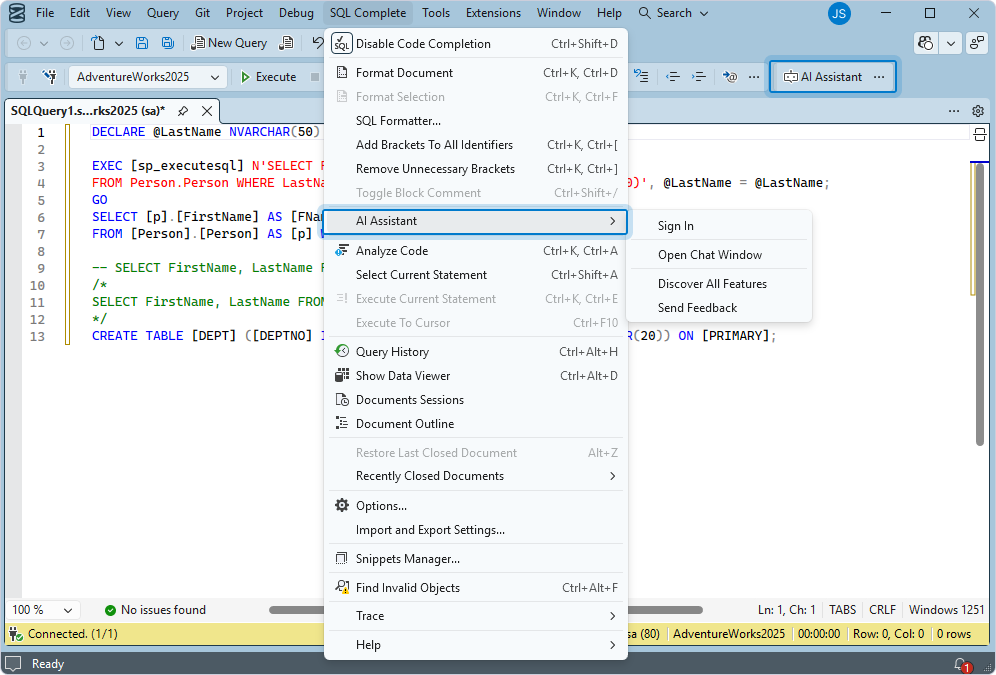
- In the top menu, select SQL Complete > AI Assistant > Open Chat Window.
Note
Starting with SSMS version 21, SQL Complete is not added to the menu bar by default. You can manually add it.
To add SQL Complete to the SSMS menu bar:
1. Navigate to Extensions and select Customize Menu.
2. In the Customize > Extensions Menu dialog that opens, clear the checkbox next to SQL Complete and Debug.
3. Select Save and Restart.
4. In the confirmation dialog, select Yes to apply the changes.
- On the main toolbar, click AI Assistant.
Note
If AI Assistant is hidden on the toolbar, right-click the main toolbar and select AI Assistant.