New File window
The New File window enables you to create a new file. It supports the following file types:
- General files –
.txtand.xmlfiles. - Script files for SQL Server –
.sqlfile, query file, and database diagram. - Data analysis files – blank data report, pivot table, and master-detail document.
Open the New File window
To open the New File window, select File > New > File.
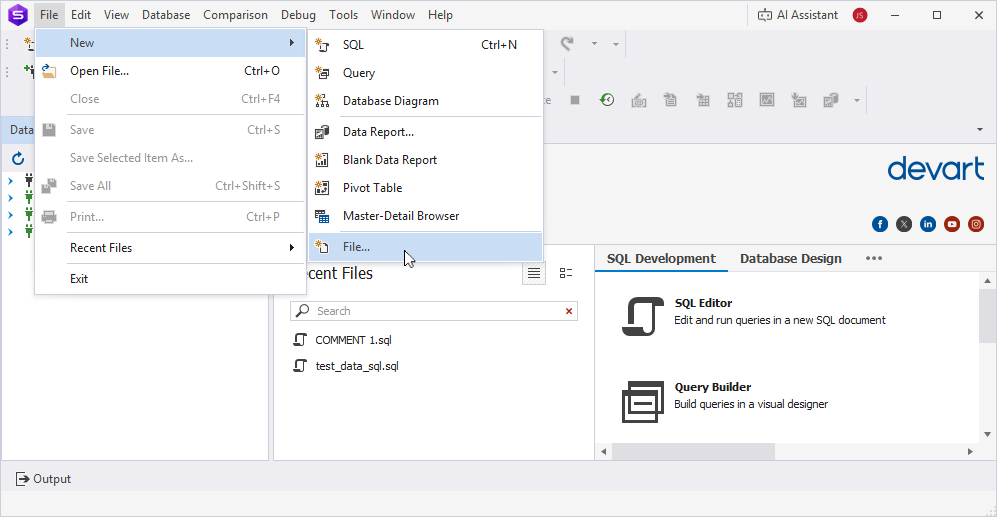
Create a file
1. In the New File window, select the file type you want to create.
2. In the Name field, specify the file name.
3. Click Create to generate the new file.
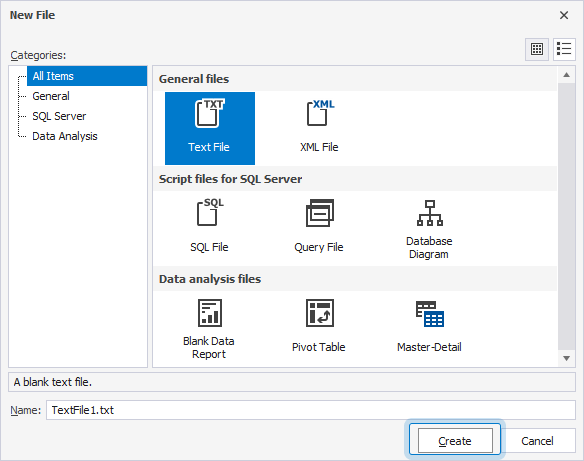
Depending on the file type you choose, a blank file opens so you can finalize the file creation.
The table lists the supported file types.
| File type | Description | Default file name |
|---|---|---|
| Text File | Creates a blank plain text file. | TextFile.txt |
| XML file | Creates a blank XML structured file. | XmlFile.xml |
| SQL file | Creates a blank SQL script file. | SQL.sql |
| Query File | Opens a blank query editor to create a query. | Query.sql |
| Database Diagram | Opens a blank editor to create a database diagram. | Diagram.dbd |
| Blank Data Report | Opens a blank editor to create a report. | Report.rdb |
| Pivot Table | Opens a blank editor to create a pivot table. | PivotTable.sql |
| Master-Detail | Opens a blank diagram to create a master-detail file. | MasterDetail.mdet |
To discard the file creation, click Cancel.
Change the style of icons
To change the appearance of icons to large, click  Large Icons in the upper-right corner of the window.
To change the appearance of icons to small, click Small Icons in the upper-right corner of the window.