Run a data synchronization script against a different database
When you generate a data synchronization script using the dbForge Studio for SQL Server command-line interface (CLI) and need to execute it against a database with a different name, you might find that the script fails to run—even if you specify the correct database using the /database switch.
This guide provides a PowerShell script that you can use to generate a synchronization script and update it to run against a database with a different name.
Overview
When the dbForge Studio for SQL Server CLI generates a synchronization script, it embeds the target database name in the following places:
-
USEstatements. -
A safety check that verifies whether the script runs against the correct database:
IF DB_NAME() <> N'TargetDatabase' SET NOEXEC ON.
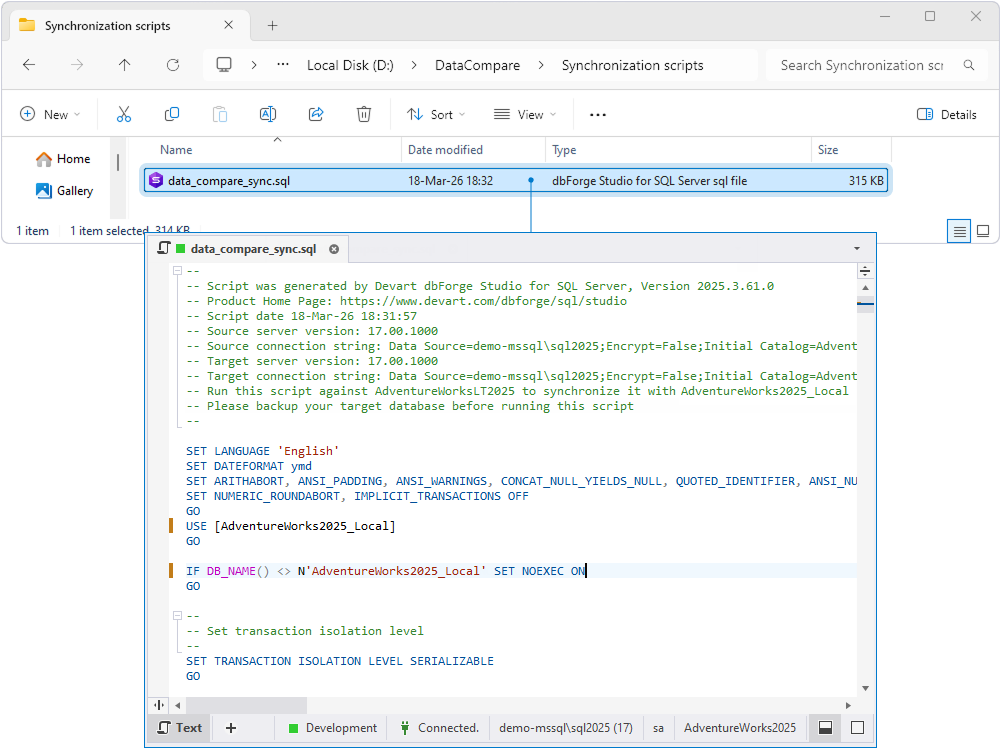
When you execute the script on a different computer using the /execute command and specify a different database using the /database switch, only the USE statement is updated, while the DB_NAME() check remains unchanged. This causes the safety check to block script execution when targeting a different database.
Generate and update the synchronization script using a PowerShell script
The PowerShell script compares the source and target databases using the dbForge Studio for SQL Server command-line interface, generates a synchronization SQL file, and then updates the DB_NAME() check and all USE statements to match the database specified by the user. The modification is applied selectively: only the safety check and USE statements are updated, while all other parts of the generated script remain unchanged. This ensures that the script can be executed correctly on a different database without manual changes.
Note
Before running the script, create the folders where the synchronization script and log file will be saved.
Step 1: Configure the PowerShell script
1. Open a text editor.
2. Enter the following script:
 Click to open the PowerShell script example
# ============================================================
# dbForge Studio for SQL Server CLI
# Generate the sync script and safely update DB_NAME() and USE statements
# ============================================================

# ---------- Database name for script execution ----------
$ExecutionTargetDatabase = "yourExecutionDatabase"

# ---------- dbForge CLI path ----------
$DbForgeCliPath = "C:\Program Files\Devart\dbForge Studio for SQL Server\dbforgesql.com"

# ---------- Source connection ----------
$SourceServer = "yourSourceServer"
$SourceDatabase = "yourSourceDatabase"
$SourceUser = "yourUsername"
$SourcePassword = "yourPassword"

# ---------- Target connection ----------
$TargetServer = "yourTargetServer"
$TargetDatabase = "yourTargetDatabase"
$TargetUser = "yourUsername"
$TargetPassword = "yourPassword"

# ---------- Output files ----------
$SyncScriptFile = "D:\DataCompare\Synchronization scripts\data_compare_sync.sql"
$LogFile = "D:\DataCompare\Logs\data_compare.log"

# ============================================================
# Ensure the output directory exists
# ============================================================
$OutputDir = Split-Path $SyncScriptFile
if (-not (Test-Path $OutputDir)) {
New-Item -Path $OutputDir -ItemType Directory | Out-Null
}

# ============================================================
# Build the dbForge Data Compare command
# ============================================================
$Arguments = @(
"/datacompare",
"/source connection:`"Data Source=$SourceServer;Encrypt=False;Initial Catalog=$SourceDatabase;Integrated Security=False;User ID=$SourceUser;Password=$SourcePassword`"",
"/target connection:`"Data Source=$TargetServer;Encrypt=False;Initial Catalog=$TargetDatabase;Integrated Security=False;User ID=$TargetUser;Password=$TargetPassword`"",
"/sync:`"$SyncScriptFile`"",
"/log:`"$LogFile`""
)

Write-Host "Running dbForge Data Compare CLI..."
Write-Host "$DbForgeCliPath $($Arguments -join ' ')"
Write-Host ""

Start-Process `
-FilePath $DbForgeCliPath `
-ArgumentList $Arguments `
-Wait `
-NoNewWindow

# ============================================================
# Validate sync script generation
# ============================================================
if (-not (Test-Path $SyncScriptFile)) {
throw "Synchronization SQL file was not created: $SyncScriptFile"
}

$content = Get-Content -Path $SyncScriptFile -Raw

if ([string]::IsNullOrWhiteSpace($content)) {
Write-Warning "Synchronization SQL file is empty: $SyncScriptFile. Possibly no changes detected."
return
}

# ============================================================
# Update DB_NAME() safety check
# ============================================================
$patternDBName = "IF\s+DB_NAME\(\)\s+<>\s+N'[^']+'\s+SET\s+NOEXEC\s+ON"
$replacementDBName = "IF DB_NAME() <> N'$ExecutionTargetDatabase' SET NOEXEC ON"

$newContent = [regex]::Replace($content, $patternDBName, $replacementDBName)

if ($newContent -eq $content) {
Write-Warning "DB_NAME() safety check was not found or not replaced."
}

# ============================================================
# Replace all USE statements with the execution database
# ============================================================
# Matches any line starting with USE [OldDatabase] (case-insensitive)
$newContent = [regex]::Replace(
$newContent,
"(?i)^\s*USE\s+(\[?[^\]\s]+\]?)",
"USE [$ExecutionTargetDatabase]",
'Multiline'
)

# ============================================================
# Save the modified script with UTF-8 encoding
# ============================================================
$newContent | Set-Content -Path $SyncScriptFile -Encoding UTF8

# ============================================================
# Final output
# ============================================================
Write-Host "Synchronization script generated successfully."
Write-Host "DB_NAME() check updated to: $ExecutionTargetDatabase"
Write-Host "All USE statements replaced with: $ExecutionTargetDatabase"
Write-Host "SQL file: $SyncScriptFile"
Write-Host "Log file: $LogFile"
3. Replace the placeholder values with your actual values.
| Parameter | Description |
|---|---|
$ExecutionTargetDatabase |
The name of the database on the computer where the synchronization script will be executed. This value replaces the original target database name in the DB_NAME() check and all USE statements in the generated script. |
$DbForgeCliPath |
The full path to the dbforgesql.com executable file. Depending on how dbForge Studio for SQL Server was installed, the default path to the executable file may vary.
|
$SourceServer |
The name of the server hosting the source database. |
$SourceDatabase |
The name of the source database. |
$SourceUser |
The username for the source server connection. |
$SourcePassword |
The password for the source server connection. |
$TargetServer |
The name of the server hosting the target database. |
$TargetDatabase |
The name of the target database used for comparison. |
$TargetUser |
The username for the target server connection. |
$TargetPassword |
The password for the target server connection. |
$SyncScriptFile |
The full path to the generated SQL file. |
$LogFile |
The full path to the log file. |
Step 2: Save the script
Save the file with a .ps1 extension, for example, run-sync-script-against-different-database.ps1.
Step 3: Run the script
1. Open Windows PowerShell ISE as an administrator.
2. Navigate to File > Open and select the created .ps1 file.
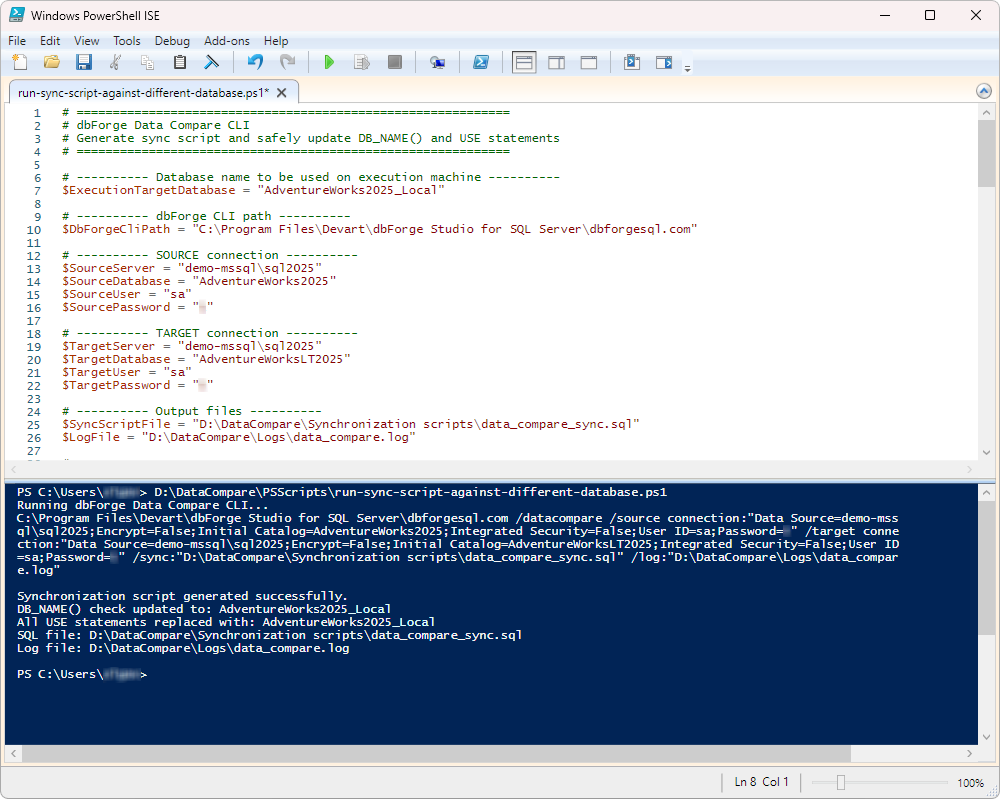
3. Run the script.
After you run the PowerShell script, a synchronization SQL file with updated database references is generated and saved to the specified location.
Step 4: Run the synchronization script on the execution computer
1. Transfer the generated SQL file containing the synchronization script to the computer where you want to apply the changes.
2. Open Command Prompt.
3. Run the following command, replacing the placeholder values with your actual values.
dbforgesql.com /execute /connection:"Data Source=localhost\SQLEXPRESS01;Initial Catalog=AdventureWorks2025_Local;Integrated Security=True" /inputfile:"D:\DataCompare\Synchronization scripts\data_compare_sync.sql"
where:
-
/connection– The connection string for the target database where the synchronization script will be executed. -
/inputfile– The full path to the .sql file that contains the synchronization script.
After you run the command, the synchronization script is executed against the specified database, and the detected data changes are applied to it.
For more information about the /execute command, see Execute SQL scripts from the command line.