Build and manage queries
You can build queries by adding columns, defining joins, applying filters, grouping data, and sorting results in ascending or descending order. You can also change query types, assign aliases for tables and columns, and adjust the diagram layout by aligning tables and joins.
To build a query:
1. Open the Query Builder diagram in one of these ways:
-
On the toolbar, click New Query.
-
On the Start Page, select SQL Development > Query Builder.
-
On the menu bar, select File > New > Query.
2. Add database objects to the diagram.
-
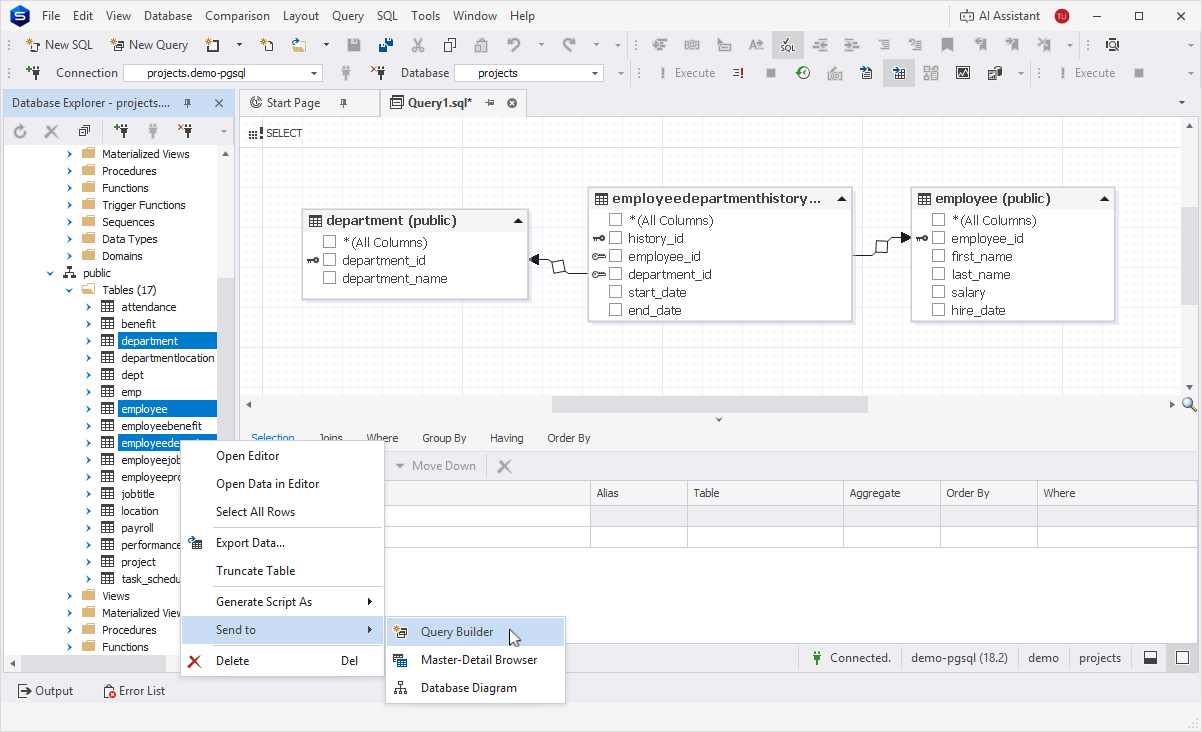
To add a single object, drag it from Database Explorer to the diagram. Alternatively, in Database Explorer, right-click a table or view you want to add to the diagram, then select Send to > Query Builder.
-
To add multiple database objects:
1. In Database Explorer, press and hold Ctrl, then select tables or views.
2. Drag them to the diagram. Alternatively, right-click the objects, then select Send to > Query Builder.
A SELECT query opens by default. You can change the query type if needed.
Note
You can only add database objects from the same database connection.
When you add multiple tables that share a foreign key, the relationship is displayed on the diagram automatically.
3. Optional: Adjust queries using the following options:
-
Add columns to include additional data in the query results.
-
Use table and column aliases to improve readability.
-
Apply aggregate functions to columns to summarize data.
-
Use arithmetic, aggregate, and analytical functions to define conditions.
-
Define joins to combine data from multiple tables.
-
Apply filters to limit the data returned.
-
Group data to aggregate results.
-
Sort results in ascending or descending order.
For more information about how to customize the query, see Adjust the query.
4. Save the query in one of these ways:
-
On the toolbar, click
 .
. -
Right-click the query tab and save the query to a .sql file.
After you build a query, you can preview and execute it.