Stored procedure without result
This example shows how to use a stored procedure that executes an INSERT query and doesn’t return any result.
The following SQL Server script creates the stored procedure and table.
CREATE TABLE dbo.Department (
  DeptNo int NOT NULL,
  DName varchar(14),
  Loc varchar(13),
  PRIMARY KEY (DeptNo)
)
GO

CREATE PROCEDURE dbo.Department_Insert
        @PDeptNo INT,
        @PDName VARCHAR(14),
        @PLoc VARCHAR(13)
AS
        INSERT INTO dbo.Department(DeptNo, DName, Loc) VALUES (@PDeptNo, @PDName, @PLoc);
GO
Creating the method in Entity Developer
Create a model and add a method that maps to the stored function.
You can do this during model creation on the Select Database Objects page of the Create Model Wizard, or by dragging the required stored function from Database Explorer to the diagram or Model Explorer in an existing model.
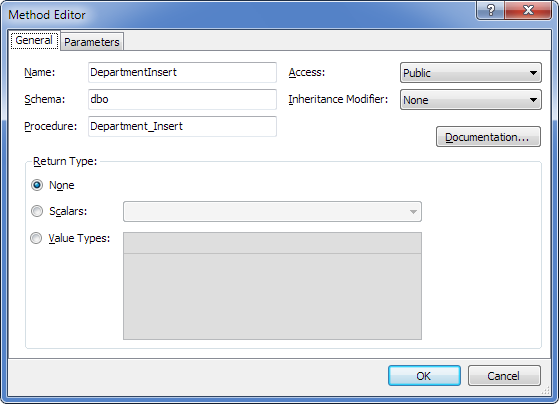
As a result, the model includes a method that corresponds to the stored function.
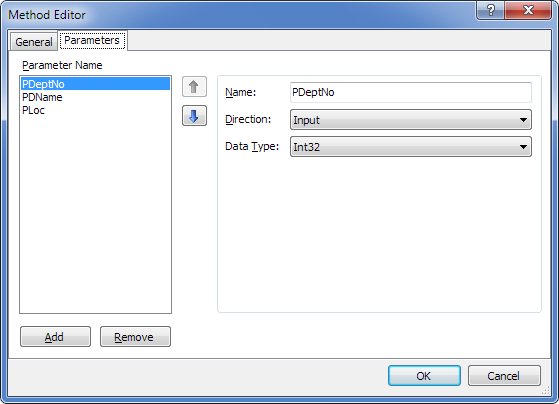
Method parameters are as follows.
Generated code
As a result of code generation, the following method is generated with a signature close to the stored procedure.
C#:
public int DepartmentInsert(System.Nullable<int> PDeptNo, string PDName, string PLoc)
{
    OAParameter PDeptNoParameter = new OAParameter();
    PDeptNoParameter.ParameterName = @"PDeptNo";
    PDeptNoParameter.Direction = ParameterDirection.Input;
    if (PDeptNo.HasValue)
    {
        PDeptNoParameter.Value = PDeptNo.Value;
    }
    else
    {
        PDeptNoParameter.DbType = DbType.Int32;
        PDeptNoParameter.Size = -1;
        PDeptNoParameter.Value = DBNull.Value;
    }
    OAParameter PDNameParameter = new OAParameter();
    PDNameParameter.ParameterName = @"PDName";
    PDNameParameter.Direction = ParameterDirection.Input;
    if (PDName != null)
    {
        PDNameParameter.Value = PDName;
    }
    else
    {
        PDNameParameter.DbType = DbType.String;
        PDNameParameter.Size = -1;
        PDNameParameter.Value = DBNull.Value;
    }
    OAParameter PLocParameter = new OAParameter();
    PLocParameter.ParameterName = @"PLoc";
    PLocParameter.Direction = ParameterDirection.Input;
    if (PLoc != null)
    {
        PLocParameter.Value = PLoc;
    }
    else
    {
        PLocParameter.DbType = DbType.String;
        PLocParameter.Size = -1;
        PLocParameter.Value = DBNull.Value;
    }
    int result = this.ExecuteNonQuery(@"dbo.Department_Insert", CommandType.StoredProcedure, PDeptNoParameter, PDNameParameter, PLocParameter);
    return result;
}
Using the stored procedure
You can now call the stored procedure in your application through the generated method wrapper. The wrapper provides a consistent way to work with the procedure in code.
Wrapper methods are strongly typed, appear in IntelliSense, and have signatures that match the corresponding stored procedures.