Stored procedure with multiple resultsets
This example shows how to use a stored procedure that executes SELECT queries against multiple tables and returns table records as lists of complex type objects.
The following SQL Server script creates the stored procedure and tables.
CREATE TABLE dbo.Department (
  DeptNo int NOT NULL,
  DName varchar(14),
  Loc varchar(13),
  PRIMARY KEY (DeptNo)
)
GO

CREATE TABLE dbo.Employee (
  EmployeeID int IDENTITY PRIMARY KEY,
  LastName nvarchar(20) NOT NULL,
  FirstName nvarchar(10) NOT NULL,
  Address nvarchar(60),
  City nvarchar(15),
  Country nvarchar(15),
  DeptNO int NOT NULL,
  FOREIGN KEY (DeptNO) REFERENCES dbo.Department(DeptNO)
)
GO

CREATE PROCEDURE dbo.SelectDeptsAndEmps
AS
SELECT *
FROM dbo.Department;
SELECT *
FROM dbo.Employee;
GO
Using complex type results
Creating the method
- Create a model and drag the required stored procedure from the Database Explorer window to the design area.
- In the displayed message box, click Yes to obtain metadata of procedure result sets.
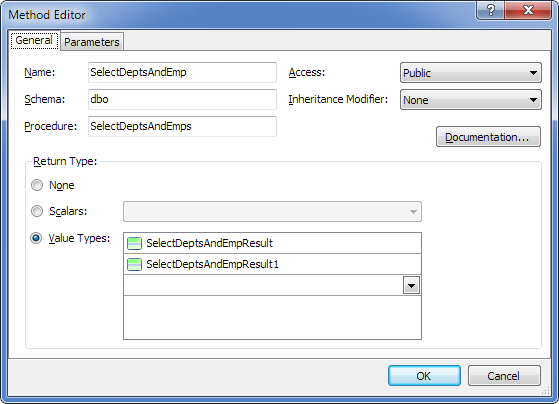
As a result, two complex types with default names (SelectDeptsAndEmpResult and SelectDeptsAndEmpResult1) and a method corresponding to the stored procedure are created. For convenience, rename the complex types to DeptsResult and EmpsResult.
Generated code
As a result of code generation, the following method is generated with a signature close to the stored procedure.
C#:
public SelectDeptsAndEmpMultipleResult SelectDeptsAndEmp()
{
    SelectDeptsAndEmpMultipleResult result = new SelectDeptsAndEmpMultipleResult();
    OAConnection connection = this.Connection;
    bool needClose = false;
    if (connection.State != ConnectionState.Open)
    {
        connection.Open();
        needClose = true;
    }
    try
    {
        using (OACommand cmd = connection.CreateCommand())
        {
            cmd.CommandType = CommandType.StoredProcedure;
            cmd.CommandText = @"dbo.SelectDeptsAndEmps";
            using (OADataReader reader = cmd.ExecuteReader())
            {
                result.SelectDeptsAndEmpResults.AddRange(this.Translate<SelectDeptsAndEmpResult>(reader));
                reader.NextResult();
                result.SelectDeptsAndEmpResult1s.AddRange(this.Translate<SelectDeptsAndEmpResult1>(reader));
                reader.NextResult();
            }
        }
    }
    finally
    {
        if (needClose)
            connection.Close();
    }
    return result;
}

public class SelectDeptsAndEmpMultipleResult
{
    public SelectDeptsAndEmpMultipleResult()
    {
        SelectDeptsAndEmpResults = new List<SelectDeptsAndEmpResult>();
        SelectDeptsAndEmpResult1s = new List<SelectDeptsAndEmpResult1>();
    }
    public List<SelectDeptsAndEmpResult> SelectDeptsAndEmpResults { get; private set; }
    public List<SelectDeptsAndEmpResult1> SelectDeptsAndEmpResult1s { get; private set; }
}
Using entity results
Use this approach when you need to retrieve whole tables instead of complex type results.
Creating the method
- Drag the required stored procedure from the Database Explorer window to the design area.
- In the displayed message box, click No to skip retrieving metadata for the procedure result sets.
- Drag the required tables from the Database Explorer window to the design area.
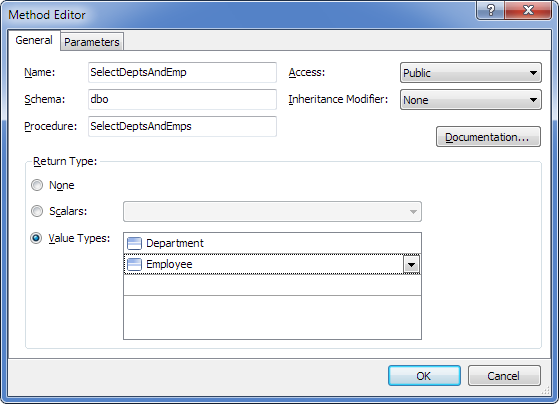
- Double-click the method and in the Value Types dropdown list, select the Department and Employee tables.
Generated code
As a result of code generation, the following method is generated with a signature close to the stored procedure.
C#:
public SelectDeptsAndEmpMultipleResult SelectDeptsAndEmp()
{
    SelectDeptsAndEmpMultipleResult result = new SelectDeptsAndEmpMultipleResult();
    OAConnection connection = this.Connection;
    bool needClose = false;
    if (connection.State != ConnectionState.Open)
    {
        connection.Open();
        needClose = true;
    }
    try
    {
        using (OACommand cmd = connection.CreateCommand())
        {
            cmd.CommandType = CommandType.StoredProcedure;
            cmd.CommandText = @"dbo.SelectDeptsAndEmps";
            using (OADataReader reader = cmd.ExecuteReader())
            {
                result.Departments.AddRange(this.Translate<Department>(reader));
                reader.NextResult();
                result.Employees.AddRange(this.Translate<Employee>(reader));
                reader.NextResult();
            }
        }
    }
    finally
    {
        if (needClose)
            connection.Close();
    }
    return result;
}

public class SelectDeptsAndEmpMultipleResult
{
    public SelectDeptsAndEmpMultipleResult()
    {
        Departments = new List<Department>();
        Employees = new List<Employee>();
    }
    public List<Department> Departments { get; private set; }
    public List<Employee> Employees { get; private set; }
}
Complex types and tables can be combined in one method.