Table-valued function
User-defined functions that return a table data type can be powerful alternatives to views. These functions are referred to as table-valued functions. A table-valued user-defined function can be used where table or view expressions are allowed in SQL queries.
The following SQL Server script creates the table-valued function and table.
CREATE TABLE dbo.Department (
  DeptNo int NOT NULL,
  DName varchar(14),
  Loc varchar(13),
  PRIMARY KEY (DeptNo)
)
GO

CREATE FUNCTION dbo.Fun_DepartmentByLocation(@Loc varchar(13))
RETURNS TABLE
AS
RETURN (
        SELECT * FROM dbo.Department WHERE Loc = @Loc
)
GO
Creating the method in Entity Developer
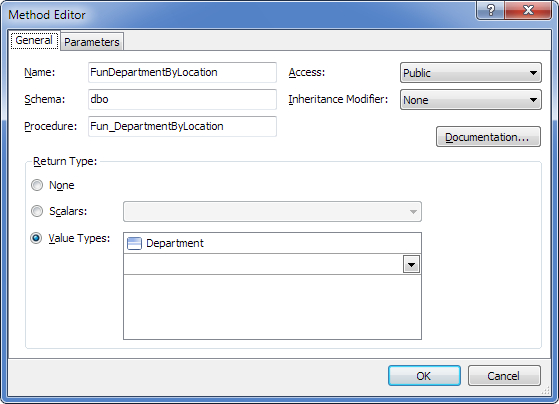
Create a model and add a method that maps to the stored function.
You can do this during model creation on the Select Database Objects page of the Create Model Wizard, or by dragging the required stored function from Database Explorer to the diagram or Model Explorer in an existing model.
As a result, the model includes a method that corresponds to the stored function.
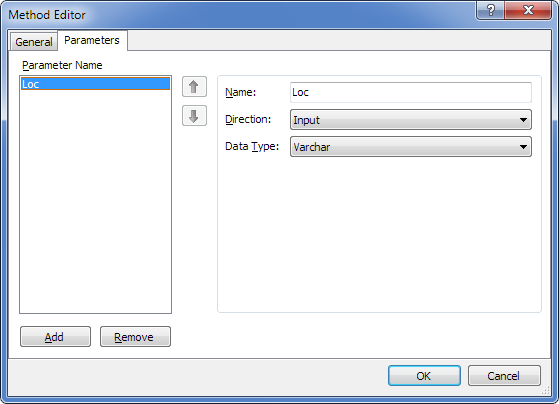
Method parameters are as follows.
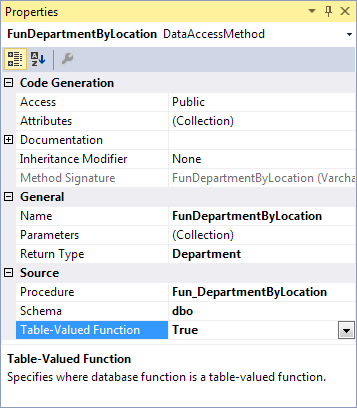
Configuring the method
- Click the method in the Model Explorer.
- In the Properties window, set the Table-Valued Function property to True.
Generated code
As a result of code generation, the following method is generated with a signature close to the stored function:
C#:
public IList<Department> FunDepartmentByLocation(string Loc)
{
    OAParameter LocParameter = new OAParameter();
    LocParameter.ParameterName = @"Loc";
    LocParameter.Direction = ParameterDirection.Input;
    if (Loc != null)
    {
        LocParameter.Value = Loc;
    }
    else
    {
        LocParameter.DbType = DbType.String;
        LocParameter.Size = -1;
        LocParameter.Value = DBNull.Value;
    }
    IList<Department> result = this.ExecuteQuery<Department>(@"select * from dbo.Fun_DepartmentByLocation(@Loc)", CommandType.Text, LocParameter);
    return result;
}
Using the table-valued function
You can now call the table-valued function in your application through the generated method wrapper. The wrapper provides a consistent way to work with the function in code.
Wrapper methods are strongly typed, appear in IntelliSense, and have signatures that match the corresponding table-valued functions.