Procedure Editor
Procedure Editor in dbForge Studio for PostgreSQL provides a visual interface for creating and configuring stored procedures, allowing you to set procedure properties without manually specifying them in SQL code. The editor generates valid CREATE PROCEDURE and ALTER PROCEDURE DDL statements based on the data you specify. You can review this script before you apply the changes.
Use Procedure Editor to:
-
Create a new procedure in the selected schema and with a specified owner.
-
Edit an existing procedure’s body and properties.
-
Generate a DDL script to create or modify a procedure.
Open Procedure Editor
You can open Procedure Editor in one of these ways:
-
In Database Explorer:
- Right-click a database and select New Object > Procedure.
- Expand a database, right-click the Procedures node, then select New Procedure.
- Right-click an existing procedure and select New Procedure.
-
On the Standard toolbar, click the arrow next to
 , then select Procedure.
 -
On the menu bar, select Database > New Database Object. In the dialog, select the database > Procedure, specify the procedure name, then click Create.
-
On the Start Page, select Database Design > New Database Object. In the dialog, select the database > Procedure, specify the procedure name, then click Create.
To open Procedure Editor for an existing procedure, use one of these ways:
-
In Database Explorer:
- Right-click the procedure and select Open Editor.
- Double-click the procedure.
Note
You can configure the default action that occurs when you double-click a procedure in Database Explorer. Choose whether to open the procedure in the editor or execute it.
To configure the default action:
1. On the menu bar, select Tools > Options.
2. In the Options dialog, navigate to Database Explorer > General.
3. Under Procedure and Function Default Action, select one of the following options:
- Execute – Executes the procedure when you double-click it in Database Explorer.
- Open Object Editor – Opens the procedure in Procedure Editor.
4. Click OK.
- In schema comparison results, right-click a procedure in the comparison grid and select Source Object or Target Object > Open Editor.
User interface concepts
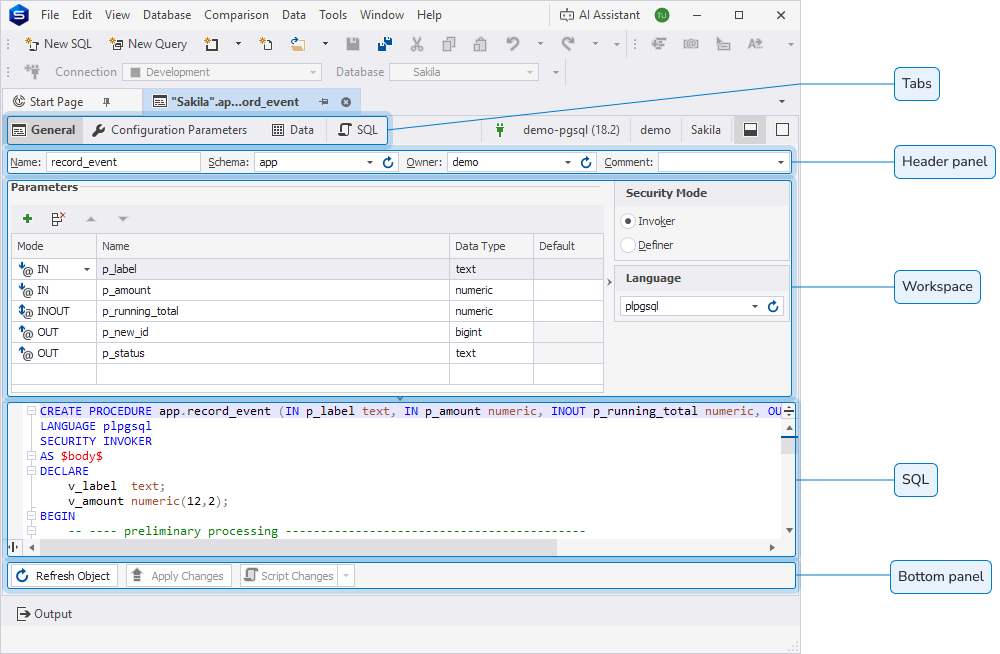
Procedure Editor includes the following user interface elements:
-
Tabs – Use to switch between the General, Configuration Parameters, Data, and SQL sections of the editor.
-
Header panel – Use to specify the procedure name, assign a schema and an owner, and add a comment.
-
Workspace – Use to configure procedure parameters and settings.
-
SQL – Use to view and manage the DDL script, which automatically updates based on the properties you configure in the visual editor.
-
Bottom panel – Use to refresh the object, apply changes, or generate a script for review before execution.
Header panel
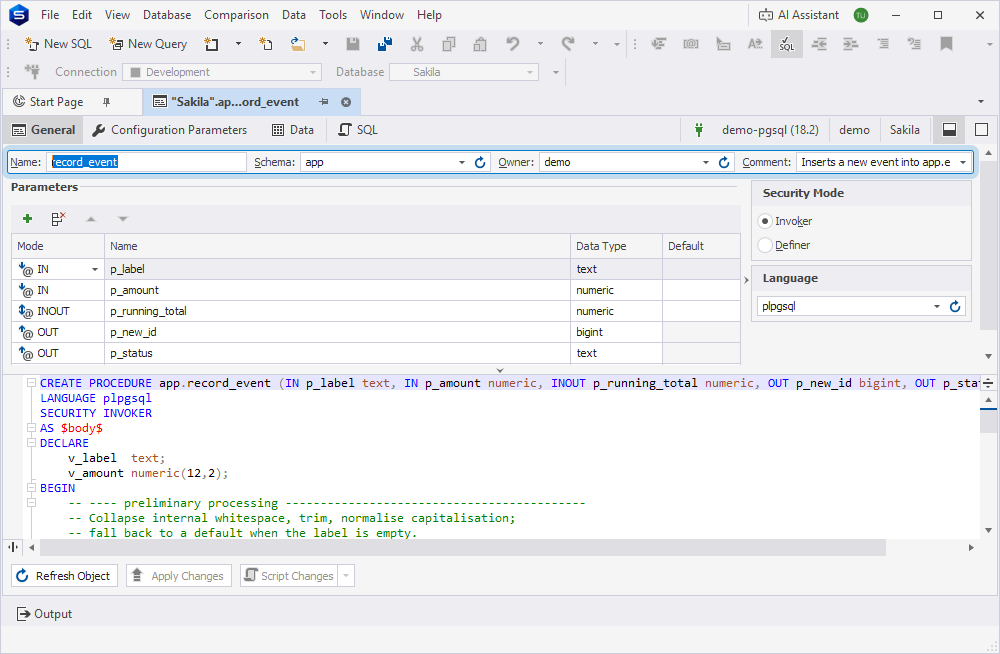
You can use the header panel to specify the basic procedure details:
-
Name (required) – Enter a procedure name. When you create a procedure, the default value is
procedure1. If a procedure with this name already exists, the system generates a unique name by incrementing a numeric suffix, for example,procedure2,procedure3. -
Schema (optional) – Select the schema for the procedure from the dropdown list.
-
Owner (optional) – Select the procedure owner from the dropdown list.
-
Comment (optional) – Enter a procedure description. To open the comment in a full-text editor, click the arrow next to the field. To save the description, click OK. To discard the change, click Cancel.
Note
Comment isn’t available for Amazon Redshift.
Tip
To refresh the list of schemas and owners, click
.
General tab
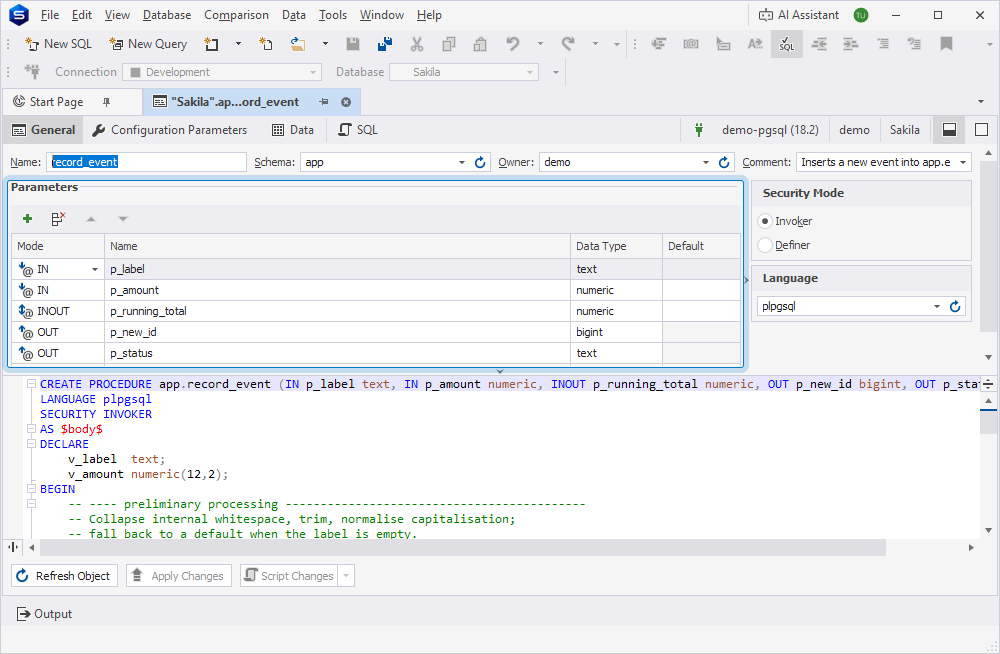
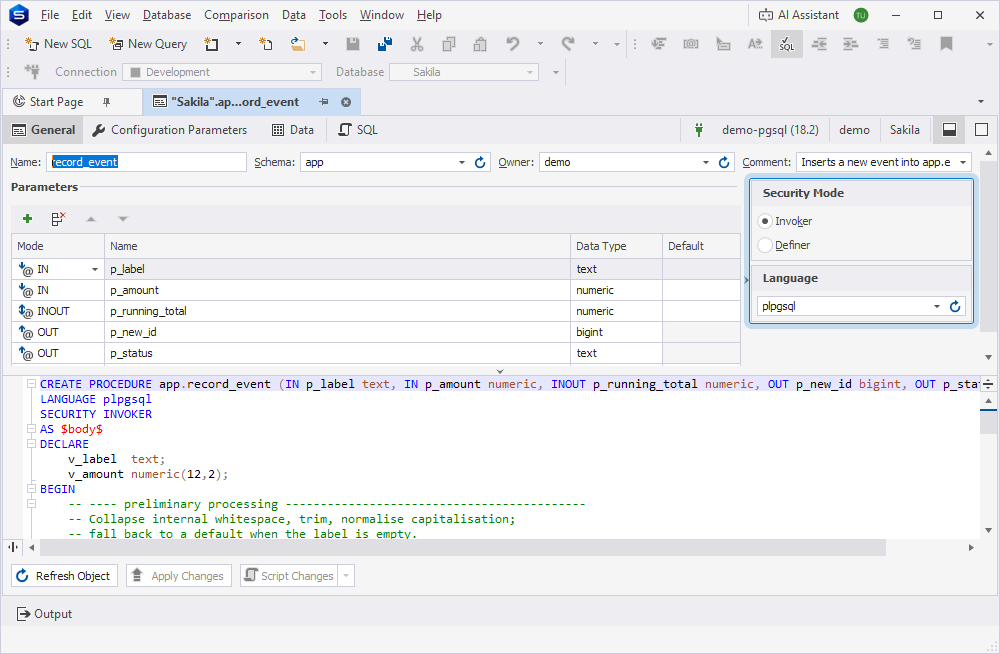
On the General tab, you can configure procedure parameters and execution settings.
Configure procedure parameters
In the Parameters grid, you can configure procedure parameters.
1. In Mode, select the parameter mode. Available options are IN, INOUT, OUT, and VARIADIC. If you leave this field empty, the mode defaults to IN.
Note
VARIADIC isn’t available for Amazon Redshift.
Only one VARIADIC parameter is allowed in a parameter list.
Only OUT parameters are allowed after a VARIADIC parameter. If you add a new IN or INOUT parameter below an existing VARIADIC parameter, Procedure Editor automatically moves the new parameter above VARIADIC and regenerates the DDL script accordingly.
2. In Name, enter the parameter name. You can use only letters, digits, and underscores. The parameter name is required and must be unique within the parameter list.
3. In Data Type, the data type is filled in automatically based on the parameter name. To change the data type, select the required data type from the dropdown list.
4. Optional: In Default, enter the default value for the parameter. This field is available for parameters with the IN or INOUT mode.
Tip
To add a parameter, click
or right-click the grid and select Add. Alternatively, press Ins.
To remove the selected parameter, click
or right-click the grid and select Delete. Alternatively, press Ctrl+Del.
To reorder the selected parameter, click
or
to move it up or down, or right-click the grid and select Move Up or Move Down. The order of parameters in the grid matches their order in the generated DDL script.
Configure procedure settings
In the workspace, you can configure the following procedure execution settings.
Security Mode
| Property name | Description |
|---|---|
| Invoker | Executes the procedure with the privileges of the user who called it. Note: The property is set by default. |
| Definer | Executes the procedure with the privileges of the procedure owner. |
Language
| Property name | Description |
|---|---|
| Language | Specifies the procedural language used to implement the procedure body. Available options are plpgsql (default), sql, c, and internal. Note: For Amazon Redshift, this option is hidden because plpgsql is the only language it supports. |
Tip
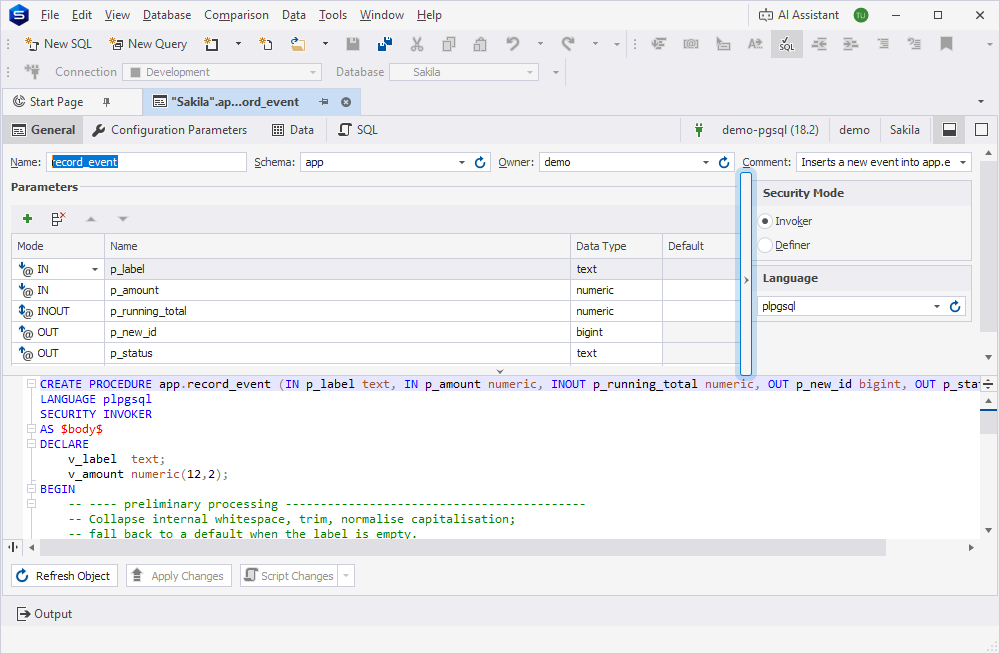
To hide the panel with procedure settings, click the vertical splitter or drag it to the right.
Configuration Parameters tab
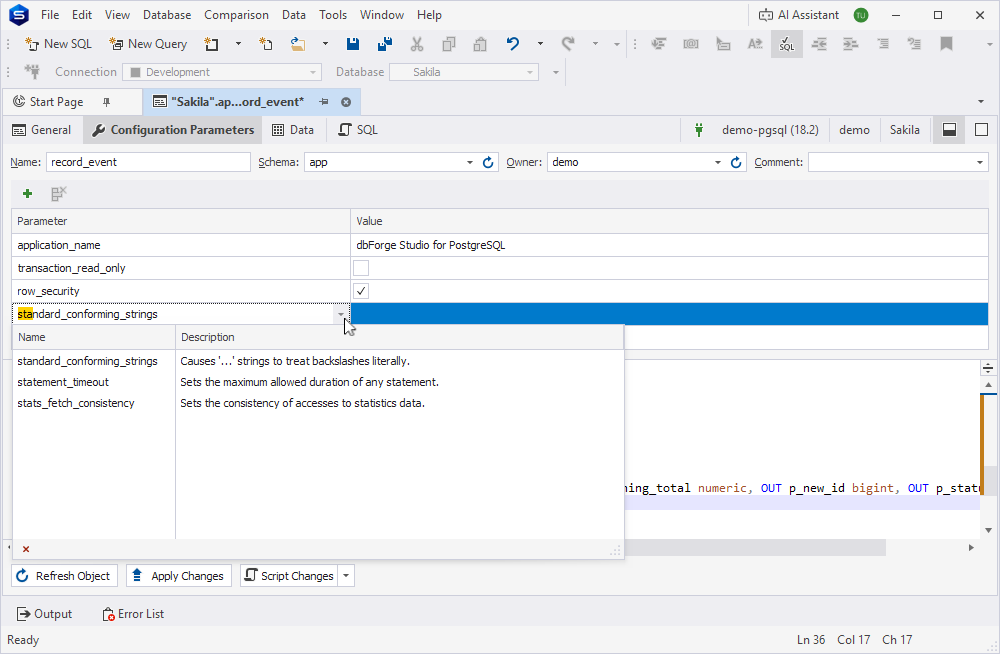
On the Configuration Parameters tab, you can configure server parameters that apply only when the procedure is executed.
Note
The Configuration Parameters tab isn’t available for Amazon Redshift.
To configure server parameters for the procedure:
1. In Parameter, select a parameter from the list of available configuration parameters. To narrow down the list, start entering the parameter name.
2. In Value, enter the parameter value. For boolean parameters, select or clear the checkbox instead.
Tip
To add a parameter, click
To remove the selected parameter, click
Available configuration parameters
The following table provides a short description of configuration parameters available in Procedure Editor. For more information about PostgreSQL parameters, see the official documentation.
Click to view the list of available configuration parameters.
| Parameter | Description |
|---|---|
allow_in_place_tablespaces |
Allows tablespaces directly inside pg_tblspc, for testing. |
allow_system_table_mods |
Allows modifications of the structure of system tables. |
application_name |
Sets the application name to be reported in statistics and logs. |
array_nulls |
Enables input of NULL elements in arrays. |
backend_flush_after |
Sets the number of pages after which previously performed writes are flushed to disk. |
backslash_quote |
Sets whether \ is allowed in string literals. |
backtrace_functions |
Logs backtrace for errors in these functions. |
bytea_output |
Sets the output format for bytea. |
check_function_bodies |
Checks routine bodies during CREATE FUNCTION and CREATE PROCEDURE. |
client_connection_check_interval |
Sets the time interval between checks for disconnection while running queries. |
client_encoding |
Sets the client’s character set encoding. |
client_min_messages |
Sets the message levels that are sent to the client. |
commit_delay |
Sets the delay in microseconds between transaction commit and flushing WAL to disk. |
commit_siblings |
Sets the minimum number of concurrent open transactions required before performing commit_delay. |
compute_query_id |
Enables in-core computation of query identifiers. |
constraint_exclusion |
Enables the planner to use constraints to optimize queries. |
cpu_index_tuple_cost |
Sets the planner’s estimate of the cost of processing each index entry during an index scan. |
cpu_operator_cost |
Sets the planner’s estimate of the cost of processing each operator or function call. |
cpu_tuple_cost |
Sets the planner’s estimate of the cost of processing each tuple (row). |
createrole_self_grant |
Sets whether a CREATEROLE user automatically grants the role to themselves, and with which options. |
cursor_tuple_fraction |
Sets the planner’s estimate of the fraction of a cursor’s rows that are retrieved. |
DateStyle |
Sets the display format for date and time values. |
deadlock_timeout |
Sets the time to wait on a lock before checking for deadlock. |
debug_discard_caches |
Aggressively flushes system caches for debugging purposes. |
debug_logical_replication_streaming |
Forces immediate streaming or serialization of changes in large transactions. |
debug_parallel_query |
Forces the planner’s use of parallel query nodes. |
debug_pretty_print |
Indents parse and plan tree displays. |
debug_print_parse |
Logs each query’s parse tree. |
debug_print_plan |
Logs each query’s execution plan. |
debug_print_rewritten |
Logs each query’s rewritten parse tree. |
default_statistics_target |
Sets the default statistics target. |
default_table_access_method |
Sets the default table access method for new tables. |
default_tablespace |
Sets the default tablespace to create tables and indexes in. |
default_text_search_config |
Sets default text search configuration. |
default_toast_compression |
Sets the default compression method for compressible values. |
default_transaction_deferrable |
Sets the default deferrable status of new transactions. |
default_transaction_isolation |
Sets the transaction isolation level of each new transaction. |
default_transaction_read_only |
Sets the default read-only status of new transactions. |
dynamic_library_path |
Sets the path for dynamically loadable modules. |
effective_cache_size |
Sets the planner’s assumption about the total size of the data caches. |
effective_io_concurrency |
Sets the number of simultaneous requests that can be handled efficiently by the disk subsystem. |
enable_async_append |
Enables the planner’s use of async append plans. |
enable_bitmapscan |
Enables the planner’s use of bitmap-scan plans. |
enable_distinct_reordering |
Enables reordering of DISTINCT keys. |
enable_gathermerge |
Enables the planner’s use of gather merge plans. |
enable_group_by_reordering |
Enables reordering of GROUP BY keys. |
enable_hashagg |
Enables the planner’s use of hashed aggregation plans. |
enable_hashjoin |
Enables the planner’s use of hash join plans. |
enable_incremental_sort |
Enables the planner’s use of incremental sort steps. |
enable_indexonlyscan |
Enables the planner’s use of index-only-scan plans. |
enable_indexscan |
Enables the planner’s use of index-scan plans. |
enable_material |
Enables the planner’s use of materialization. |
enable_memoize |
Enables the planner’s use of memoization. |
enable_mergejoin |
Enables the planner’s use of merge join plans. |
enable_nestloop |
Enables the planner’s use of nested-loop join plans. |
enable_parallel_append |
Enables the planner’s use of parallel append plans. |
enable_parallel_hash |
Enables the planner’s use of parallel hash plans. |
enable_partition_pruning |
Enables plan-time and execution-time partition pruning. |
enable_partitionwise_aggregate |
Enables partitionwise aggregation and grouping. |
enable_partitionwise_join |
Enables partitionwise join. |
enable_presorted_aggregate |
Enables the planner’s ability to produce plans that provide presorted input for ORDER BY / DISTINCT aggregate functions. |
enable_self_join_elimination |
Enables removal of unique self-joins. |
enable_seqscan |
Enables the planner’s use of sequential-scan plans. |
enable_sort |
Enables the planner’s use of explicit sort steps. |
enable_tidscan |
Enables the planner’s use of TID scan plans. |
escape_string_warning |
Warns about backslash escapes in ordinary string literals. |
event_triggers |
Enables event triggers. |
exit_on_error |
Terminates session on any error. |
extension_control_path |
Sets the path for extension control files. |
extra_float_digits |
Sets the number of digits displayed for floating-point values. |
file_copy_method |
Selects the file copy method. |
from_collapse_limit |
Sets the FROM-list size beyond which subqueries are not collapsed. |
geqo |
Enables genetic query optimization. |
geqo_effort |
Sets the GEQO effort used to determine the default for other GEQO parameters. |
geqo_generations |
Sets the number of iterations of the GEQO algorithm. |
geqo_pool_size |
Sets the number of individuals in the GEQO population. |
geqo_seed |
Sets the GEQO seed for random path selection. |
geqo_selection_bias |
Sets the selective pressure within the GEQO population. |
geqo_threshold |
Sets the threshold of FROM items beyond which GEQO is used. |
gin_fuzzy_search_limit |
Sets the maximum allowed result for exact search by GIN. |
gin_pending_list_limit |
Sets the maximum size of the pending list for GIN index. |
hash_mem_multiplier |
Sets the multiple of work_mem to use for hash tables. |
icu_validation_level |
Sets the log level for reporting invalid ICU locale strings. |
idle_in_transaction_session_timeout |
Sets the maximum allowed idle time between queries, when in a transaction. |
idle_session_timeout |
Sets the maximum allowed idle time between queries, when not in a transaction. |
ignore_checksum_failure |
Continues processing after a checksum failure. |
IntervalStyle |
Sets the display format for interval values. |
io_combine_limit |
Limits the size of data reads and writes. |
jit |
Allows JIT compilation. |
jit_above_cost |
Performs JIT compilation if query is more expensive. |
jit_dump_bitcode |
Writes out LLVM bitcode to facilitate JIT debugging. |
jit_expressions |
Allows JIT compilation of expressions. |
jit_inline_above_cost |
Performs JIT inlining if query is more expensive. |
jit_optimize_above_cost |
Optimizes JIT-compiled functions if query is more expensive. |
jit_tuple_deforming |
Allows JIT compilation of tuple deforming. |
join_collapse_limit |
Sets the FROM-list size beyond which JOIN constructs are not flattened. |
lc_messages |
Sets the language in which messages are displayed. |
lc_monetary |
Sets the locale for formatting monetary amounts. |
lc_numeric |
Sets the locale for formatting numbers. |
lc_time |
Sets the locale for formatting date and time values. |
local_preload_libraries |
Lists unprivileged shared libraries to preload into each backend. |
lock_timeout |
Sets the maximum allowed duration of any wait for a lock. |
lo_compat_privileges |
Enables backward compatibility mode for privilege checks on large objects. |
log_duration |
Logs the duration of each completed SQL statement. |
log_error_verbosity |
Sets the verbosity of logged messages. |
log_executor_stats |
Writes executor performance statistics to the server log. |
logical_decoding_work_mem |
Sets the maximum memory to be used for logical decoding. |
log_lock_failures |
Logs lock failures. |
log_lock_waits |
Logs long lock waits. |
log_min_duration_sample |
Sets the minimum execution time above which a sample of statements is logged. Sampling is determined by log_statement_sample_rate. |
log_min_duration_statement |
Sets the minimum execution time above which all statements are logged. |
log_min_error_statement |
Causes all statements generating error at or above this level to be logged. |
log_min_messages |
Sets the message levels that are logged. |
log_parameter_max_length |
Sets the maximum length in bytes of data logged for bind parameter values when logging statements. |
log_parameter_max_length_on_error |
Sets the maximum length in bytes of data logged for bind parameter values when logging statements, on error. |
log_parser_stats |
Writes parser performance statistics to the server log. |
log_planner_stats |
Writes planner performance statistics to the server log. |
log_replication_commands |
Logs each replication command. |
log_statement |
Sets the type of statements logged. |
log_statement_sample_rate |
Sets the fraction of statements exceeding log_min_duration_sample to be logged. |
log_statement_stats |
Writes cumulative performance statistics to the server log. |
log_temp_files |
Logs the use of temporary files larger than this number of kilobytes. |
log_transaction_sample_rate |
Sets the fraction of transactions from which to log all statements. |
maintenance_io_concurrency |
Sets a variant of effective_io_concurrency that is used for maintenance work. |
maintenance_work_mem |
Sets the maximum memory to be used for maintenance operations. |
max_parallel_maintenance_workers |
Sets the maximum number of parallel processes per maintenance operation. |
max_parallel_workers |
Sets the maximum number of parallel workers that can be active at one time. |
max_parallel_workers_per_gather |
Sets the maximum number of parallel processes per executor node. |
max_stack_depth |
Sets the maximum stack depth, in kilobytes. |
md5_password_warnings |
Enables deprecation warnings for MD5 passwords. |
min_parallel_index_scan_size |
Sets the minimum amount of index data for a parallel scan. |
min_parallel_table_scan_size |
Sets the minimum amount of table data for a parallel scan. |
parallel_leader_participation |
Controls whether Gather and Gather Merge also run subplans. |
parallel_setup_cost |
Sets the planner’s estimate of the cost of starting up worker processes for parallel query. |
parallel_tuple_cost |
Sets the planner’s estimate of the cost of passing each tuple (row) from worker to leader backend. |
password_encryption |
Chooses the algorithm for encrypting passwords. |
plan_cache_mode |
Controls the planner’s selection of custom or generic plan. |
quote_all_identifiers |
Quotes all identifiers when generating SQL fragments. |
random_page_cost |
Sets the planner’s estimate of the cost of a nonsequentially fetched disk page. |
recursive_worktable_factor |
Sets the planner’s estimate of the average size of a recursive query’s working table. |
restrict_nonsystem_relation_kind |
Prohibits access to non-system relations of specified kinds. |
row_security |
Enables row security. |
scram_iterations |
Sets the iteration count for SCRAM secret generation. |
search_path |
Sets the schema search order for names that are not schema-qualified. |
seq_page_cost |
Sets the planner’s estimate of the cost of a sequentially fetched disk page. |
session_preload_libraries |
Lists shared libraries to preload into each backend. |
session_replication_role |
Sets the session’s behavior for triggers and rewrite rules. |
standard_conforming_strings |
Causes '...' strings to treat backslashes literally. |
statement_timeout |
Sets the maximum allowed duration of any statement. |
stats_fetch_consistency |
Sets the consistency of accesses to statistics data. |
synchronize_seqscans |
Enables synchronized sequential scans. |
synchronous_commit |
Sets the current transaction’s synchronization level. |
tcp_keepalives_count |
Sets the maximum number of TCP keepalive retransmits. |
tcp_keepalives_idle |
Sets the time between issuing TCP keepalives. |
tcp_keepalives_interval |
Sets the time between TCP keepalive retransmits. |
tcp_user_timeout |
Sets the TCP user timeout. |
temp_buffers |
Sets the maximum number of temporary buffers used by each session. |
temp_file_limit |
Limits the total size of all temporary files used by each process. |
temp_tablespaces |
Sets the tablespace(s) to use for temporary tables and sort files. |
TimeZone |
Sets the time zone for displaying and interpreting time stamps. |
timezone_abbreviations |
Selects a file of time zone abbreviations. |
trace_notify |
Generates debugging output for LISTEN and NOTIFY. |
trace_sort |
Emits information about resource usage in sorting. |
track_activities |
Collects information about executing commands. |
track_cost_delay_timing |
Collects timing statistics for cost-based vacuum delay. |
track_counts |
Collects statistics on database activity. |
track_functions |
Collects function-level statistics on database activity. |
track_io_timing |
Collects timing statistics for database I/O activity. |
track_wal_io_timing |
Collects timing statistics for WAL I/O activity. |
transaction_deferrable |
Determines whether to defer a read-only serializable transaction until it can be executed with no possible serialization failures. |
transaction_isolation |
Sets the current transaction’s isolation level. |
transaction_read_only |
Sets the current transaction’s read-only status. |
transaction_timeout |
Sets the maximum allowed duration of any transaction within a session (not a prepared transaction). |
transform_null_equals |
Treats expr=NULL as expr IS NULL. |
update_process_title |
Updates the process title to show the active SQL command. |
vacuum_buffer_usage_limit |
Sets the buffer pool size for VACUUM, ANALYZE, and autovacuum. |
vacuum_cost_delay |
Sets the vacuum cost delay in milliseconds. |
vacuum_cost_limit |
Sets the vacuum cost amount available before napping. |
vacuum_cost_page_dirty |
Sets the vacuum cost for a page dirtied by vacuum. |
vacuum_cost_page_hit |
Sets the vacuum cost for a page found in the buffer cache. |
vacuum_cost_page_miss |
Sets the vacuum cost for a page not found in the buffer cache. |
vacuum_failsafe_age |
Sets the age at which VACUUM should trigger failsafe to avoid a wraparound outage. |
vacuum_freeze_min_age |
Sets the minimum age at which VACUUM should freeze a table row. |
vacuum_freeze_table_age |
Sets the age at which VACUUM should scan whole table to freeze tuples. |
vacuum_max_eager_freeze_failure_rate |
Sets the fraction of pages in a relation vacuum can scan and fail to freeze before disabling eager scanning. |
vacuum_multixact_failsafe_age |
Sets the multixact age at which VACUUM should trigger failsafe to avoid a wraparound outage. |
vacuum_multixact_freeze_min_age |
Sets the minimum age at which VACUUM should freeze a MultiXactId in a table row. |
vacuum_multixact_freeze_table_age |
Sets the multixact age at which VACUUM should scan whole table to freeze tuples. |
vacuum_truncate |
Enables vacuum to truncate empty pages at the end of the table. |
wal_compression |
Compresses full-page writes written in WAL file with specified method. |
wal_consistency_checking |
Sets the WAL resource managers for which WAL consistency checks are done. |
wal_init_zero |
Writes zeros to new WAL files before first use. |
wal_recycle |
Recycles WAL files by renaming them. |
wal_sender_timeout |
Sets the maximum time to wait for WAL replication. |
wal_skip_threshold |
Sets the minimum size of new file to fsync instead of writing WAL. |
work_mem |
Sets the maximum memory to be used for query workspaces. |
xmlbinary |
Sets how binary values are to be encoded in XML. |
xmloption |
Sets whether XML data in implicit parsing and serialization operations is to be considered as documents or content fragments. |
zero_damaged_pages |
Continues processing past damaged page headers. |
Data tab
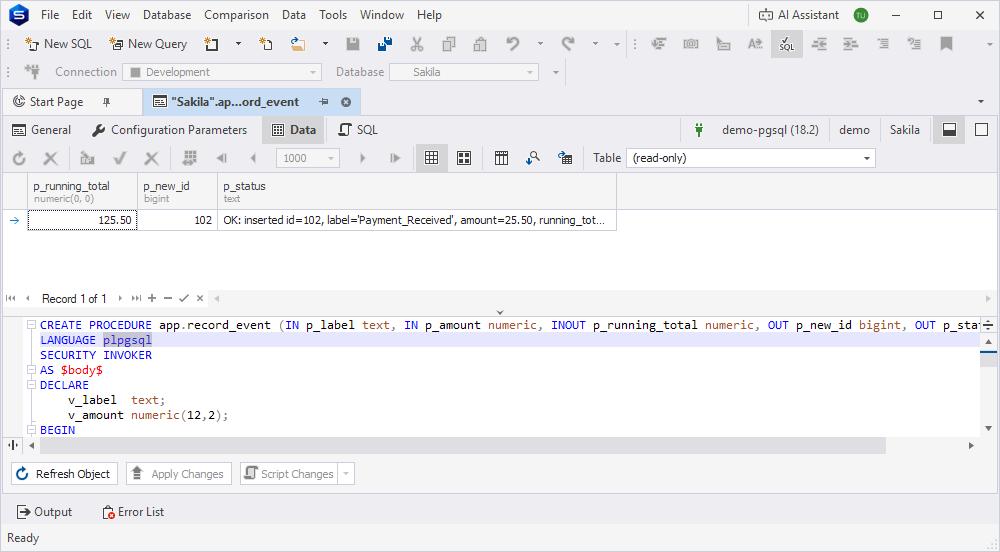
On the Data tab, you can view the data returned by the procedure.
For more information about how to work with table data, see View data in the grid.
SQL tab
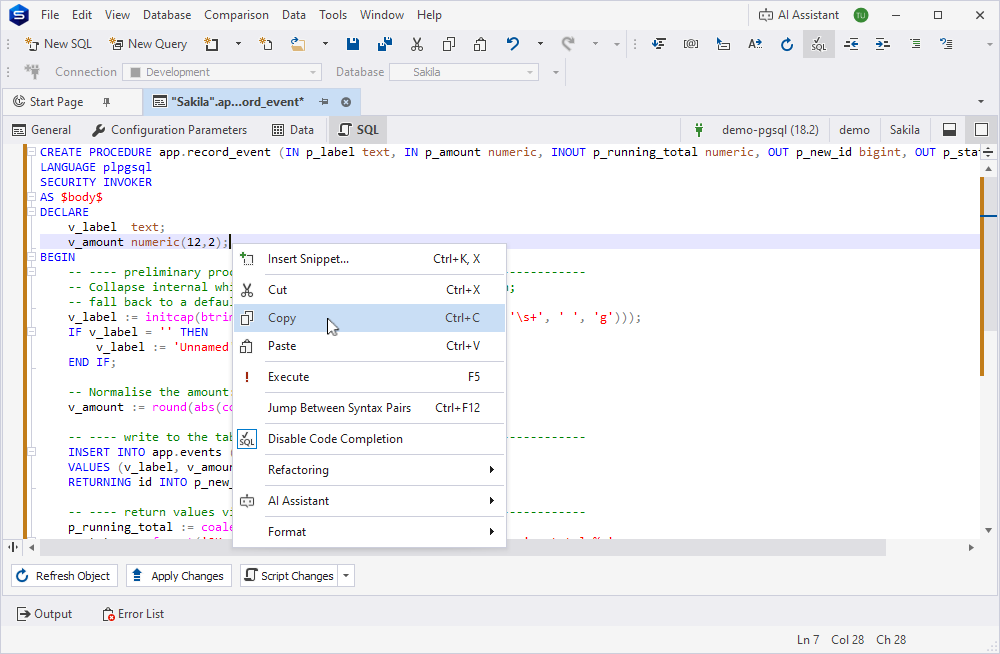
On the SQL tab, you can view the CREATE PROCEDURE or ALTER PROCEDURE DDL statements, which automatically update based on the properties you configure in the visual editor.
You can use the shortcut menu to copy, execute, or format the script, or use AI Assistant. Right-click anywhere in the editor and select the required option.
Procedure Editor layout
Procedure Editor supports two layouts: split and combined.
Split layout
By default, Procedure Editor opens in the split layout.
To switch from the combined layout to the split layout, in the upper-right corner of the editor, click  .
.
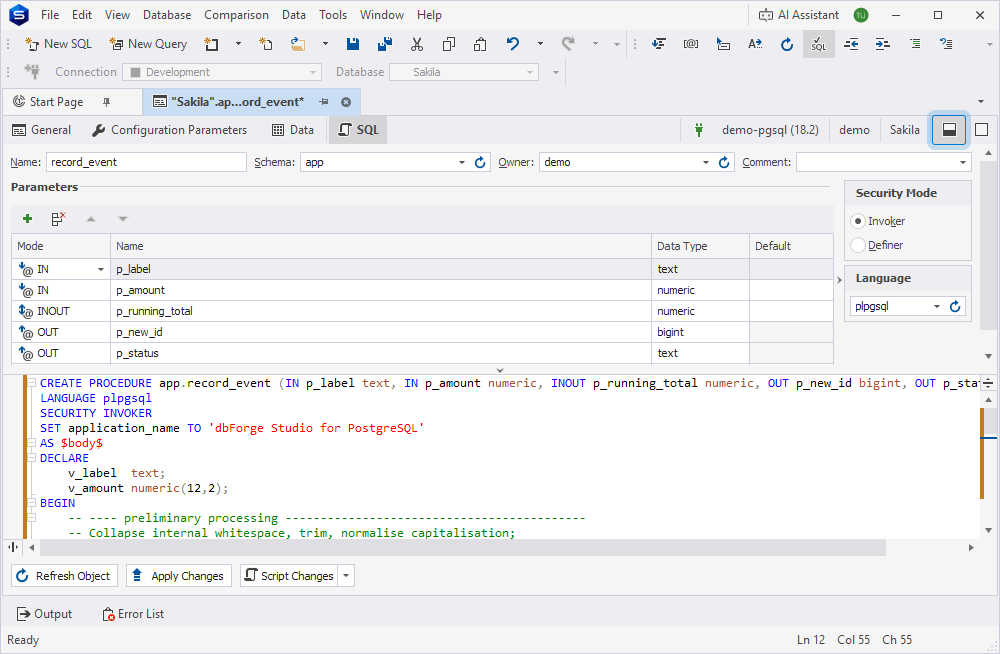
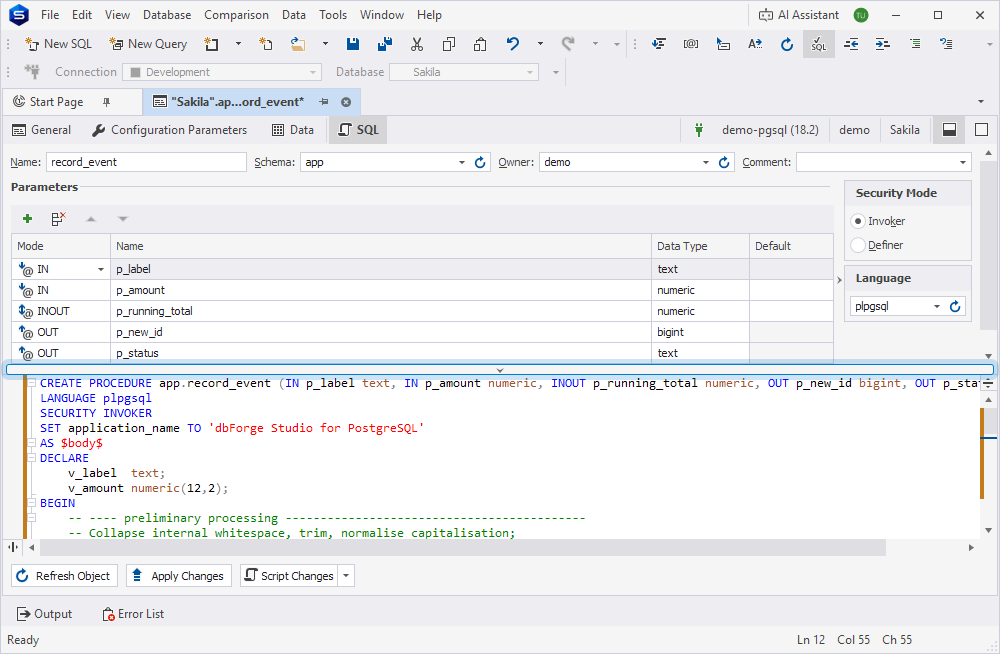
To hide the SQL editor, click the horizontal splitter or drag it down.
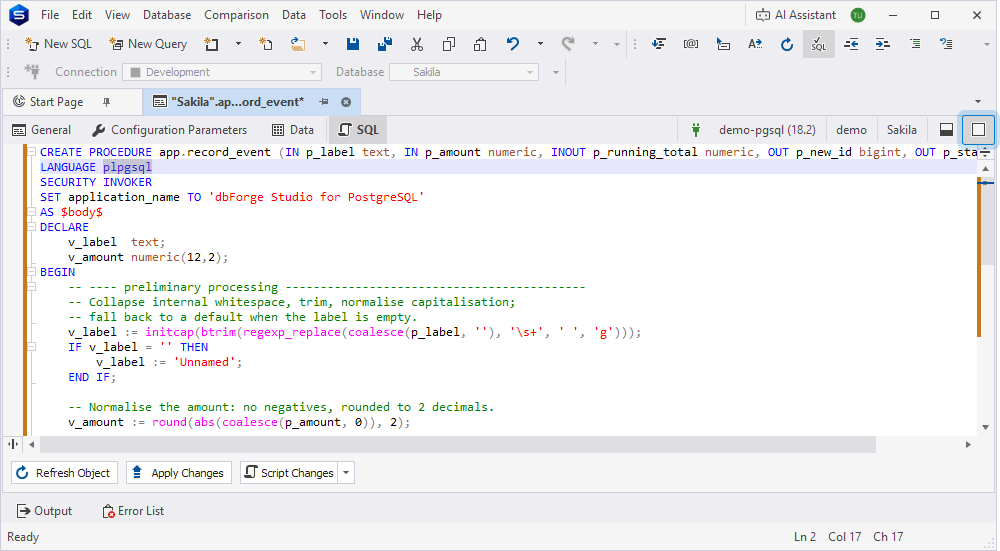
Combined layout
To switch to the combined layout, in the upper-right corner of the editor, click  .
.
In the combined layout, only one view is displayed at a time.
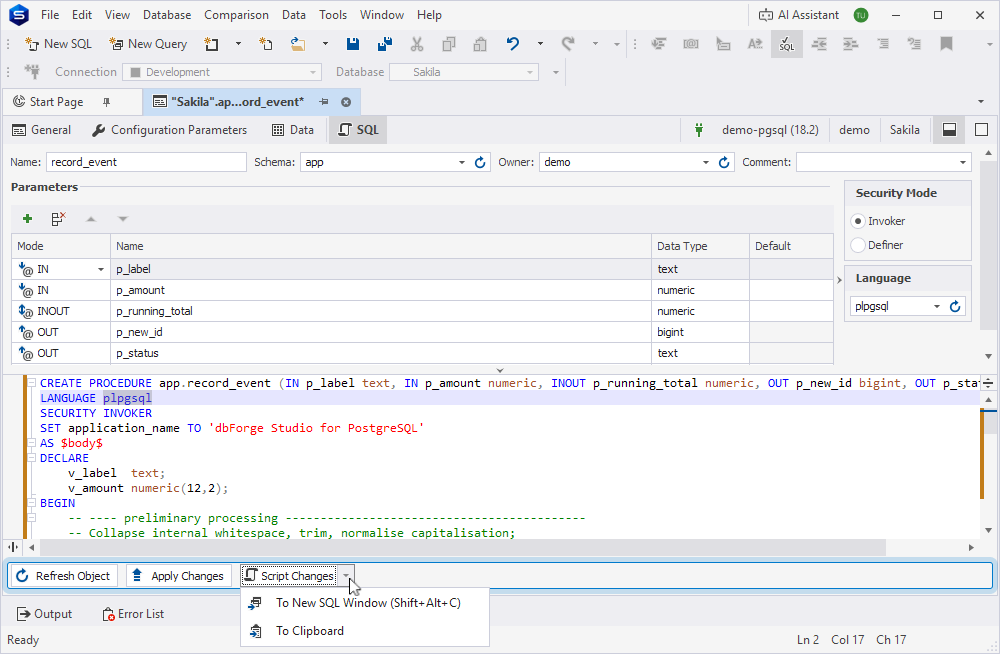
Bottom panel
You can use the bottom panel to refresh the object, apply changes, or generate a script for review before execution.
Refresh an object
To load the latest object definition from the server, click Refresh Object. If no changes are detected, the editor remains unchanged.
Save changes
An asterisk (*) on the tab title indicates unsaved changes. To save and apply them, click Apply Changes.
Generate a script
To view the generated script in a new SQL document, click Script Changes. This script shows the changes to be applied when you click Apply Changes.
You can click the arrow next to Script Changes and select one of the following options:
- To New SQL Window (Shift+Alt+C) – Opens the script in a new SQL document.
- To Clipboard – Copies the script to the clipboard.
Note
Apply Changes and Script Changes are available only after you make changes to the procedure.