Automate database deployment across multiple databases
This topic describes how to automate the propagation of schema and data changes from a reference database synchronized with version control to multiple target databases.
Scenario
You need to deploy database changes from a development database to multiple production databases. For example, after you add a table in development, you need to roll out the same change to several production databases at the same time.
The sample databases are:
- sakila – The development database where you make changes. This database is linked to a Git repository, and the changes are committed using the Source Control tool available in dbForge Studio for MySQL.
- sakila_ref – The reference database that is regularly compared with the Git repository. If there are any differences in structure and data, the reference database is updated to match the structure and data stored in Git.
- sakila_prod_eu – The production database, which receives changes replicated from sakila_ref.
- sakila_prod_us – The production database, which receives changes replicated from sakila_ref.
Note
The sakila database is identical to the Git repository.
Prerequisites
Create a .scomp file
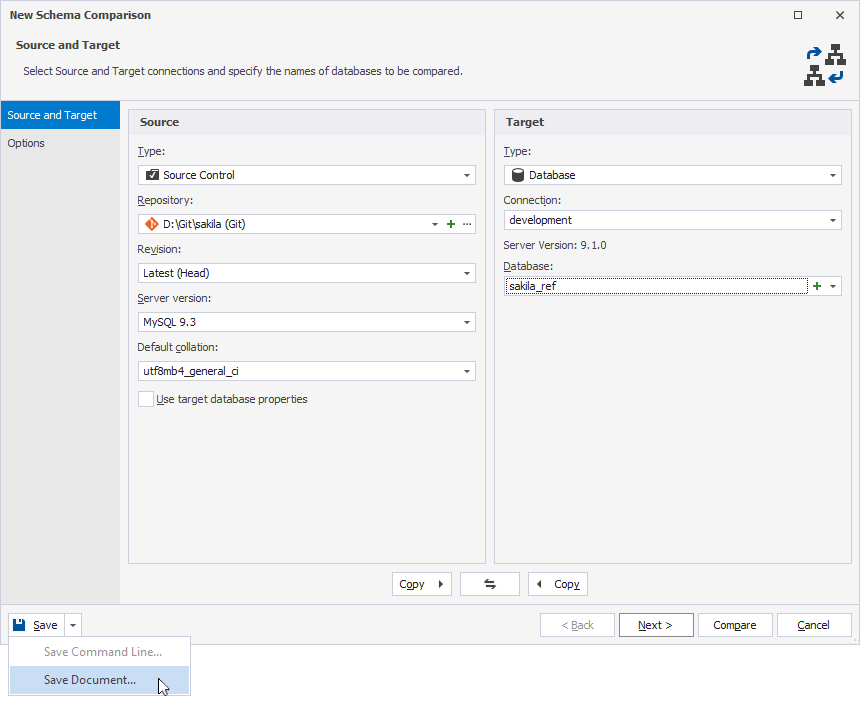
1. Run a schema comparison between a Git repository as the source and the sakila_ref database as the target.
2. In the New Schema Comparison wizard, click the arrow next to Save and select Save Document to create a schema comparison project file (.scomp), for example, sakila_sc.scomp.
The .scomp file stores all settings for comparing the databases between your Git repository and the sakila_ref database.
3. Synchronize the Git repository with the sakila_ref database.
4. Synchronize the sakila_prod_eu and sakila_prod_us databases with the Git repository; set the Git repository as the source, and the databases as the target.
Note
You don’t need to create the .scomp file for the sakila_prod_eu and sakila_prod_us databases.
Create a .dcomp file
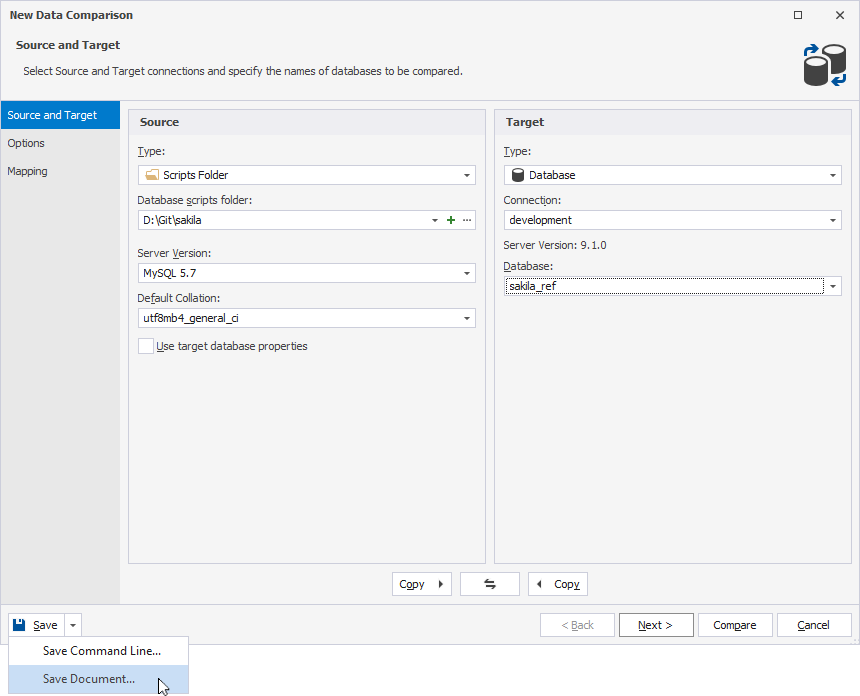
1. Run a data comparison between the scripts folder (Git repository) as the source and the sakila_ref database as the target.
2. In the New Data Comparison wizard, click the arrow next to Save and select Save Document to create a data comparison project file (.dcomp), for example, sakila_dc.dcomp.
The .dcomp file stores all settings for comparing data between your scripts folder (Git repository) and the sakila_ref database.
Create a database configuration file
1. Open a text editor.
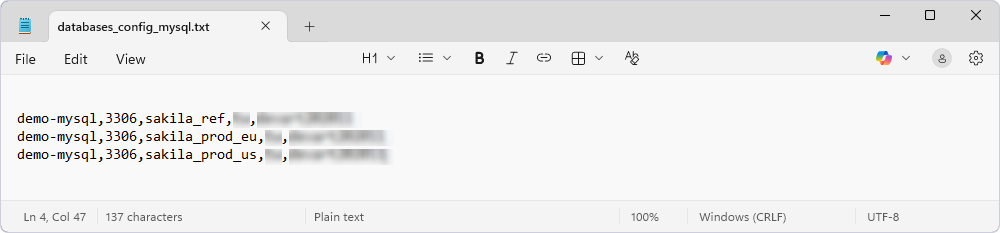
2. Enter the connection details for each target server and database, using a comma to separate values.
host, port, reference_database, user, password
host, port, database1, user, password
host, port, database2, user, password
where:
host, port, reference_database, user, password– The connection details for the reference database that the .scomp file compares with the Git repository.host, port, database1, user, passwordandhost, port, database2, user, password– The connection details for the target databases thatreference_databasewill be replicated to.
Note
You can add as many servers and databases as you need.
3. Save the .txt file, for example, databases_config_mysql.txt.
This file contains the connection details that the PowerShell script uses to connect to the reference and production databases.
Automate schema deployment
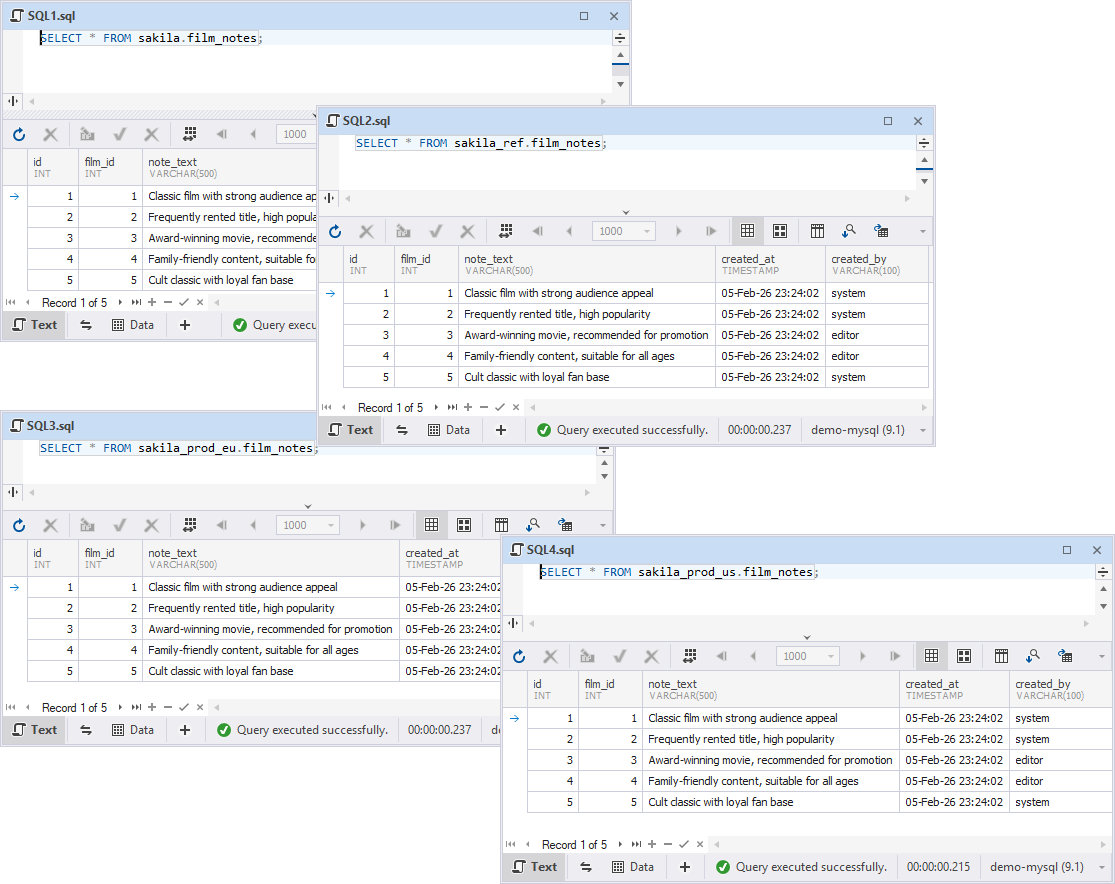
Create a new database object in the development database
1. Open the SQL Editor.
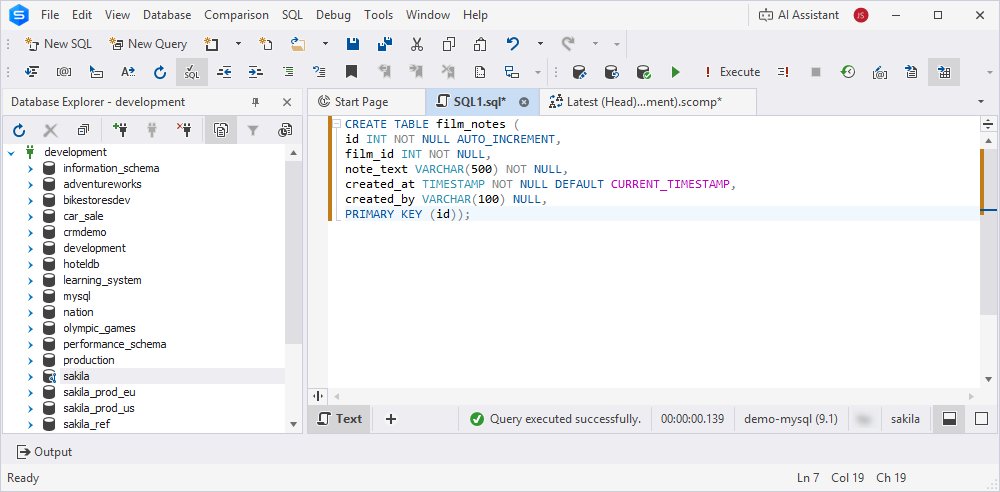
2. In the sakila database, create the film_notes table and populate it with data.
CREATE TABLE film_notes (
id INT NOT NULL AUTO_INCREMENT,
film_id INT NOT NULL,
note_text VARCHAR(500) NOT NULL,
created_at TIMESTAMP NOT NULL DEFAULT CURRENT_TIMESTAMP,
created_by VARCHAR(100) NULL,
PRIMARY KEY (id));

INSERT INTO film_notes (film_id, note_text, created_by)
VALUES
(1, 'Classic film with strong audience appeal', 'system'),
(2, 'Frequently rented title, high popularity', 'system'),
(3, 'Award-winning movie, recommended for promotion', 'editor'),
(4, 'Family-friendly content, suitable for all ages', 'editor'),
(5, 'Cult classic with loyal fan base', 'system');
Commit the created table and static data to the remote Git repository
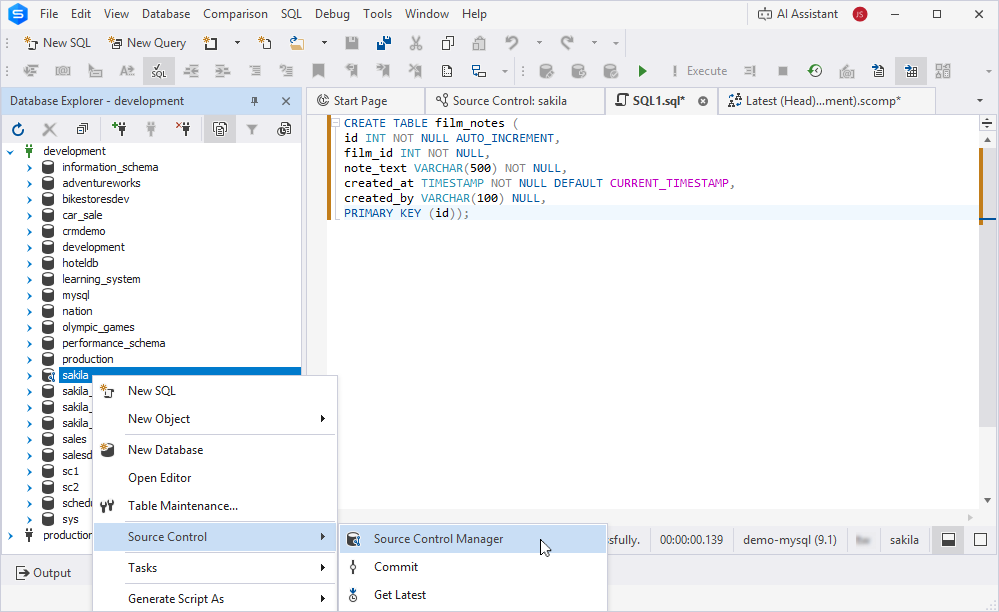
1. Open Source Control Manager.
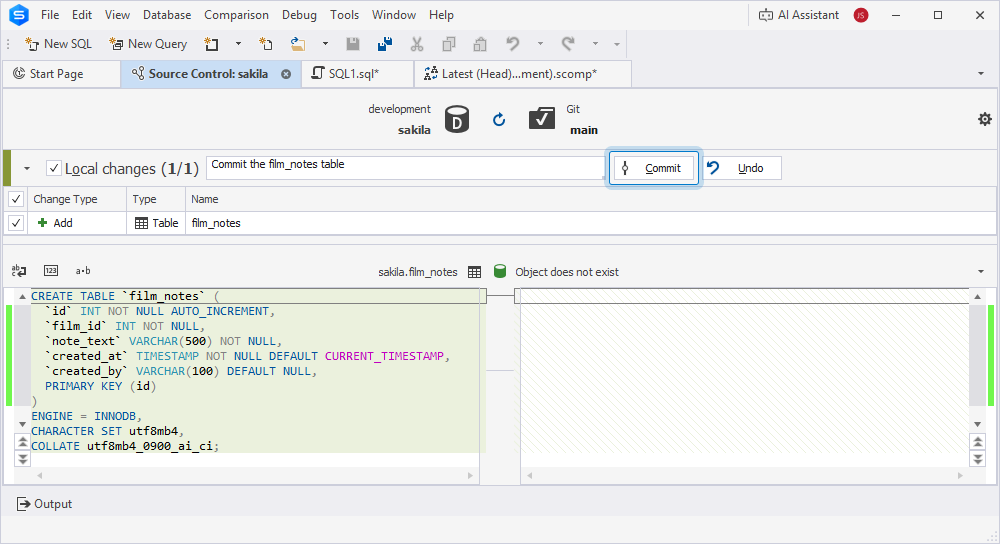
2. Commit the film_notes table to the remote repository.
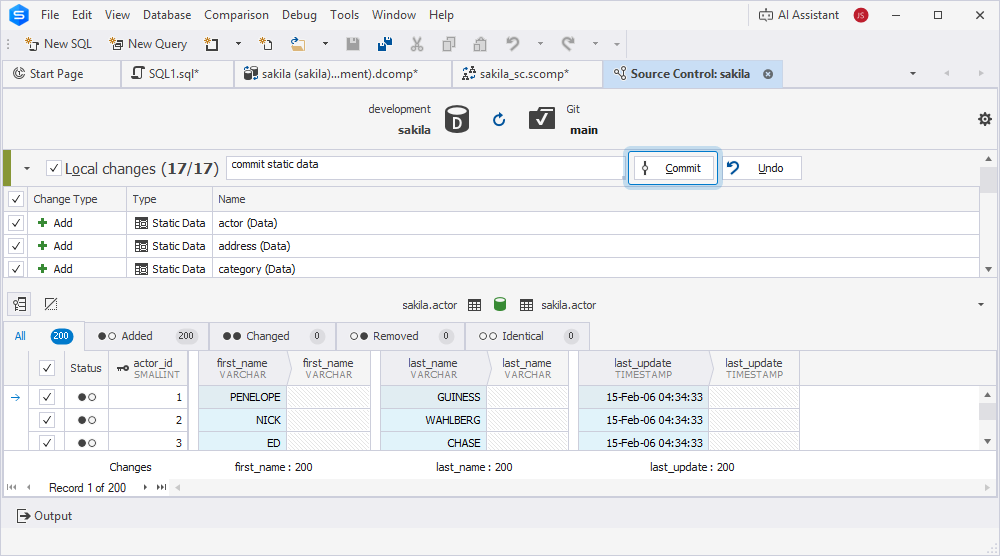
3. Commit the static data to the repository.
Run the PowerShell script
1. Open the Windows PowerShell ISE as an administrator.
2. Run the script, replacing all placeholders with your actual configuration values.
Click to open the PowerShell script.
# ----------------------------
# Paths and settings
# ----------------------------

# Path to a database configuration file
$configFile = "D:\AutomateDatabaseSynchronization\databases_config_mysql.txt"

# Path to the dbForge Studio for MySQL CLI executable
$dbForgeCli = "C:\Program Files\Devart\dbForge Studio for MySQL\dbforgemysql.com"

# Path to a Schema Compare project file
$scompFile = "D:\AutomateDatabaseSynchronization\sakila_sc.scomp"

# Path to a Data Compare project file
$dcompFile = "D:\AutomateDatabaseSynchronization\sakila_dc.dcomp"

# Path to a log file
$logFile = "D:\AutomateDatabaseSynchronization\MySQL_Log_file.log"

# Flags to track applied changes during deployment
$schemaChanged = $false
$dataChanged = $false


try {

# ----------------------------
# Read database configuration
# ----------------------------

$databases = Get-Content $configFile |
Where-Object { $_.Trim() -and -not $_.Trim().StartsWith("#") } |
ForEach-Object {
$p = $_ -split ","
[PSCustomObject]@{
Host = $p[0]
Port = $p[1]
Database = $p[2]
User = $p[3]
Password = $p[4]
}
}

$masterDb = $databases[0]
$targetDbs = if ($databases.Count -gt 1) { $databases[1..($databases.Count - 1)] } else { @() }

Write-Output "Master database: $($masterDb.Database)"
Write-Output "Target databases: $($targetDbs.Database -join ', ')"

# ----------------------------
# Schema Compare
# ----------------------------

Write-Output "Comparing Git schema with master database..."

$schemaCompare = Start-Process $dbForgeCli -Wait -PassThru -ArgumentList @(
"/schemacompare",
"/compfile:`"$scompFile`"",
"/target", "connection:`"User Id=$($masterDb.User);Password=$($masterDb.Password);Host=$($masterDb.Host);Port=$($masterDb.Port);Database=$($masterDb.Database);Character Set=utf8`"",
"/log:`"$logFile`""
)

if ($schemaCompare.ExitCode -eq 101) {

$schemaChanged = $true
Write-Output "Schema changes detected. Applying schema synchronization..."

Start-Process $dbForgeCli -Wait -ArgumentList @(
"/schemacompare",
"/compfile:`"$scompFile`"",
"/target", "connection:`"User Id=$($masterDb.User);Password=$($masterDb.Password);Host=$($masterDb.Host);Port=$($masterDb.Port);Database=$($masterDb.Database);Character Set=utf8`"",
"/log:`"$logFile`"",
"/sync"
)

foreach ($db in $targetDbs) {
Start-Process $dbForgeCli -Wait -ArgumentList @(
"/schemacompare",
"/source", "connection:`"User Id=$($masterDb.User);Password=$($masterDb.Password);Host=$($masterDb.Host);Port=$($masterDb.Port);Database=$($masterDb.Database);Character Set=utf8`"",
"/target", "connection:`"User Id=$($db.User);Password=$($db.Password);Host=$($db.Host);Port=$($db.Port);Database=$($db.Database);Character Set=utf8`"",
"/log:`"$logFile`"",
"/sync"
)
}

}
else {
Write-Output "No schema changes detected."
}

# ----------------------------
# Data Compare
# ----------------------------

Write-Output "Comparing Git data with master database..."

$dataCompareMaster = Start-Process $dbForgeCli -Wait -PassThru -ArgumentList @(
"/datacompare",
"/compfile:`"$dcompFile`"",
"/target", "connection:`"User Id=$($masterDb.User);Password=$($masterDb.Password);Host=$($masterDb.Host);Port=$($masterDb.Port);Database=$($masterDb.Database)`"",
"/log:`"$logFile`""
)

if ($dataCompareMaster.ExitCode -eq 101) {

$dataChanged = $true
Write-Output "Data changes detected. Applying data synchronization..."

Start-Process $dbForgeCli -Wait -ArgumentList @(
"/datacompare",
"/compfile:`"$dcompFile`"",
"/target", "connection:`"User Id=$($masterDb.User);Password=$($masterDb.Password);Host=$($masterDb.Host);Port=$($masterDb.Port);Database=$($masterDb.Database)`"",
"/log:`"$logFile`"",
"/sync"
)

foreach ($db in $targetDbs) {
Start-Process $dbForgeCli -Wait -ArgumentList @(
"/datacompare",
"/compfile:`"$dcompFile`"",
"/source", "connection:`"User Id=$($masterDb.User);Password=$($masterDb.Password);Host=$($masterDb.Host);Port=$($masterDb.Port);Database=$($masterDb.Database)`"",
"/target", "connection:`"User Id=$($db.User);Password=$($db.Password);Host=$($db.Host);Port=$($db.Port);Database=$($db.Database)`"",
"/log:`"$logFile`"",
"/sync"
)
}

}
else {
Write-Output "No data changes detected."
}

# ----------------------------
# Final result
# ----------------------------

if (-not $schemaChanged -and -not $dataChanged) {
Write-Output "No changes detected. Database state was not modified."
}
else {
Write-Output "DEPLOYMENT FINISHED SUCCESSFULLY."
}

}
catch {
Write-Error "DEPLOYMENT FAILED:"
Write-Error $_
}
finally {
Write-Output ""
Read-Host "Press Enter to exit"
}
Required parameters
| Name | Description |
|---|---|
$configFile |
The full path to the .txt file that contains credentials to access the specified databases. |
$dbForgeCli |
The full path to the dbforgemysql.com executable.Depending on how dbForge Studio for MySQL was installed, the default path to the installation folder may vary:
|
$scompFile |
The full path to the .scomp file that contains schema comparison settings. |
$dcompFile |
The full path to the .dcomp file that contains data comparison settings. |
$logFile |
The full path to the log file. This file is created automatically and saved to the specified folder. |
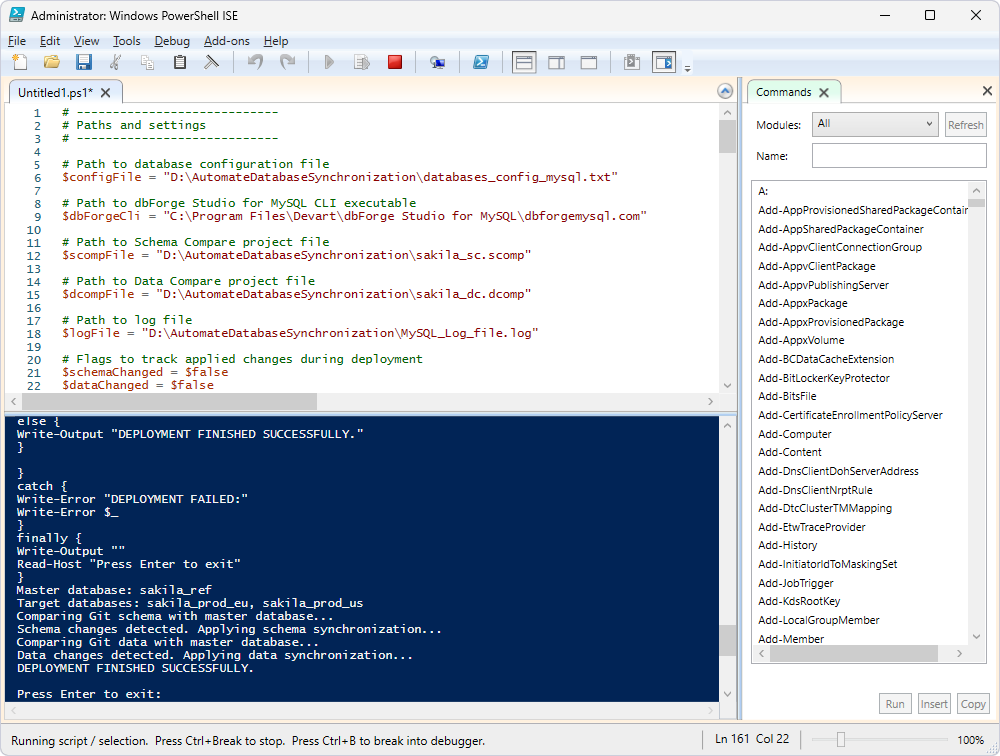
After synchronization, the tables and their data become available for use and are displayed in Database Explorer once it is refreshed.