Creating stored procedures
How to manually create storage metadata schema stored procedure
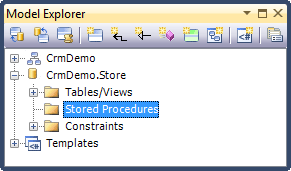
1. Right-click the Stored Procedures node in the Model Explorer, select Add from the popup menu and then select New Procedure.
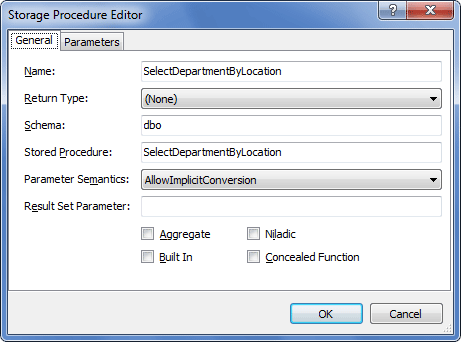
2. The Storage Procedure Editor will be displayed.
3. Enter the procedure name into the Name box and specify other procedure parameters:
4. If the procedure should have parameters, switch to the Parameters tab.
5. Click Add.
6. Specify the parameter settings, e.g. as follows:
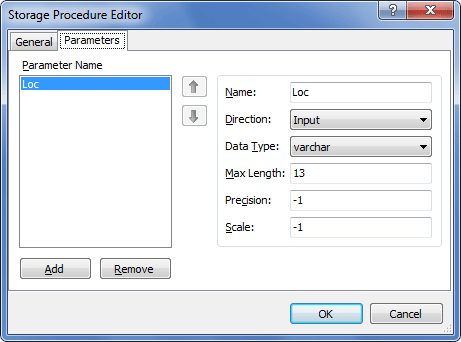
7. Repeat steps 5 and 6 for all the procedure parameters and click OK.
How to create procedure from the SQL code
1. Right-click the Stored procedures node in the Model Explorer, select Add from the popup menu and then select New Command Text.
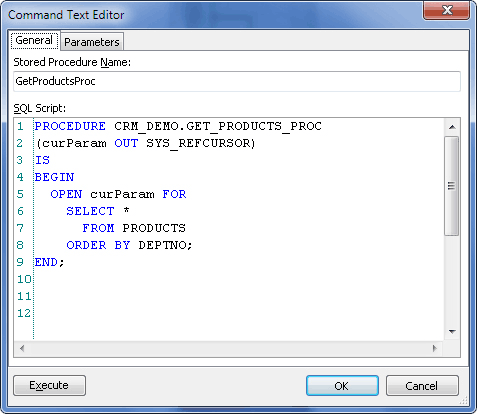
2. In the displayed dialog enter the Stored Procedure Name and SQL Script.
3. Click OK.
4. If the script contains parameters, you will be asked whether to generate parameters collection. Click Yes to generate it or No to build it later manually.
Note
If a stored procedure or function exists only in the Storage part of the model, i.e. is not used either in Insert/Update/Delete mapping or in mapping to methods in the Conceptual part, the corresponding warning message is displayed in the Error List window: The storage function
`<function name>`is not used by any object in the conceptual model.