Storage Procedure Editor
Use this editor to create or edit the storage schema procedures.
To call Storage Procedure Editor, use one of the following options:
- In the Model Explorer window right-click the Storage Model node to call its context menu, and in the Add submenu select New Procedure.
- In the Model Explorer window right-click an existing stored procedure and in its context menu select Edit.
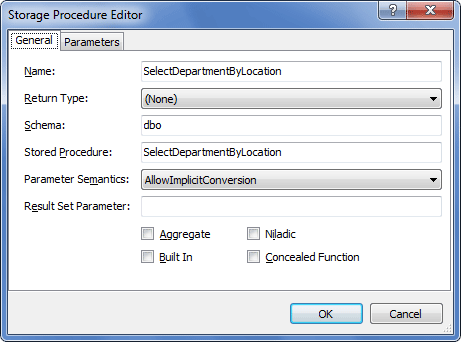
The following options are available:
General tab
Name – specifies the storage schema procedure name.
Return Type – specifies the return type of the procedure (for stored functions). Acceptable values are: bigint, binary, bit, char, date, datetime, datetime2, datetimeoffset, decimal, float, geography, geometry, image, int, money, nchar, ntext, numeric, nvarchar, nvarchar(max), real, rowversion, smalldatetime, smallint, smallmoney, text, time, timestamp, tinyint, uniqueidentifier, varbinary, varbinary(max), varchar, varchar(max), xml.
Schema – specifies the schema in the database, the stored procedure belongs to.
Stored Procedure – specifies the database stored procedure name.
Parameter Semantics – defines the type semantics that is used to resolve the stored procedure overloads. Acceptable values are:
- AllowImplicitConversion – implicit conversion between the given and the formal argument types will be performed, if necessary. Default value.
- AllowImplicitPromotion – type promotion between the given and the formal argument types will be performed, if necessary.
- ExactMatchOnly – argument types must be equivalent.
Result Set Parameter – defines the name of the stored procedure OUT parameter, which returns the result set.
Aggregate – indicates if the stored procedure is aggregate (returns a single value, calculated from values in a column).
Niladic – indicates if the stored procedure is called without parentheses and does not accept parameters.
Built In – this checkbox should be selected for database server built-in functions.
Concealed Function – select this checkbox to hide the function return type and make Entity Framework process this function as a procedure.
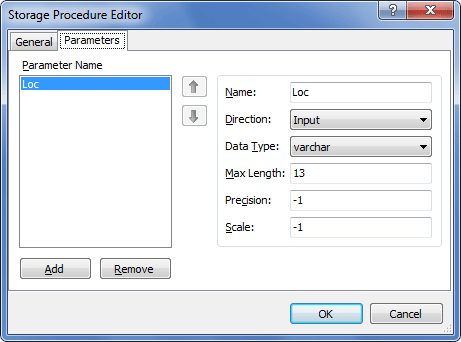
Parameters tab
Parameter Name – this box contains all the stored procedure parameters. Click on the parameter to edit it.
Add – click to add a parameter to a stored procedure.
Remove – click to remove the selected parameter.
Arrow buttons – use these buttons to change the parameter order.
Name – defines the parameter name.
Direction – indicates whether the parameter is input, output, or bidirectional.
Data Type – specifies the parameter data type. Acceptable values are: bigint, binary, bit, char, date, datetime, datetime2, datetimeoffset, decimal, float, geography, geometry, image, int, money, nchar, ntext, numeric, nvarchar, nvarchar(max), real, rowversion, smalldatetime, smallint, smallmoney, text, time, timestamp, tinyint, uniqueidentifier, varbinary, varbinary(max), varchar, varchar(max), xml.
Scale – defines the parameter scale. Scale can be applied only for the decimal type.
Max Length – defines the parameter maximal length.
Precision - defines the parameter precision. Precision can be applied only for the decimal type.