Resolve the Git error “ignoring dangling symref head”
You may encounter the following Git error when the symbolic reference (HEAD) points to a branch or commit that no longer exists or is not properly defined. This can also occur if the repository was not initialized correctly.
warning: ignoring dangling symref head
fatal: ambiguous argument 'head': unknown revision or path not in the working tree.
Use '--' to separate paths from revisions, like this:
'git <command> [<revision>...] -- [<file>...]'
Causes
This issue usually appears in the following situations:
- The Git repository was not initialized correctly or lacks an initial commit.
- The
HEADreference is broken or points to a missing branch. - The same source control settings were used across multiple databases without updating the repository configuration.
Solution 1: Ensure an initial commit exists
To avoid this error, ensure you have created a valid local Git repository and performed an initial commit. Run the following commands:
git commit --allow-empty -m initial
git push
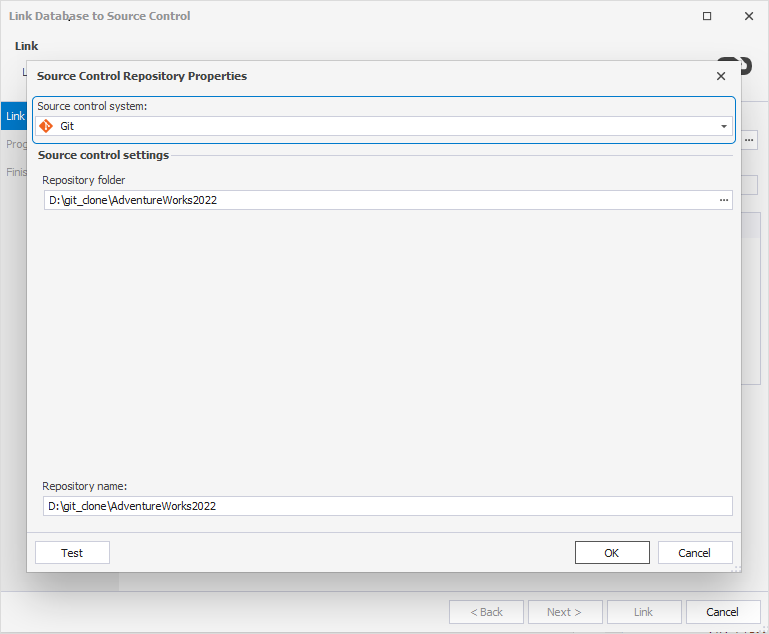
Then, in dbForge Studio, ensure you:
- Open the Source Control Repository Properties dialog.
- Select Git as the source control system.
- Choose the correct repository folder.
Solution 2: Re-link the database with a new repository
If you’re linking a different database using the same source control settings, the error may also occur.
To resolve it, re-link the database using a different repository folder or a new repository name.
Automate repository setup with a batch file
To streamline the setup of a Git repository for your database, you can use the following batch script:
:: Save this as a batch file in a folder that will store repositories.
:: Change DatabaseName to your database name; this will be the repository folder name.
set _database=DatabaseName
:: Change _main if desired; this will be the folder for the main repository.
set _mainfolder=_main
:: Please do not change the following variables and commands.
set _maindir=%_mainfolder%\%_database%

:: Create the main folder to store the main repository.
md %_mainfolder%
:: Create a subfolder under the main folder with the name of the database.
md %_maindir%
:: Navigate to the subfolder.
cd %_maindir%
:: Initialize the main repository (will be empty).
git init --bare

:: Go back to the root directory.
cd ..\..
:: Clone the main repository, creating a folder with the name of the database.
git clone %_maindir%
:: Navigate to the cloned folder.
cd %_database%
:: Run git commands in the cloned folder.
git commit --allow-empty -m initial
git push
set _path=%cd%
:: Print the repository folder for reference.
echo Cloned repo folder: %_path%
cd ..
:: In dbForge Studio, select the database, then use Source Control > Link database to Source Control.
:: Pick the Source Control repository as the cloned repository in the folder you created above.

pause
This script sets up a bare repository, clones it, performs an initial commit, and prepares the environment for linking with dbForge Studio. It works only with cloned repositories and cannot commit directly to bare or remote repositories.
For more information, see How to link a database to a Git repository.