Command-line interface
dbForge Studio for SQL Server provides a command-line interface (CLI) that allows you to automate and schedule data import tasks without using the graphical user interface.
What you can do with the command-line interface
- Import data using a template file (.dit) containing the import settings.
- Schedule data import.
- Create a new table on the specified server.
Availability
The command-line interface is available in the Professional and Enterprise editions of dbForge Studio for SQL Server.
Access to the command-line interface
To run dbForge Studio CLI commands, open Command Prompt and navigate to the folder that contains dbforgesql.com. The default path to this executable depends on where dbForge Studio for SQL Server is installed. If you installed dbForge Studio:
- As a standalone tool
C:\Program Files\Devart\dbForge Studio for SQL Server
- As part of the dbForge Edge bundle
C:\Program Files\Devart\dbForge Edge\dbForge Studio for SQL Server
Command-line syntax
The /dataimport command initiates data import from a table or view using a template file (.dit).
dbforgesql.com /dataimport [/option_name1[:value | [parameter1:value parameter2:value ..]] /option_name2 ..]
Command-line switches
The following command enables you to view the switches available for /dataimport.
dbforgesql.com /dataimport /?
For the complete list of switches, see Command-line switches.
Example
You can specify the required arguments directly in the command line.
dbforgesql.com /dataimport /connection:"Data Source=<server_name>;Initial Catalog=<database_name>;User ID=<user_name>" /password:yourPassword /table <table_name>
Alternatively, you can define data import settings in a template file (.dit), which the command references when running the script.
dbforgesql.com /dataimport /templatefile:"D:\DataImportTemplate.dit"
where:
/templatefile:"D:\DataImportTemplate.dit"– The full path to a template file (.dit).
For detailed automation scenarios, see:
Command-line exit codes
The /dataimport command returns exit codes that indicate the operation status.
For the complete list of exit codes, see Command-line exit codes.
Command-line wizard
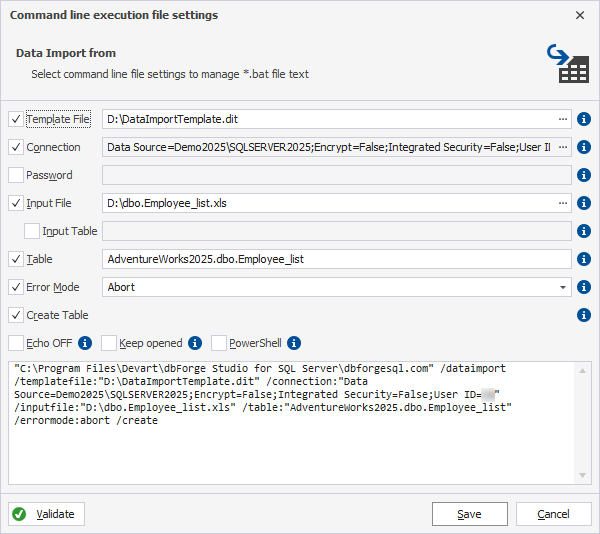
dbForge Studio provides a built-in command-line wizard that helps you generate reusable command-line commands based on actions configured in the graphical user interface.
Instead of writing command-line syntax manually, you can configure data import settings in the command-line wizard. The wizard then generates the corresponding command-line syntax, which you can review, edit, and save as a .bat file for reuse or scheduling.