Connection options
Devart ODBC Driver for Zoho CRM uses OAuth 2.0 authentication to connect to Zoho CRM and supports connections via a proxy server.
OAuth 2.0 authentication
OAuth 2.0 provides a secure way to connect without storing credentials in the connection settings.
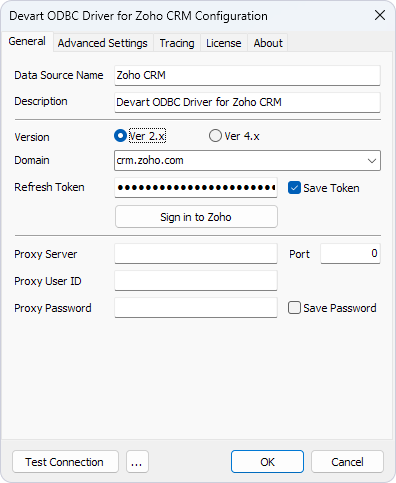
Required parameters:
Domain – The Zoho CRM instance (for example, crm.zoho.com for the US region, or crm.zoho.eu for the EU region). If a Zoho CRM domain isn’t available in the dropdown list, you can enter it manually.
Refresh Token – The Zoho OAuth 2.0 refresh token obtained through the sign-in flow.
Example connection string:
DRIVER=Devart ODBC Driver for Zoho CRM;Domain=crm.zoho.com;Refresh Token=<your_refresh_token>
Connection via proxy server
Devart ODBC Driver for Zoho CRM supports proxy connections, enabling users to route their connection through a proxy server for enhanced network security and access control.
Required parameters:
Proxy Server – The proxy server address.
Port – The port number used for the proxy connection.
Proxy User ID – The username for proxy authentication.
Proxy Password – The password for proxy authentication.
Example connection string:
DRIVER=Devart ODBC Driver for Zoho CRM;Domain=crm.zoho.com;Refresh Token=<your_refresh_token>;Proxy Server=<your_proxy_server>;Proxy Port=<your_proxy_port>;Proxy User=<your_proxy_username>;Proxy Password=<your_proxy_password>