Obtain a refresh token
To sign in and obtain a new refresh token in the driver configuration dialog:
1. In the ODBC Data Source Administrator, select your Zoho CRM data source, then click Configure.
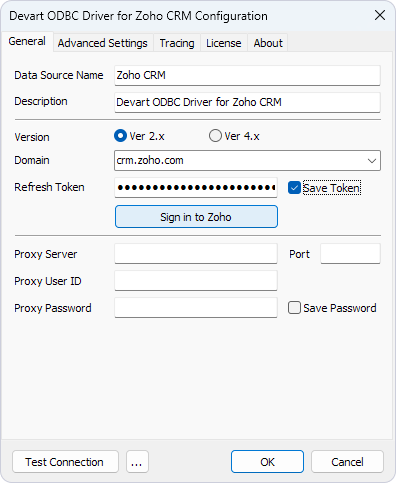
The Devart ODBC Driver for Zoho CRM Configuration dialog opens.
2. In Domain, select the domain for your Zoho CRM instance.
3. Click Sign in to Zoho.
4. In the sign-in dialog, enter your Zoho account credentials, then click Sign in.
5. Review the permissions request, then click Accept to authorize the driver.
The refresh token is automatically populated in Refresh Token.
6. Optional: Select Save Token to store the token in the DSN.