Database column mapping
This section describes the column parameters you can define when configuring entity properties in Entity Developer.
Opening Column Editor
You can open the Column Editor dialog by:
- Clicking the ellipsis
 button on the right side of the Column field
 - Pressing Alt+E in any of these dialogs:
- Class Editor
- Complex Type Editor
- Inheritance Editor
- Join Tables Editor
- Property Editor
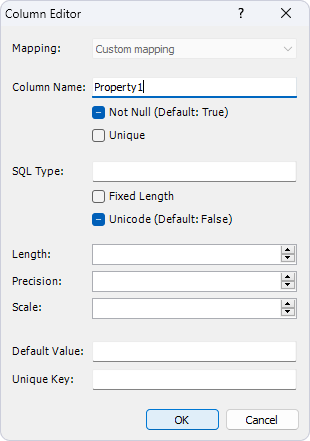
Column parameters
Mapping
The Mapping dropdown menu sets the property mapping type to the column. The available options depend on the property type:
- Custom mapping - Allows you to specify custom column names for property mapping. This is the default and only available option for scalar properties.
- Default mapping - Is used for properties that are part of a complex type (component). You can either keep the column name suggested by the application (based on naming rules in model settings) or enter a custom name.
- No mapping - Excludes a property from mapping.
You can also configure mapping from the Class Editor by clicking the ellipsis button in the Column field for properties that belong to a complex type.
For more information, see Complex type mapping.
Column name
By default, the column name is identical to the property name and follows the naming rules defined in the Model Settings dialog. If naming rules or the property name change, the default column name updates accordingly.
You can set a custom column name by entering it in the Column Name field. Additional options include:
- Not Null - Prohibits null values in the column.
- Unique - Creates a unique key constraint on the column.
Note
If the Not Null checkbox is not explicitly specified, its value is calculated based on the Nullable property value.
Data type parameters
You can make optional adjustments to the column data type in the Column Editor dialog:
SQL type
Specifies the database column data type. When set, the Fixed Length and Unicode checkboxes become unavailable.
Fixed length
When selected, specifies that the column stores fixed-length data (for example, BIT, CHAR, or BINARY types). A CHAR or BINARY column is created instead of VARCHAR or VARBINARY.
Unicode
Specifies that the string data type in the model should match NCHAR or NVARCHAR types in the database.
Note
If not explicitly specified, the Unicode value is calculated based on the Default Unicode property from the model properties.
Length
Specifies the maximum length for character or binary data types (such as CHAR, VARCHAR, BINARY, BIT, or VARBINARY).
Note
If not explicitly specified, this value is calculated based on the Default Length property from the model property set.
Precision and scale
Specifies exact parameters for numeric values (for example, DECIMAL type in Oracle):
- Precision - Total number of significant digits.
- Scale - Number of digits to the right of the decimal point.
Note
If not explicitly specified, values are calculated based on the Default Precision and Default Scale properties from the model property set.
Default value
Specifies the value to be used during database creation script generation by the Telerik Data Access runtime or Entity Developer, which will be inserted into the database column.
Unique key
Specifies the name of a unique constraint that includes the column and is used during database creation script generation by the Telerik Data Access runtime or Entity Developer itself.