This topic describes connection parameters for the dotConnect for Salesforce data provider.
Host
Select the Salesforce.com or Database.com login URL, i.e. either login.salesforce.com or login.database.com.
User Id
Specify your login.
Password
Specify your password.
Security Token
Specify your security token. Security token is an automatically generated key that is used for logging in to Salesforce from an untrusted network.
Allow saving password
If set to True, the password is stored together with the other connection parameters.
|
User password will be stored in your model in an unencrypted form (as plain text). |

OAuth 2.0 authentication allows the user to enter their account email and password directly on the Salesforce web page and does not require a security token. As part of the OAuth 2.0 sign-in flow, Salesforce issues a refresh token. You can specify it when the authentication type is set to OAuth 2.0.
To connect with the OAuth 2.0 authentication:
| 1. | Select the OAuth 2.0 authentication type. |
| 2. | Click Sign in. |
| 3. | Log in to Salesforce with your username and password. |
After this, the credentials and the Refresh Token parameters are filled automatically, and you can connect.
You can also fine-tune the connection by setting advanced options.
If needed, you can enter Client ID (Consumer Key), Client Secret (Consumer Secret), and Refresh Token manually.
For information about how to create a connected app and get the Client ID and Client Secret, see Get Credentials for OAuth Authentication.
Server-to-server authentication
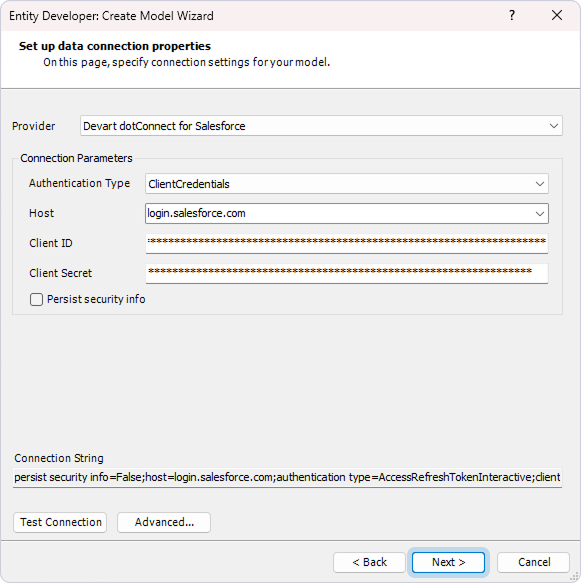
Server-to-server authentication uses the OAuth 2.0 client credentials flow and enables applications to access Salesforce data without interactive user sign-in. Instead of signing in through a browser, the application authenticates using a consumer key and consumer secret.
To connect with server-to-server authentication:
| 1. | In Authentication Type, select ClientCredentials. |
| 2. | In Host, select the Salesforce login URL. |
| 3. | Enter your Client ID (Consumer Key) and Client Secret (Consumer Secret). |
| 4. | Optional: To configure advanced connection options, click Advanced. |
| 5. | Optional: To verify that the connection details are valid, click Test Connection. |
| 6. | To continue configuring the model, click Next. |
For information about how to create an external client app and get the Client ID and Client Secret, see Get Credentials for Server-to-Server Authentication.