Wildcards for Find and Replace
The Find and Replace window contains a list of expressions to replace characters or digits in the Find what field. They are called Wildcards.
To select a required wildcard, do the following:
- On the Edit menu, hover over Find and Replace and select Find.
-
In the Find and Replace dialog, select the Use check box and choose Wildcards from the drop-down list.
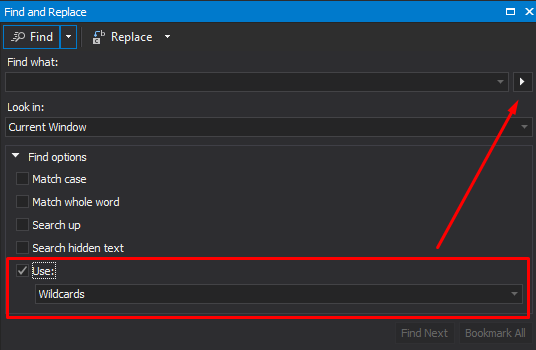
The
 arrow button next to the Find what field becomes active.
 - In the Find what field, click the arrow button and select a wildcard from the drop-down list. It is inserted into the Find what field.
The drop-down list contains the following wildcards:
| Syntax | Expression | Description |
|---|---|---|
| * | Zero or more of any character | Matches one or more characters. For example, test* matches any text that includes “test”, such as textfile.txt. |
| ? | Any single character | Matches any single character. |
| # | Any single digit | Matches any single digit. For example, 5# matches numbers that include 5 followed by another number, such as 51, but not 15. |
| [] | Any one character in the set | Matches one of the characters specified in the set. |
| [!] | Any one character not in the set | Matches one character that is not specified in the set. |
| \ | Escape Special Character | Matches the character that follows the backslash as a literal. This allows you to find the characters used in wildcard notation, such as * and #. |