Customize statement templates
You can customize CRUD procedure templates and script generation settings to match your coding standards and requirements.
Customize a statement template
1. On the menu bar, select Tools > Options.
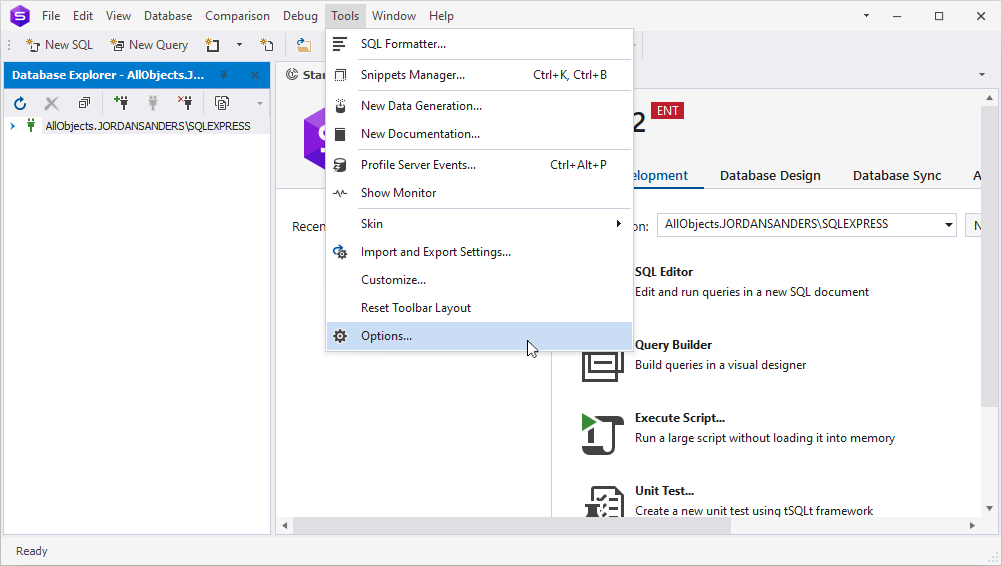
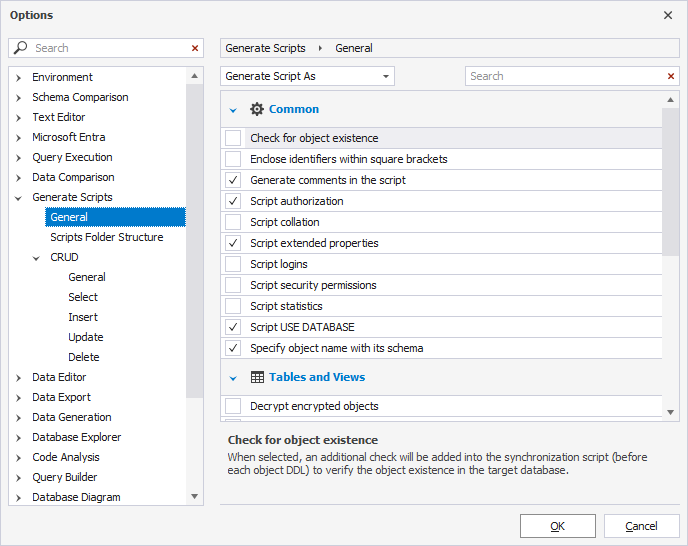
2. Switch to Generate Scripts > General.
3. Select the options you want to include in the script, and clear the options you want to exclude.
| Option name | Option group | Option description |
|---|---|---|
| Check for object existence | Common | Verifies whether an object exists in a target database. |
| Enclose identifiers within square brackets | Common | Inserts all identifiers into square brackets. |
| Generate comments in the script | Common | Adds comments to the script. |
| Script authorization | Common | Generates script authorization clauses. |
| Script collation | Common | Inserts collation information into the script. |
| Script default constraints | Common | Includes default constraints and schema defaults. |
| Script extended properties | Common | Adds extended properties of database objects to the script. |
| Script logins | Common | Generates scripts for server logins. |
| Script security permissions | Common | Includes security permissions. |
| Script statistics | Common | Includes statistics. |
| Script USE DATABASE | Common | Generates a USE DATABASE statement. |
| Security object name with its schema | Common | Adds the schema name as a prefix to object names. |
| Decrypt encrypted objects | Tables/Views | Decrypts bodies of encrypted objects for comparison and synchronization. |
| Enforce full column list | Tables/Views | Generates INSERT statements with fully specified column list. |
| Script change tracking | Tables/Views | Adds CHANGE_TRACKING statements during database comparison and synchronization. |
| Script check constraints | Tables/Views | Adds CHECK constraints to the script. |
| Script DATA_COMPRESSION for indexes, primary and unique constraints | Tables/Views | Adds a DATA_COMPRESSION clause for indexes, primary, and unique key constraints. |
| Script DML triggers | Tables/Views | Adds a CREATE statement of triggers on tables. |
| Script foreign keys | Tables/Views | Adds a CREATE statement of foreign keys on tables. |
| Script full-text search | Tables/Views | Adds full-text stoplists, full-text catalogs, and full-text indexes. |
| Script indexes | Tables/Views | Adds a CREATE statement of indexes on tables. |
| Script primary keys | Tables/Views | Adds a CREATE statement of primary keys on tables. |
| Script unique keys | Tables/Views | Adds a CREATE statement of unique keys on tables. |
4. Switch to CRUD.
The CRUD page includes the following subpages:
| Option name | Option description |
|---|---|
| General | Allows you to include SELECT, INSERT, UPDATE, or DELETE statements. |
| Select | Adjusts a SELECT code template. |
| Insert | Adjusts an INSERT code template. |
| Update | Adjusts an UPDATE code template. |
| Delete | Adjusts a DELETE code template. |
Note
In the script templates, you can use predefined snippet placeholders to automatically insert object-specific values into generated SQL code. These placeholders act as variables that dbForge Studio for SQL Server replaces with actual metadata (for example, table names, column lists, or schema names) when generating the script.
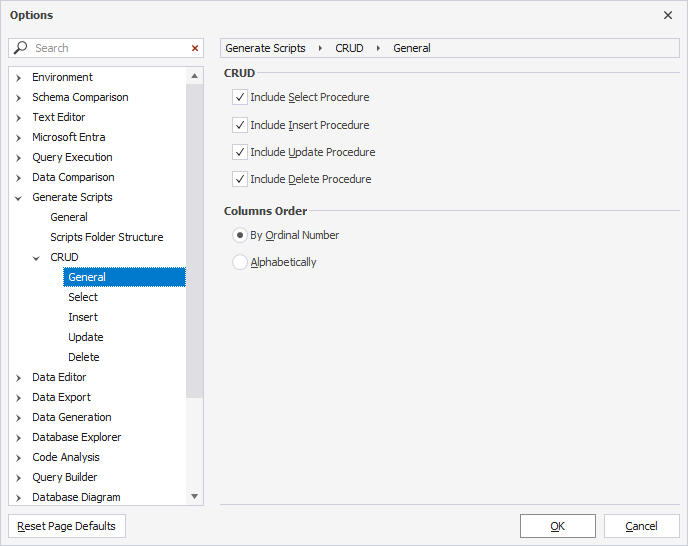
5. On the General page, configure the following options:
- Select the CRUD procedures you want to include in the script.
- Set the order of columns: By Ordinal Number (default) or Alphabetically.
By default, all options are selected.
Note
By default, stored procedure names are generated using the usp_TableName_Operation template.
6. To configure a SELECT procedure template, switch to Select.
The table describes the SELECT template placeholders.
| Placeholder | Description |
|---|---|
$table$ |
Specifies the name of the table for which you generate the CRUD procedures. |
$schema$ |
Specifies the schema name. |
$col.Name$ |
Specifies column names. |
$col.AsParameter$ |
Specifies the name of the procedure parameter converted from the column name. |
$col.Type$ |
Specifies the column data type. |
$col.WhereName$ |
Checks the column data type. If it’s geography or geometry, the STEquals($col.AsParameter$) method call is added. |
$col.WhereAsParameter$ |
Specifies the name of the table column to use as the procedure parameter name, or 1 if the column data type is geography or geometry. |
;format="id" |
Specifies the formatting for any name. If a name is already quoted, it is quoted again. For example, ‘id’ will be ‘‘id’’. |
$procedure$ |
Specifies the procedure name, for example, usp_$table$_Select. |
$parameters$ |
Defines the procedure parameters only for PRIMARY KEY columns. |
$columns$ |
Specifies the list of columns in $col.Name$ separated by , (comma). |
$where$ |
Determines the list of selection conditions, combined with the AND operator. If Return all data if input parameters are null is selected, the $col.WhereName$ = $col.WhereAsParameter$ OR $col.AsParameter$ IS NULL conditions are available only for PRIMARY KEY columns. Otherwise, $col.WhereName$ = $col.WhereAsParameter$ is available only for PRIMARY KEY columns. |
7. To configure an INSERT procedure template, switch to Insert.
The table describes the INSERT template placeholders.
| Placeholder | Description |
|---|---|
$table$ |
Specifies the name of the table for which you generate the CRUD procedures. |
$schema$ |
Specifies the schema name. |
$col.Name$ |
Specifies column names. |
$col.AsParameter$ |
Specifies a name of the procedure parameter converted from the column name. |
$col.Type$ |
Specifies the column data type. |
$col.WhereName$ |
Checks the column data type. If it’s geography or geometry, the STEquals($col.AsParameter$) method call is added. |
$col.WhereAsParameter$ |
Specifies the name of the table column to use as the procedure parameter name, or 1 if the column data type is geography or geometry. |
;format="id" |
Specifies the formatting for any name. If a name is already quoted, it is quoted again. For example, ‘id’ will be ‘‘id’’. |
$procedure$ |
Specifies the procedure name, for example, usp_$table$_Insert. |
$columns$ |
Specifies the list of columns, except AUTO INCREMENT (IDENTITY) and GENERATED ALWAYS. |
$parameters$ |
Specifies the procedure parameters for all columns. |
$values$ |
Specifies inserted data as $col.AsParameter$ separated by , (comma) for all columns, except AUTO INCREMENT (IDENTITY) and GENERATED ALWAYS. |
$where$ |
Determines the list of selection conditions, combined with the AND operator. If Return inserted row is selected and if the table has AUTO INCREMENT (IDENTITY) and GENERATED ALWAYS columns, the $col.Name$ = SCOPE_IDENTITY() condition is available only for AUTO INCREMENT (IDENTITY) columns. Otherwise, $col.WhereName$ = $col.WhereAsParameter$ is available for all the columns, except GENERATED ALWAYS. |
8. To configure an UPDATE procedure template, switch to Update.
The table describes the UPDATE template placeholders.
| Placeholder | Description |
|---|---|
$table$ |
Specifies the name of the table for which you generate the CRUD procedures. |
$schema$ |
Specifies the schema name. |
$col.Name$ |
Specifies column names. |
$col.AsParameter$ |
Specifies a name of the procedure parameter converted from the column name. |
$col.Type$ |
Specifies the column data type. |
$col.WhereName$ |
Checks the column data type. If it’s geography or geometry, the STEquals($col.AsParameter$) method call is added. |
$col.WhereAsParameter$ |
Specifies the name of the table column to use as the procedure parameter name, or 1 if the column data type is geography or geometry. |
;format="id" |
Specifies the formatting for any name. If a name is already quoted, it is quoted again. For example, ‘id’ will be ‘‘id’’. |
$procedure$ |
Specifies the procedure name, for example, usp_$table$_Update. |
$parameters$ |
Specifies the procedure parameters for all columns, except GENERATED ALWAYS. |
$columns$ |
Specifies the list of columns, except AUTO INCREMENT (IDENTITY) and GENERATED ALWAYS. |
$assignments$ |
Defines column assignments for the UPDATE statement in the format $col.WhereName$ = $col.WhereAsParameter$, combined with the AND operator and applied only to PRIMARY KEY columns. |
9. To configure a DELETE procedure template, switch to Delete.
The table describes the DELETE template placeholders.
| Placeholder | Description |
|---|---|
$table$ |
Specifies the name of the table for which you generate the CRUD procedures. |
$schema$ |
Specifies the schema name. |
$col.AsParameter$ |
Specifies a name of the procedure parameter converted from the column name. |
$col.Type$ |
Specifies the column data type. |
$col.WhereName$ |
Checks the column data type. If it’s geography or geometry, the STEquals($col.AsParameter$) method call is added. |
$col.WhereAsParameter$ |
Specifies the name of the table column to use as the procedure parameter name, or 1 if the column data type is geography or geometry. |
;format="id" |
Specifies the formatting for any name. If a name is already quoted, it is quoted again. For example, ‘id’ will be ‘‘id’’. |
$procedure$ |
Specifies the procedure name, for example, usp_$table$_Delete. |
$parameters$ |
Defines the procedure parameters only for PRIMARY KEY columns. |
$where$ |
Defines the WHERE conditions for rows to delete in the format $col.WhereName$ = $col.WhereAsParameter$, combined with the AND operator only for PRIMARY KEY columns. |
10. Click OK.
Search for options
You can search for options by entering text or symbols (such as a wildcard or underscore) in the search box. The list filters automatically to show only options that contain the search term.
The default search mode is case-insensitive. For example, entering de matches De, de, or DE. Matching text is highlighted, and the search bar shows the number of matches. Multiple words separated by spaces highlight matches for each term.
To clear the search, click  in the search box.
Keyboard shortcuts in the search box
The table describes the list of keyboard shortcuts you can use in the search box.
| Shortcut | Action |
|---|---|
| Ctrl+A | Selects all. |
| Ctrl+Left arrow key | Moves the caret to the beginning of the word. |
| Ctrl+Right arrow key | Moves the caret to the end of the word. |
| Ctrl+Shift+Left arrow key | Selects text from the current caret position to the beginning of the current word and moves the caret to the beginning of the word. |
| Ctrl+Shift+Right arrow key | Selects text from the current caret position to the end of the current word and moves the caret to the end of the word. |
| Ctrl+Backspace | Deletes the word to the left of the caret. |