Work with the New Database Object window
The New Database Object window lets you create database objects and DDL data sources, such as:
- Table
- View
- Synonym
- Table-valued, scalar, or aggregate functions
- Procedure
- Sequence
- DDL trigger
The window opens either an editor for a selected database object or a SQL document with a generated and context-appropriate SQL statement template. To proceed, you specify the required attributes, then apply the changes or execute the SQL statement to create the object in the database.
Open the New Database Object window
You can open the New Database Object window from Database Explorer or Database menu.
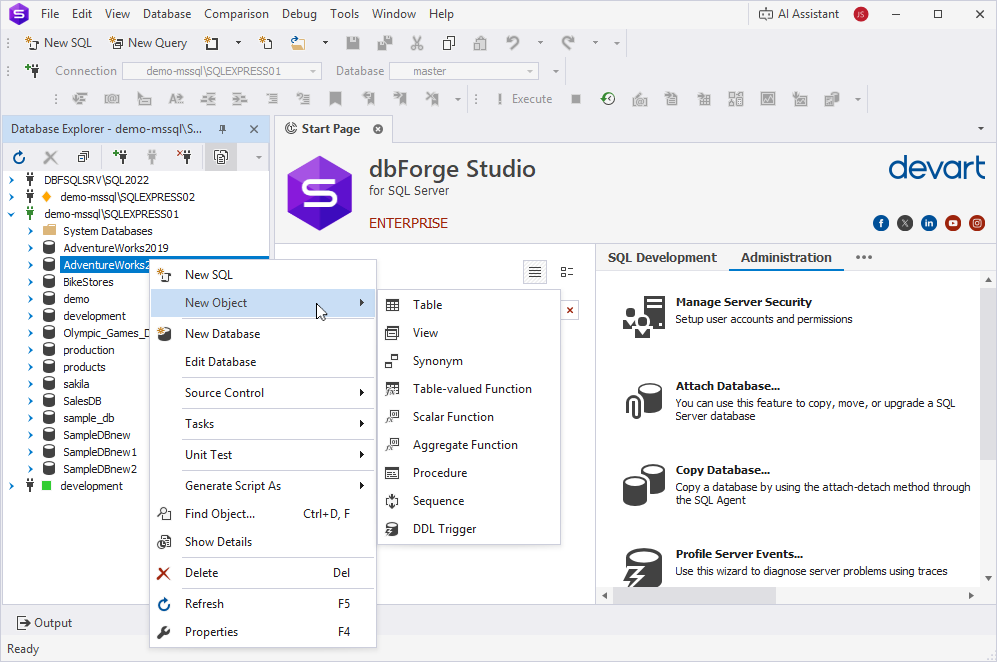
Method 1 - Open the window from Database Explorer
This method directly opens the editor for the required object.
To open the object editor:
1. In Database Explorer, right-click a database within which you want to create an object.
2. On the shortcut menu, select New Object > required object.
Method 2 - Open the window from the Database menu
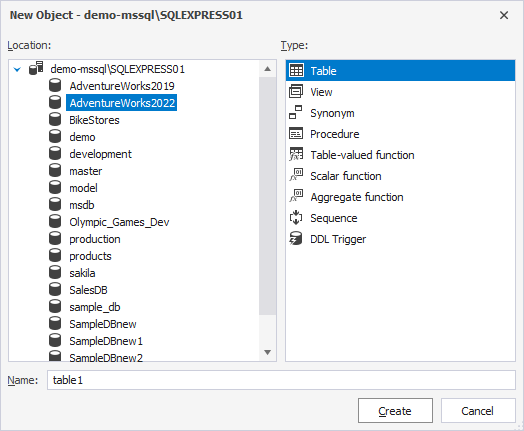
1. On the top menu, select Database > New Database Object.
2. In the New Object dialog, do the following:
- In Location, select the database where you want to create the object.
- In Type, select the object.
- In Name, specify the object name.
3. Click Create.
The editor for the selected object appears.
Database object editors
The table lists database object editors available in the New Database Object window.
| Name | Description |
|---|---|
| Table | Opens the Table Editor to create a table. |
| View | Opens the View Editor to create a view. |
| Synonym | Opens the SQL document with the CREATE SYNONYM statement template. |
| Table-valued Function | Opens the SQL document with the CREATE FUNCTION statement template. |
| Scalar Function | Opens the SQL document with the CREATE FUNCTION statement template. |
| Aggregate Function | Opens the SQL document with the CREATE AGGREGATE statement template. |
| Procedure | Opens the SQL document with the CREATE PROCEDURE statement template. |
| Sequence | Opens the SQL document with the CREATE SEQUENCE statement template. |
| DDL Trigger | Opens the SQL document with the CREATE TRIGGER statement template. |
Note
If you want to create an object that is unavailable in the list of predefined objects, open a new SQL document, enter a
CREATEstatement for the object using the code completion context-based prompts, then execute it.You can also use dbForge AI Assistant to create database objects and to get detailed explanations of queries.