Add or remove square brackets for identifiers
The Add or remove square brackets for identifiers feature enables you to add or remove square brackets for identifiers within the current SQL document or a selected code block, without changing their case. This feature doesn’t affect text in strings (' '), quotes (" "), or comments (--, /* */). It also doesn’t change the original identifier case.
Add square brackets to identifiers
You can add square brackets to all identifiers in one of these ways:
- In the top menu, select Edit > Advanced > Add Brackets to All Identifiers.
- Right-click anywhere in a SQL document and select Refactoring > Add Brackets to All Identifiers.
- Press Ctrl+K, Ctrl+[.
Tip
To undo the change, press Ctrl+Z. The script returns to its previous state, and the cursor position remains unchanged.
Remove square brackets from identifiers
You can remove unnecessary square brackets from all identifiers in one of these ways:
- In the top menu, select Edit > Advanced > Remove Unnecessary Brackets.
- Right-click anywhere in a SQL document and select Refactoring > Remove Unnecessary Brackets.
- Press Ctrl+K, Ctrl+].
Note
Remove Unnecessary Brackets doesn’t affect identifiers that:
- Contain spaces.
- Contain special symbols, for example,
@,$, or%.- Match the keywords, for example,
PRIMARY.
Example
The following script shows identifiers before brackets are added:
DECLARE @LastName NVARCHAR(50) = N'Smith';

EXEC sp_executesql N'SELECT FirstName, LastName
FROM Person.Person WHERE LastName = @LastName', N'@LastName NVARCHAR(50)', @LastName = @LastName;
GO
SELECT p.FirstName AS FName, p."LastName" AS LName
FROM Person.[Person] AS p WHERE p.LastName = 'Smith';

-- SELECT FirstName, LastName FROM Person.Person WHERE [LastName] = 'Smith';
/*
SELECT FirstName, LastName FROM Person.Person WHERE [LastName] = 'Smith';
*/
CREATE TABLE DEPT (DEPTNO INT NOT NULL PRIMARY KEY, DNAME VARCHAR(20)) ON [PRIMARY];
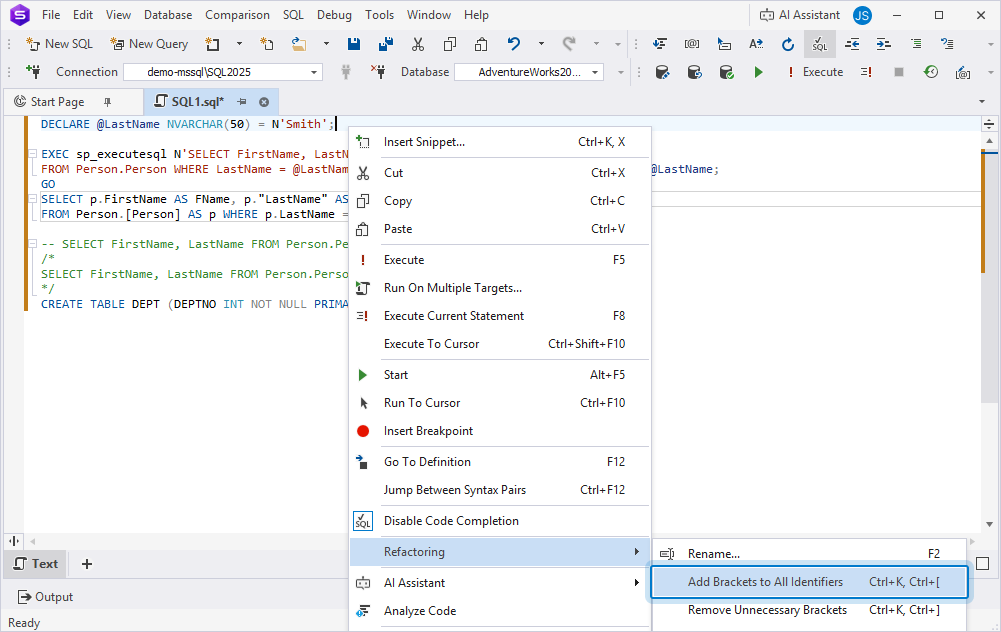
After you use Add Brackets to All Identifiers, all applicable identifiers are enclosed in square brackets automatically.
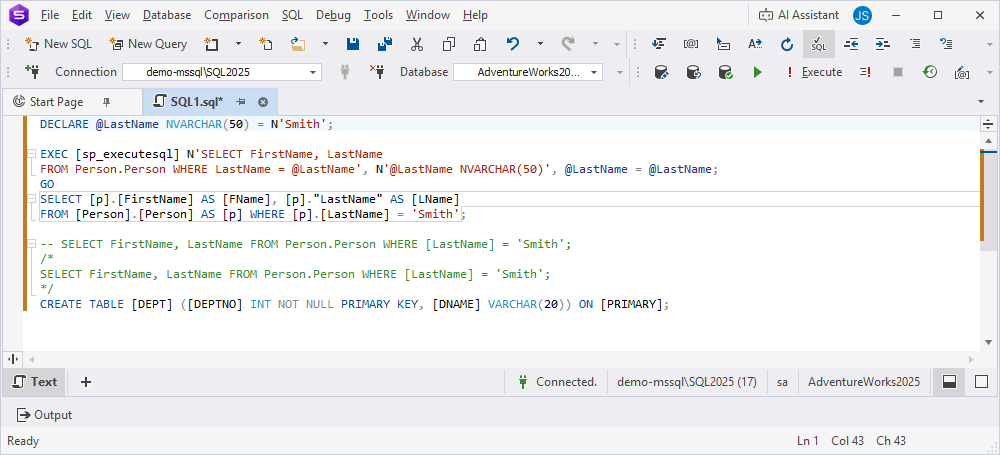
DECLARE @LastName NVARCHAR(50) = N'Smith';

EXEC [sp_executesql] N'SELECT FirstName, LastName
FROM Person.Person WHERE LastName = @LastName', N'@LastName NVARCHAR(50)', @LastName = @LastName;
GO
SELECT [p].[FirstName] AS [FName], [p]."LastName" AS [LName]
FROM [Person].[Person] AS [p] WHERE [p].[LastName] = 'Smith';

-- SELECT FirstName, LastName FROM Person.Person WHERE [LastName] = 'Smith';
/*
SELECT FirstName, LastName FROM Person.Person WHERE [LastName] = 'Smith';
*/
CREATE TABLE [DEPT] ([DEPTNO] INT NOT NULL PRIMARY KEY, [DNAME] VARCHAR(20)) ON [PRIMARY];