Compare tables with unrelated names using the CLI
During database migration, cross-system integration, and data warehouse consolidation, you may need to compare tables whose names don’t match. This scenario is common when a legacy system uses one naming convention and a new application uses another, or when different teams and vendors follow different naming standards.
When table names are unrelated, the comparison process becomes more complex. It increases the risk of matching or synchronizing the wrong tables and makes it harder to automate repeatable comparison workflows reliably.
This topic explains how to compare tables with unrelated names by using the dbForge Studio command-line interface and the TableDiff utility.
Tip
You can automate and schedule database comparison tasks from the command line.
Prerequisites
- dbForge Studio for SQL Server
- TableDiff utility (usually installed with SQL Server)
- Two SQL Server tables with unrelated names and different owners or schemas
Click to open the SQL script to create the sample tables
-- Drop and recreate SourceDB
IF DB_ID('Dev') IS NOT NULL DROP DATABASE Dev;
CREATE DATABASE Dev;
GO

USE Dev;
GO

-- Create source tables
CREATE TABLE EmployeeList (
    EmpID INT PRIMARY KEY,
    EmpName VARCHAR(50),
    DeptID INT,
    Salary MONEY,
    HireDate DATE
);
CREATE TABLE DepartmentList (
    DeptID INT PRIMARY KEY,
    DeptName VARCHAR(50),
    ManagerID INT,
    Location VARCHAR(100),
    Budget MONEY
);

-- Insert sample data into EmployeeList (20 rows)
INSERT INTO EmployeeList (EmpID, EmpName, DeptID, Salary, HireDate) VALUES
(1,  'Alice Harris',   1,  31000, '2010-01-16'),
(2,  'Alice Walker',   2,  32000, '2010-01-31'),
(3,  'Bob Anderson',   3,  33000, '2010-02-15'),
(4,  'Bob Hall',       4,  34000, '2010-03-02'),
(5,  'Chris Lewis',    5,  35000, '2010-03-17'),
(6,  'Chris Moore',    6,  36000, '2010-04-01'),
(7,  'Chris Perez',    7,  37000, '2010-04-16'),
(8,  'David Wright',   8,  38000, '2010-05-01'),
(9,  'Elena Allen',    9,  39000, '2010-05-16'),
(10, 'Elena Thompson',10,  40000, '2010-05-31'),
(11, 'Eve Perez',     11,  41000, '2010-06-15'),
(12, 'Eve Thompson',  12,  42000, '2010-06-30'),
(13, 'Fiona Lee',     13,  43000, '2010-07-15'),
(14, 'Frank Johnson', 14,  44000, '2010-07-30'),
(15, 'Frank Perez',   15,  45000, '2010-08-14'),
(16, 'Heidi Harris',  16,  46000, '2010-08-29'),
(17, 'Heidi Lee',     17,  47000, '2010-09-13'),
(18, 'Ivan Jackson',  18,  48000, '2010-09-28'),
(19, 'Ivan White',    19,  49000, '2010-10-13'),
(20, 'Leo Wilson',    20,  50000, '2010-10-28');

-- Insert sample data into DepartmentList (20 rows)
INSERT INTO DepartmentList (DeptID, DeptName, ManagerID, Location, Budget) VALUES
(1,  'Sales',             10, 'New York',     10000),
(2,  'HR',                20, 'Los Angeles',  20000),
(3,  'IT',                30, 'Chicago',      30000),
(4,  'Marketing',         40, 'Houston',      40000),
(5,  'Finance',           50, 'Phoenix',      50000),
(6,  'Legal',             60, 'Philadelphia', 60000),
(7,  'Operations',        70, 'San Antonio',  70000),
(8,  'Logistics',         80, 'San Diego',    80000),
(9,  'Procurement',       90, 'Dallas',       90000),
(10, 'R&D',              100, 'San Jose',    100000),
(11, 'Customer Service', 110, 'Austin',      110000),
(12, 'Security',         120, 'Jacksonville',120000),
(13, 'Admin',            130, 'San Francisco',130000),
(14, 'Quality',          140, 'Columbus',    140000),
(15, 'Engineering',      150, 'Fort Worth',  150000),
(16, 'Distribution',     160, 'Indianapolis',160000),
(17, 'Development',      170, 'Charlotte',   170000),
(18, 'Support',          180, 'Seattle',     180000),
(19, 'Public Relations', 190, 'Denver',      190000),
(20, 'Accounts',         200, 'Washington',  200000);


-- Drop and recreate TargetDB
IF DB_ID('Prod') IS NOT NULL DROP DATABASE Prod;
CREATE DATABASE Prod;
GO

USE Prod;
GO

CREATE SCHEMA Dept;
GO

-- Create target tables
CREATE TABLE Dept.Staff (
    StaffID INT PRIMARY KEY,
    FullName CHAR(50),
    DeptID BIGINT,
    AnnualSalary MONEY,
    StartDate DATE,
    Email VARCHAR(100)
);
CREATE TABLE Dept.Department (
    DepartmentID INT PRIMARY KEY,
    DeptName CHAR(50),
    ManagerStaffID INT,
    CityName VARCHAR(100),
    BudgetSum DECIMAL,
    CreatedDate DATE
);

-- Insert sample data into Dept.Staff (20 rows)
INSERT INTO Dept.Staff (StaffID, FullName, DeptID, AnnualSalary, StartDate, Email) VALUES
(11, 'Eve Perez',      11, 41000, '2010-06-15', '[email protected]'),
(12, 'Eve Thompson',   12, 42000, '2010-06-30', '[email protected]'),
(13, 'Fiona Lee',      13, 43000, '2010-07-15', '[email protected]'),
(14, 'Frank Johnson',  14, 44000, '2010-07-30', '[email protected]'),
(15, 'Frank Perez',    15, 45000, '2010-08-14', '[email protected]'),
(16, 'Heidi Harris',   16, 51000, '2010-09-03', '[email protected]'),
(17, 'Heidi Lee',      17, 52000, '2010-09-18', '[email protected]'),
(18, 'Ivan Jackson',   18, 53000, '2010-10-03', '[email protected]'),
(19, 'Ivan White',     19, 54000, '2010-10-18', '[email protected]'),
(20, 'Leo Wilson',     20, 55000, '2010-11-02', '[email protected]'),
(21, 'Mallory Johnson',21, 51000, '2011-07-30', '[email protected]'),
(22, 'Mike King',      22, 52000, '2011-08-09', '[email protected]'),
(23, 'Mona Anderson',  23, 53000, '2011-08-19', '[email protected]'),
(24, 'Nina King',      24, 54000, '2011-08-29', '[email protected]'),
(25, 'Peggy Martin',   25, 55000, '2011-09-08', '[email protected]'),
(26, 'Peggy Moore',    26, 56000, '2011-09-18', '[email protected]'),
(27, 'Uma Allen',      27, 57000, '2011-09-28', '[email protected]'),
(28, 'Victor Brown',   28, 58000, '2011-10-08', '[email protected]'),
(29, 'Yanni Wright',   29, 59000, '2011-10-18', '[email protected]'),
(30, 'Zara King',      30, 60000, '2011-10-28', '[email protected]');

-- Insert sample data into Dept.Department (20 rows)
INSERT INTO Dept.Department (DepartmentID, DeptName, ManagerStaffID, CityName, BudgetSum, CreatedDate) VALUES
(11, 'Customer Service', 110, 'Austin',         110000, '2020-01-12'),
(12, 'Security',         120, 'Jacksonville',   120000, '2020-01-13'),
(13, 'Admin',            130, 'San Francisco',  130000, '2020-01-14'),
(14, 'Quality',          140, 'Columbus',       140000, '2020-01-15'),
(15, 'Engineering',      150, 'Fort Worth',     150000, '2020-01-16'),
(16, 'Distribution Services',160, 'Indianapolis Downtown', 180000, '2020-01-17'),
(17, 'Dev & Research',   170, 'Charlotte Branch', 170000, '2020-01-18'),
(18, 'Tech Support',     180, 'Seattle Office', 200000, '2020-01-19'),
(19, 'PR & Marketing',   190, 'Denver Office',  195000, '2020-01-20'),
(20, 'Accounting Dept',  200, 'Washington D.C.',210000, '2020-01-21'),
(21, 'Retail',           210, 'Baltimore',      210000, '2020-01-22'),
(22, 'Wholesale',        220, 'Portland',       220000, '2020-01-23'),
(23, 'Manufacturing',    230, 'Nashville',      230000, '2020-01-24'),
(24, 'Design',           240, 'Corpus Christi', 240000, '2020-01-25'),
(25, 'Maintenance',      250, 'Raleigh',        250000, '2020-01-26'),
(26, 'Security Ops',     260, 'Tulsa',          260000, '2020-01-27'),
(27, 'Recruitment',      270, 'Wichita',        270000, '2020-01-28'),
(28, 'Training',         280, 'Cleveland',      280000, '2020-01-29'),
(29, 'Compliance',       290, 'Tampa',          290000, '2020-01-30'),
(30, 'Facilities',       300, 'Aurora',         300000, '2020-01-31');
Compare tables using TableDiff
1. Open Command Prompt.
2. Navigate to the folder where the TableDiff utility is located.
cd "C:\Program Files\Microsoft SQL Server\150\COM"
3. Run the table comparison.
tablediff ^
  -sourceserver "your_source_server_name\your_source_instance_name" ^
  -sourcedatabase "your_source_database_name" ^
  -sourcetable "your_source_table_name" ^
  -sourceschema "your_source_schema_name" ^
  -destinationserver "your_destination_server_name\your_destination_instance_name" ^
  -destinationdatabase "your_destination_database_name" ^
  -destinationtable "your_destination_table_name" ^
  -destinationschema "your_destination_schema_name" ^
  -f "C:\Path\To\Your_Diff_Script.sql"
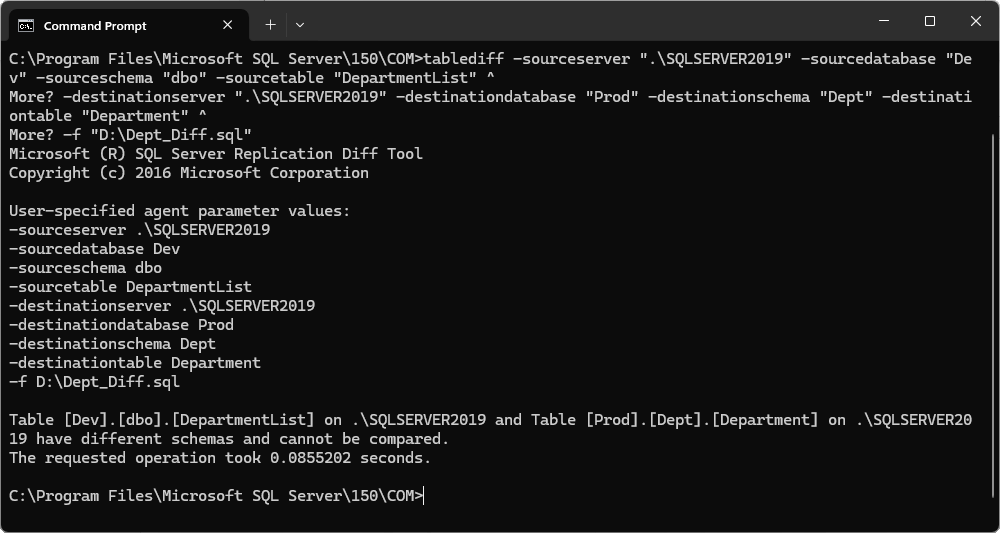
The operation returns an error because the table schemas don’t match.
TableDiff limitations
TableDiff is a useful utility for comparing database tables, but it has several limitations.
| Limitation | Description |
|---|---|
| Identical table structures required | TableDiff compares data only when the source and destination tables have identical structures, including column names, data types, and column order. Structural differences can cause the comparison to fail. |
| Views are not supported | TableDiff doesn’t compare views. It works with tables only. |
| Column mismatches | Missing columns or columns with differences are reported as discrepancies. |
| Limited support for some data types | Complex data types, such as large object (LOB) types or user-defined types, may not be fully supported and can cause errors. |
| Primary key or index mismatches | Differences in primary keys or indexes are not fully supported. |
| Data comparison restrictions | Data comparison is only available when the table structures are identical. |
Workaround for table name and structure mismatches
A common workaround for TableDiff limitations is to create a temporary table with the required schema in the destination database:
1. Identify the structural differences between the two tables.
SELECT
    ISNULL(d.COLUMN_NAME, p.COLUMN_NAME) AS ColumnName,
    d.DATA_TYPE AS DevDataType,
    d.CHARACTER_MAXIMUM_LENGTH AS DevMaxLength,
    p.DATA_TYPE AS ProdDataType,
    p.CHARACTER_MAXIMUM_LENGTH AS ProdMaxLength,
    CASE
        WHEN d.COLUMN_NAME IS NULL THEN 'Missing in Dev'
        WHEN p.COLUMN_NAME IS NULL THEN 'Missing in Prod'
        WHEN d.DATA_TYPE <> p.DATA_TYPE OR ISNULL(d.CHARACTER_MAXIMUM_LENGTH,-1) <> ISNULL(p.CHARACTER_MAXIMUM_LENGTH,-1)
        THEN 'Mismatch'
        ELSE 'Match'
    END AS Difference
FROM Dev.INFORMATION_SCHEMA.COLUMNS d
FULL OUTER JOIN Prod.INFORMATION_SCHEMA.COLUMNS p
    ON d.COLUMN_NAME = p.COLUMN_NAME
WHERE (d.TABLE_NAME = 'DepartmentList' OR d.TABLE_NAME IS NULL)
  AND (p.TABLE_NAME = 'Department' OR p.TABLE_NAME IS NULL)
ORDER BY ColumnName;
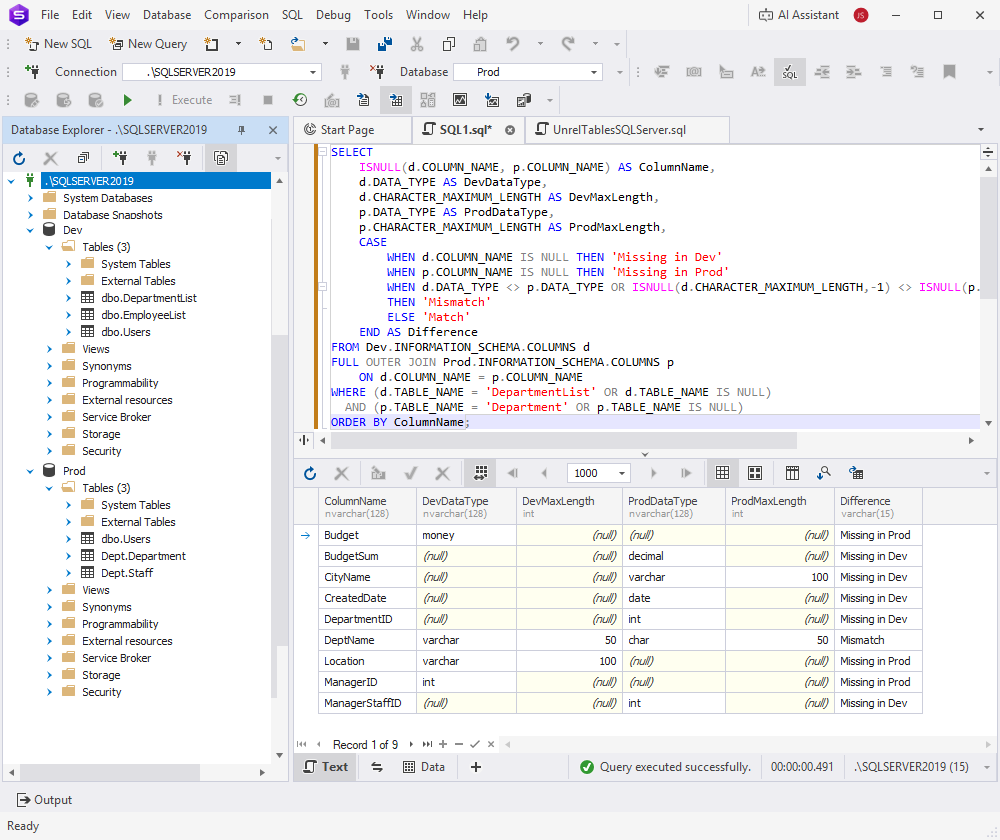
The query uses a FULL OUTER JOIN to return all columns from both tables, compare their data types and maximum lengths, and show the result in the Difference column. This column indicates whether the values match (Match), differ (Mismatch), or exist in only one table (Missing in Dev / Missing in Prod).
2. Create a new temporary table with the same schema as the source table, rename columns to match the source table, and change any mismatched data types so that they match the source schema.
USE Prod;
DROP TABLE IF EXISTS dbo.Temp_DepartmentList;

SELECT
    DepartmentID AS DeptID,
    CAST(DeptName AS varchar(50)) AS DeptName,
    ManagerStaffID AS ManagerID,
    CityName AS Location,
    CAST(BudgetSum AS money) AS Budget
INTO Prod.dbo.Temp_DepartmentList
FROM Prod.Dept.Department;
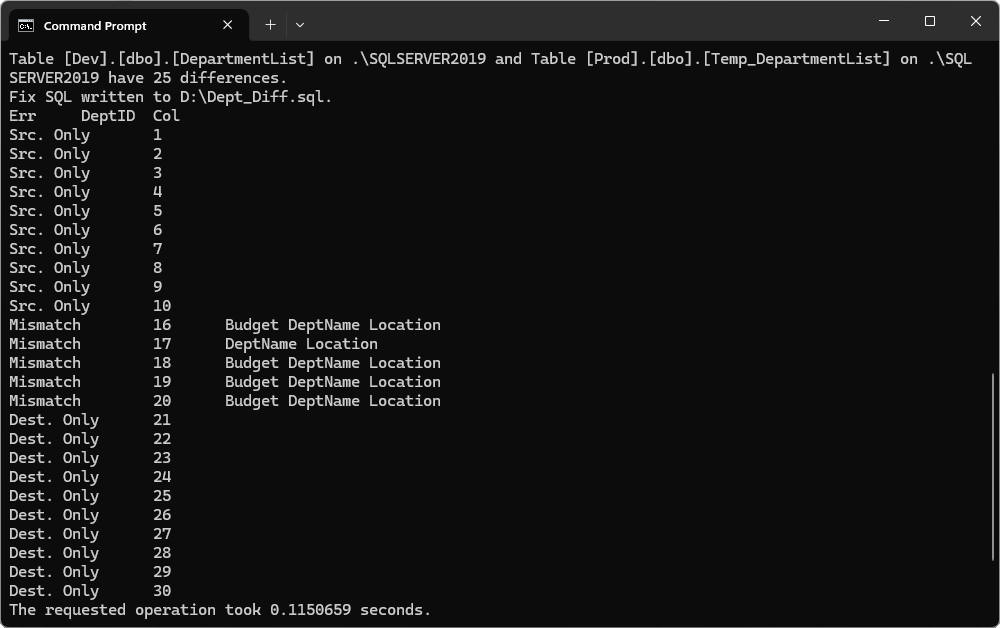
3. Compare the temporary table with the source table using TableDiff.
Compare tables with unrelated names using dbForge Studio for SQL Server
1. In the top menu, select Comparison > New Data Comparison.
2. On the Source and Target page, configure the connection details, then click Next.
3. Under Source, select the source connection and database.
4. Under Target, select the target connection and database.
5. On the Options page, configure the comparison options, then click Next.
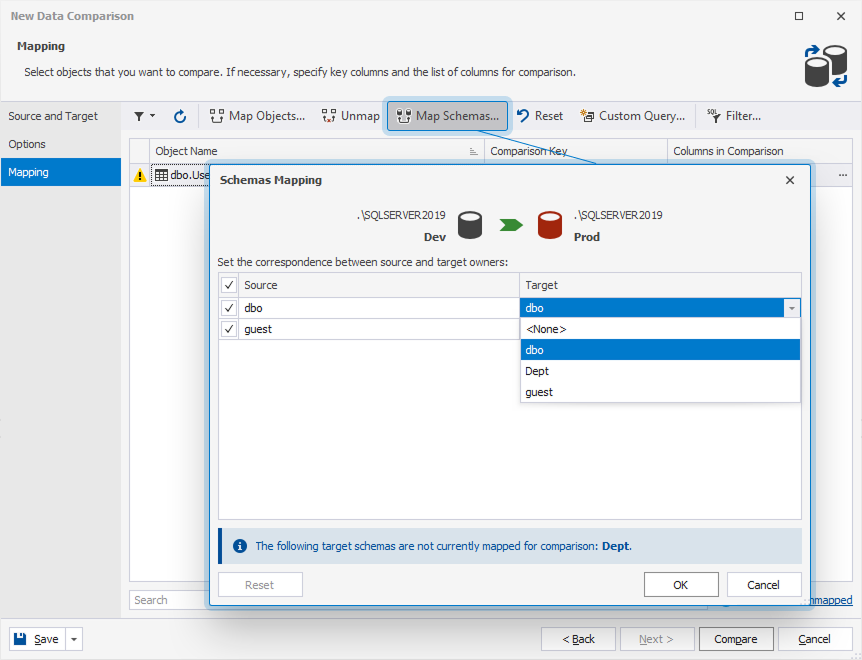
6. On the Mapping page, click Map Schemas.
7. Under Source and Target, select schemas to be mapped for comparison, then click OK.
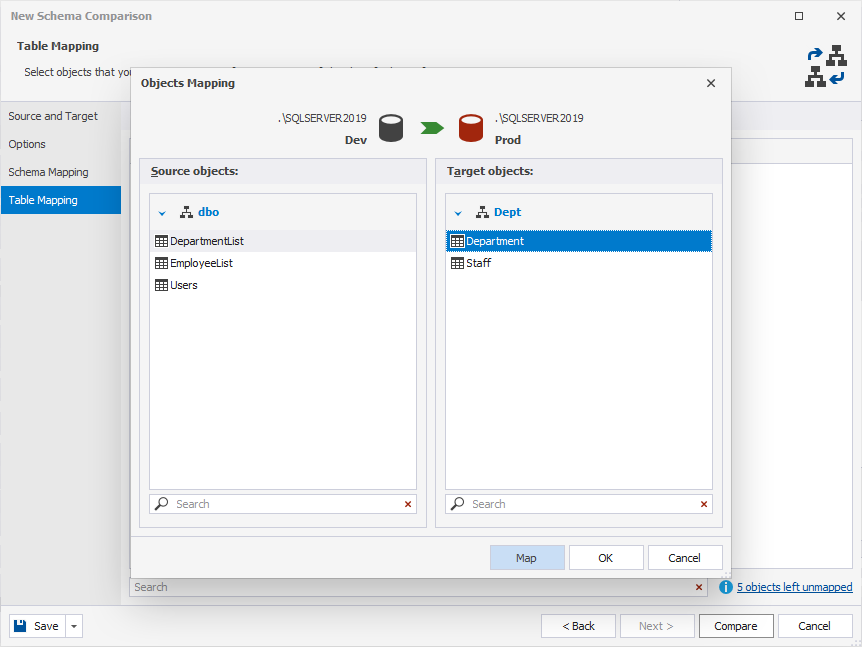
8. Click Map Objects.
9. Under Source objects, select the source table.
10. Under Target objects, select the target table.
11. Click Map, then click OK.
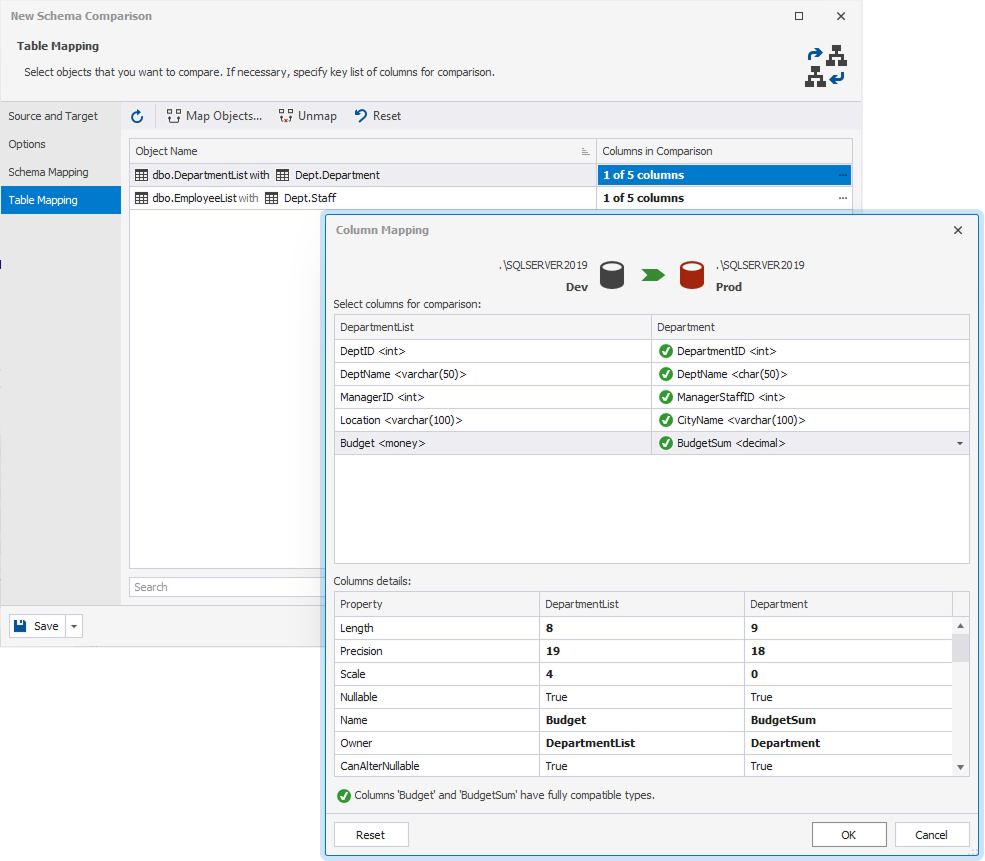
12. In Columns in Comparison column, double-click the field that shows the number of mapped columns, then click Close.
13. In the Column Mapping dialog, select the columns to map, then click OK.
14. In Save, select Save Document.
15. Enter the path where you want to save the data comparison settings file, then click Save.
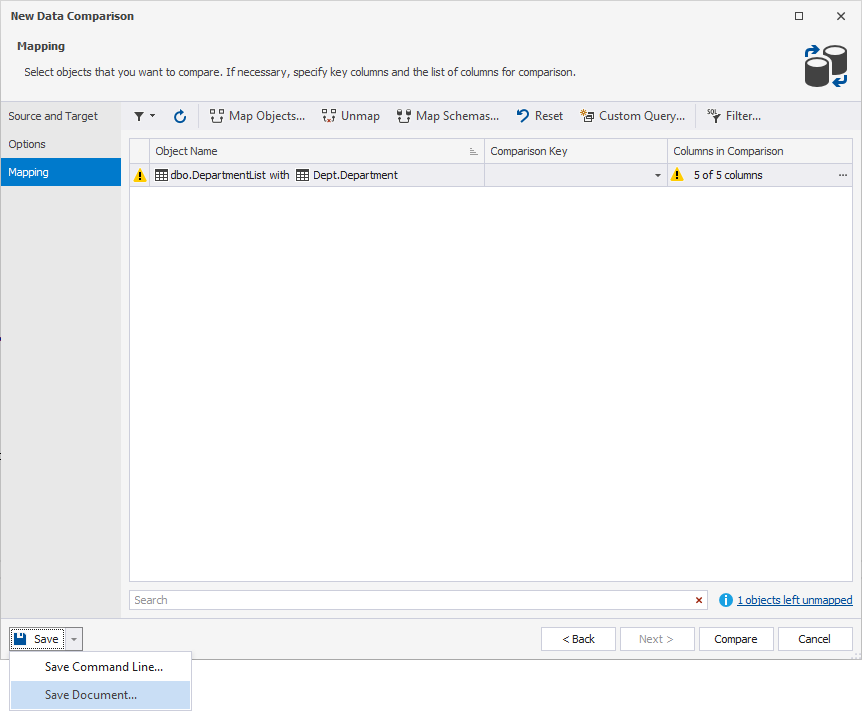
16. In Save, select Save Command Line.
17. Select Comparison Project.
18. Enter the path where you want to save the data comparison settings file.
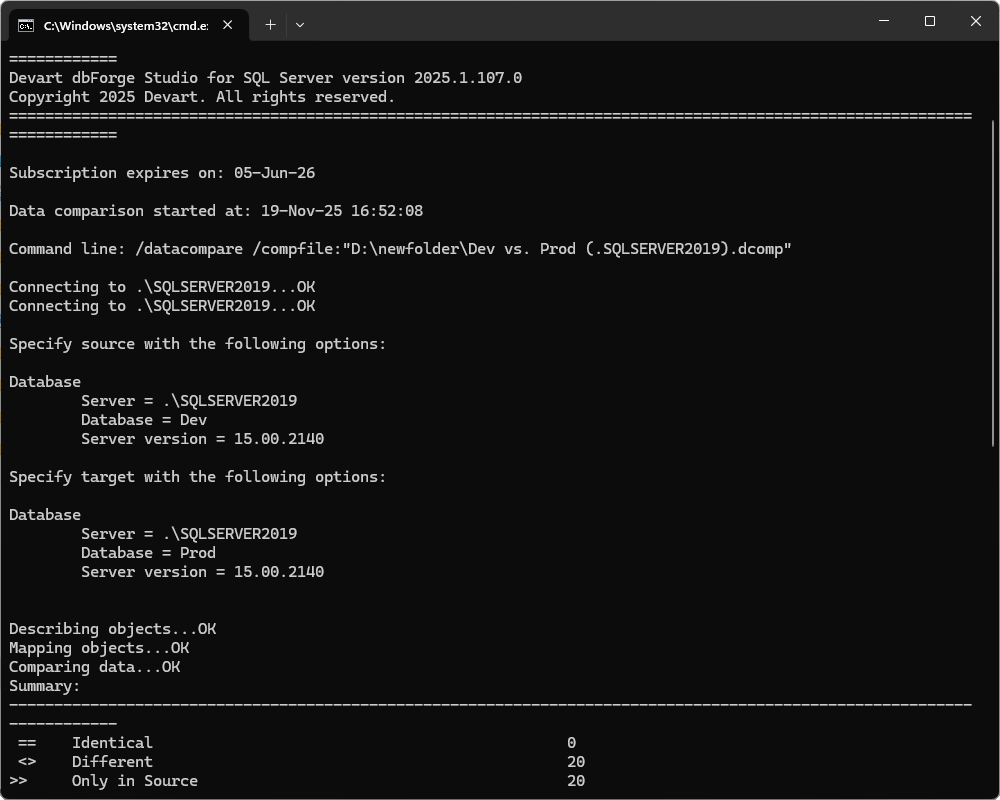
19. In the command-line wizard, remove the /sync switch if you only want to compare tables, and add pause.
20. Click Save, enter the file name and location, then click Save.
21. Run the saved .bat file.
dbForge Studio vs. TableDiff
| Feature / Capability | TableDiff | dbForge Studio for SQL Server |
|---|---|---|
| Primary purpose | A command-line utility for comparing table data and schema in SQL Server. | A full-featured IDE for SQL Server development, administration, database management, and schema and data comparison. |
| Scope of comparison | Limited to comparing two individual tables at a time, with matching or very similar structures. | Supports comparison and synchronization across schemas and databases, including multiple object types such as tables, views, and routines, with visual mapping. |
| User interface | Command-line only (no GUI); requires manual scripting and parameter configuration. | Graphical user interface with visual designers, wizards, editors, and mapping tools, along with a command-line interface for scripted workflows. |
| Handling of structural differences | Limited support. The tables must have the same columns and compatible data types. Schema mismatches can cause failure. | Supports object and column mapping, handles schema differences, and provides more flexible data and schema comparison. |
| Automation and recurring workflows | Supports batch automation, but each comparison requires full parameters. Supports only limited object sets. | Supports extensive automation through saved projects, command-line execution, scheduling, and DevOps integration. |
| Additional capabilities beyond comparison | Limited to table comparison and synchronization. | Includes SQL coding, debugging, source control, data import and export, monitoring, reporting, and data generation. |
| Ease of use for complex scenarios | Challenging for complex scenarios and may require workarounds, such as temporary tables or manual alignment. | Built for complex scenarios, with support for mapping tables with unrelated names, managing schema differences, and using visual tools to simplify the process. |
| Support and modern UI/UX | An older tool with a minimal interface and limited signs of ongoing modernization. | A modern IDE with frequent updates, a rich interface, and strong user reviews. |