Work with stamps on a diagram
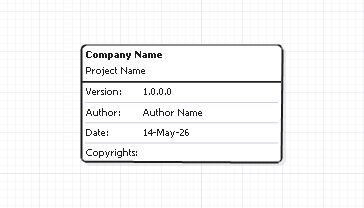
You can use stamps to add metadata, such as author, company, version, copyright information, project name, and date. You can add an unlimited number of stamps.
Add a stamp
You can add a stamp in one of these ways:
-
Right-click a diagram and select New > Stamp.
-
On the Database Diagram toolbar, click
 , then click the diagram to insert the stamp.
Edit a stamp
To edit a stamp, double-click the stamp and update its details.
Remove a stamp from the diagram
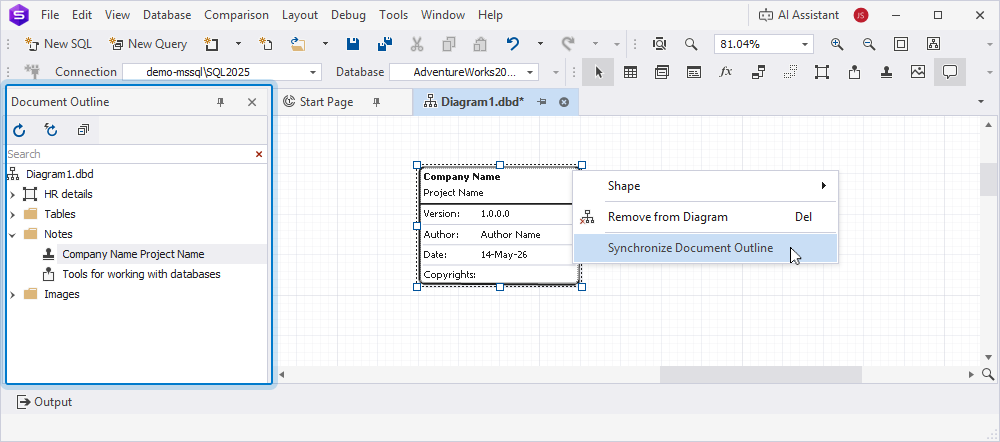
To remove a stamp from the diagram, right-click it and select Remove from Diagram. Alternatively, select the stamp and press Delete.
Adjust the stamp shape
To adjust the stamp shape, right-click a stamp, select Shape, then select one of the following options:
- Bring to Front – Moves a stamp in front of overlapping objects.
- Send to Back – Moves a stamp behind overlapping objects.
- Align to Grid – Aligns a stamp with the background grid.
- Best Fit – Adjusts the zoom level, so all objects fit within the stamp.
Resize a stamp
To resize a stamp, select it and use the vertical and horizontal resize handles.
Synchronize a stamp with Document Outline
To display the newly created stamp in Document Outline, right-click the stamp and select Synchronize Document Outline.