Add a Perforce repository
You can link a database to a Perforce repository and compare its revision with other data sources.
Add a Perforce repository to schema compare
1. In the New Schema Comparison wizard, select Source Control as the source or target type.
2. In Repository, click  .
.
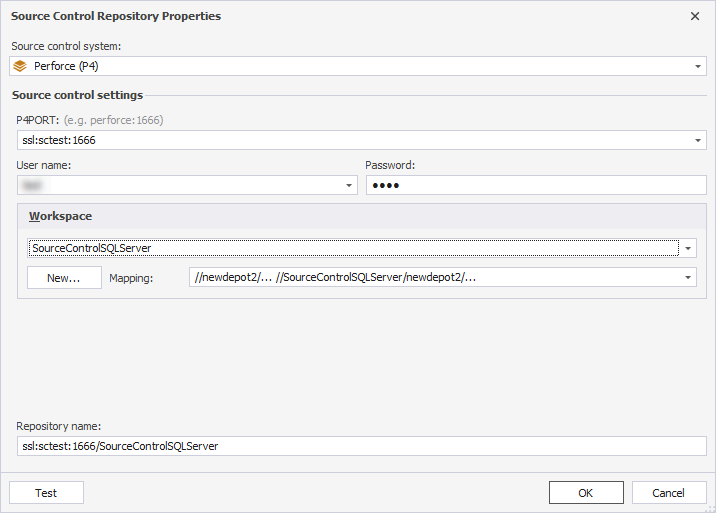
3. In the Source Control Repository Properties dialog, enter the repository settings:
3.1. In Source control system, select Perforce (P4).
3.2. In P4PORT, enter the port.
3.3. In User name, enter the username.
3.4. In Password, enter the password.
3.5. In Workspace, either create a new workspace or select an existing one.
By default, the repository name is set automatically based on the selected workspace. To use a different name, enter it manually.
Note
dbForge Source Control requires a dedicated workspace for each linked database. Don’t use the same workspace in other applications.
4. Optional: Click Test to verify the connection settings.
5. Click OK to save the settings and close the dialog.
Create a new workspace
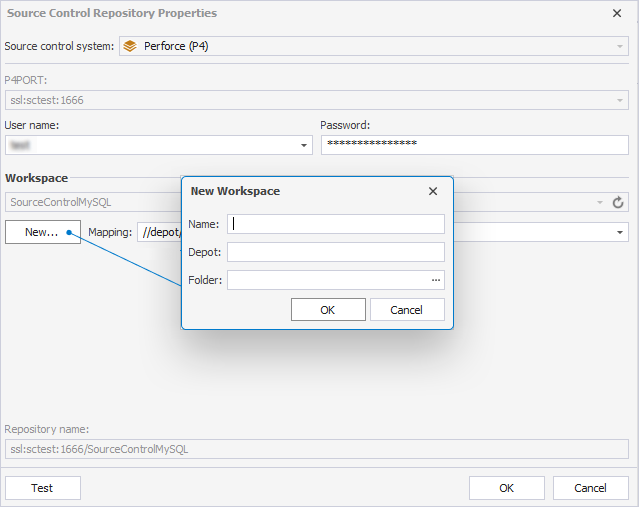
1. Under Workspace, click New.
2. In the New Workspace dialog, fill out the following fields:
2.1. In Name, specify a new workspace name.
2.2. In Depot, select an existing depot.
2.3. In Folder, enter the path to the folder with database scripts, or click the ellipsis (…) to select or create a folder.
Warning
If Folder is left empty, the entire depot specified in Mapping is treated as a database scripts folder. In this case, scripts are saved to an internal Devart folder.
3. Click OK.
Select an existing workspace
1. In the Source Control Repository Properties dialog, under Workspace, select a workspace from the list.
The workspace specifies the local folder where dbForge Studio stores the database scripts.
2. Optional: In Mapping, select a depot mapping.
Mapping specifies the depot and remote folder used by dbForge Studio.
Note
Reusing an existing workspace is not recommended, as it may cause conflicts with other applications or links.
To ensure proper functionality of dbForge Source Control, all team members must use the same settings for P4PORT, Depot, and Folder.