Compare objects with formatting differences
dbForge Studio for SQL Server detects differences in both object definitions and SQL script formatting.
When comparing database objects such as procedures, views, triggers, and functions, the Studio applies the active formatting profile to the SQL code. Formatting affects only how scripts appear in Text Compare and does not modify the database objects.
To prevent Text Compare from displaying differences caused only by formatting, use the Format Database Object Script option. This option is controlled by the Format Database Object Script button on the Text Compare toolbar. You can turn it on or off as needed.
Note
If the source and target objects differ only in formatting, they are shown in the Identical section of the Schema Comparison document and are excluded from the deployment script.
Enable the Format Database Object Script in Text Compare option
1. In the top menu, select Tools > Options.
2. Navigate to Schema Comparison > General.
3. Select Format Database Object Script in Text Compare.
4. Click OK to save the changes.
Note
Enabling the Format Database Object Script option applies only to new comparisons. It does not affect the current comparison.
Example: Compare objects with formatting differences
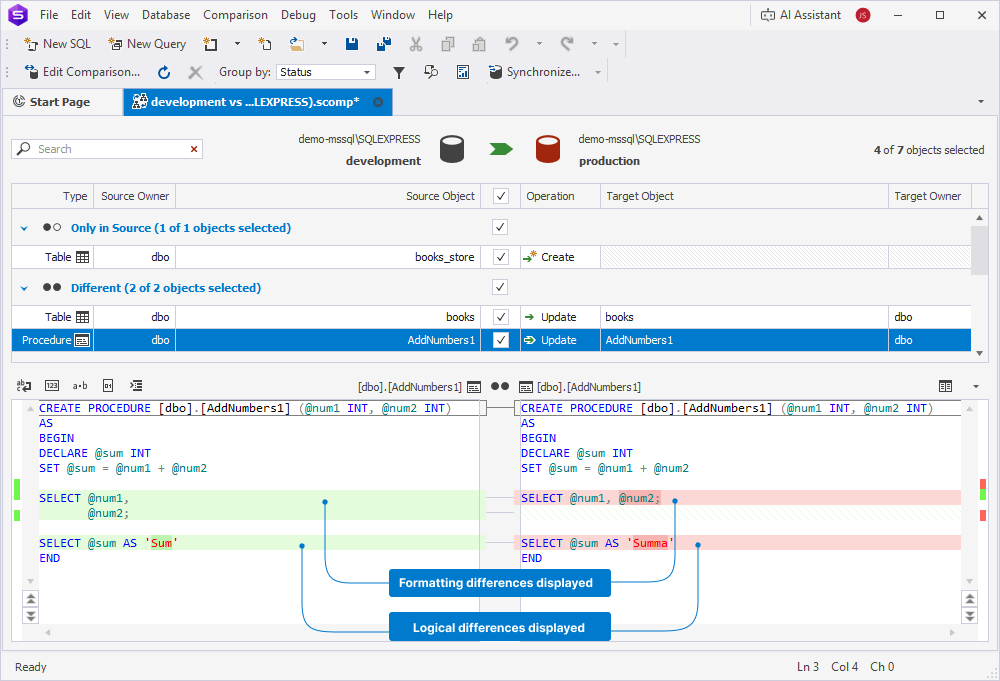
In this example, a procedure exists in both the development and production databases. The procedures differ in both formatting and logic:
- The development version uses the alias Sum.
- The production version uses the alias Summa.
Development
GO
CREATE PROCEDURE dbo.AddNumbers1 (@num1 INT, @num2 INT)
AS
BEGIN
DECLARE @sum INT
SET @sum = @num1 + @num2

SELECT @num1,
       @num2;

SELECT @sum AS 'Sum'
END
GO
Production
GO
CREATE PROCEDURE dbo.AddNumbers1 (@num1 INT, @num2 INT)
AS
BEGIN
DECLARE @sum INT
SET @sum = @num1 + @num2

SELECT @num1, @num2;

SELECT @sum AS 'Summa'
END
GO
Now, run the schema comparison.
The Schema Comparison document opens, displaying the results. The procedure appears in the Different section because of the DDL differences.
Disable Format Database Object Script
When you disable  on the Text Compare toolbar, the tool highlights both formatting differences and logical differences in the procedure code.
Enable Format Database Object Script
If you enable , the tool reformats both source and target scripts before comparison. Text Compare highlights only the logical differences—in this case, the different column aliases.
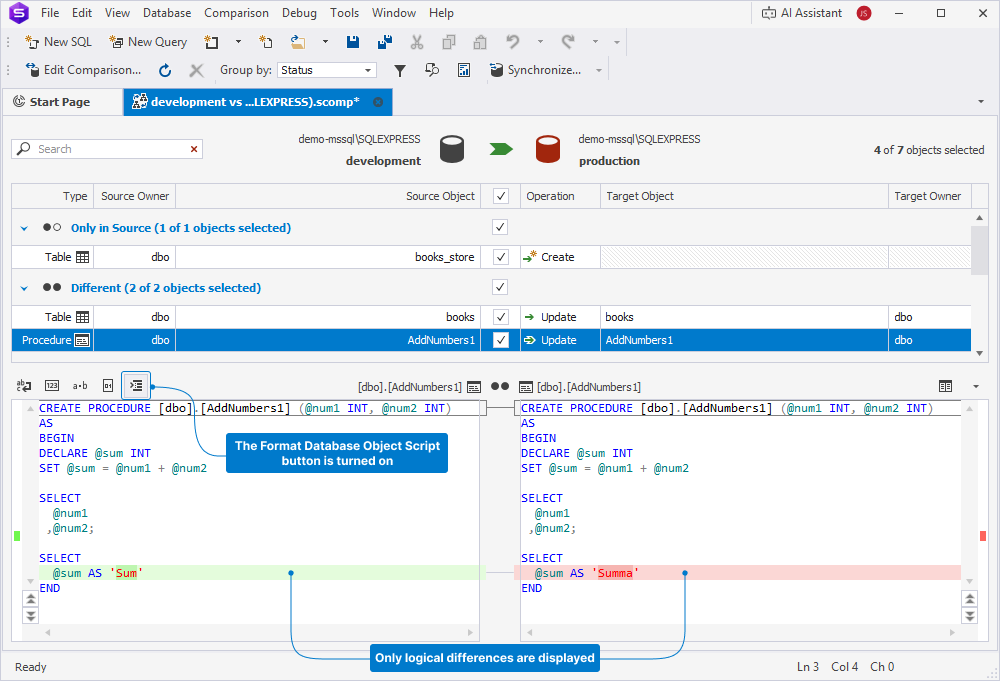
The Format Database Object Script in Text Compare option ensures that dbForge Studio for SQL Server displays only logical differences in object definitions while ignoring formatting discrepancies.