Review the action plan and warnings
You can review the action plan of your synchronization and the list of warnings that can affect the synchronization on the Summary page of the Schema Synchronization Wizard.
Open the Schema Synchronization Wizard
Open the Schema Synchronization Wizard in one of these ways:
-
At the top of the Schema Comparison document, click
 .
. -
Right-click the Schema Comparison grid and select Synchronize.
-
Press F8.
-
On the Comparison toolbar, click Synchronize.

Action plan
On the Action Plan tab, you can view synchronization actions in the order they are to be performed. The action plan is organized in collapsible categories.
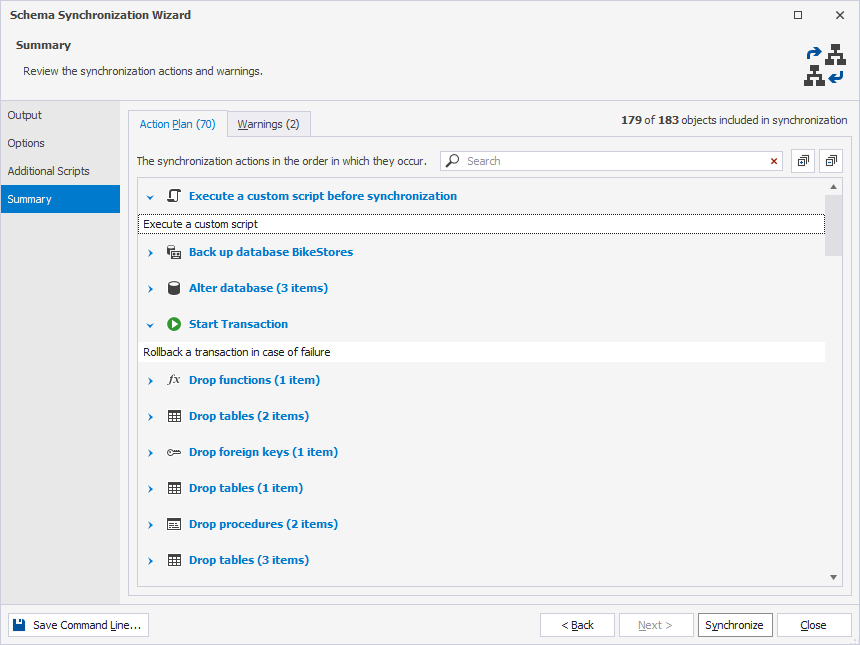
Expand the action plan
You can expand all sections in the action plan in one of these ways:
-
Right-click the action plan and select Expand all.
-
In the upper-right corner of the page, click
 .
.
Collapse the action plan
You can collapse all sections in the action plan in one of these ways:
-
Right-click the action plan and select Collapse all.
-
In the upper-right corner of the page, click
 .
.
Search for actions
You can search for specific actions by entering text or symbols, such as a wildcard or underscore, in the search box. The list filters automatically to show only actions that contain the search term.
The default search mode is case-insensitive. For example, entering alter matches Alter, alter, or ALTER. Matching text is highlighted, and the search bar shows the number of matches. Multiple words separated by spaces highlight matches for each term.
To clear the search, click  in the search box.
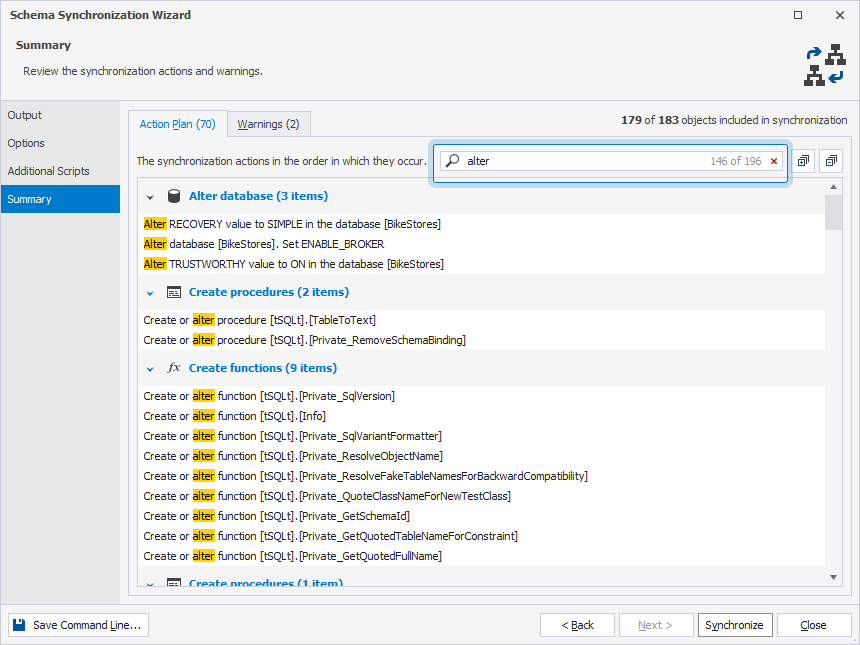
Warnings
On the Warnings tab, you can view the list of warnings that can affect the synchronization.
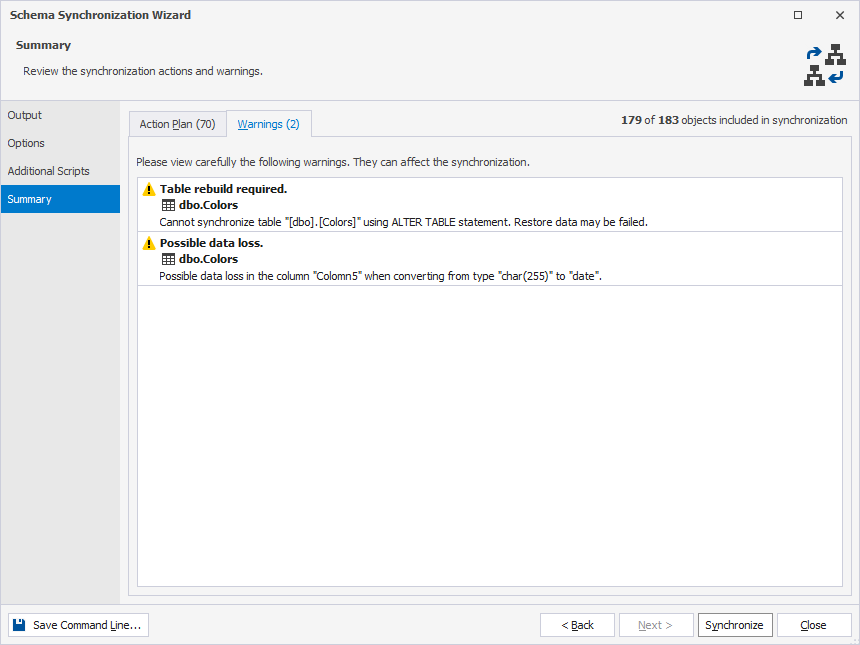
Synchronization warnings
Below is a list of all synchronization warnings provided by dbForge Studio.
Warnings-related to dropping or creating symmetric and asymmetric keys
- Input asymmetric key password.
- The asymmetric key “X” will be created. Input the password for the asymmetric key instead of the default password.
- The asymmetric key “X” will be dropped. All data that were encrypted by this key may not be decrypted any longer.
- The asymmetric key will be dropped.
- Input symmetric key password.
- The symmetric key “X” will be created. Input the password for the symmetric key instead of the default password.
- The symmetric key “X” will be dropped. All data that were encrypted by this key may not be decrypted any longer.
- The symmetric key will be dropped.
Table synchronization-related warnings
- Cannot synchronize table “X” using the
ALTER TABLEstatement.
Warnings-related to certificates
- Input key file path and password for it.
- A private key will be assigned to the certificate “X”. Input the private key file path and password for it instead of the default password.
- Input certificate password.
- The certificate “X” will be created. Input the password for the certificate instead of the default password.
- The certificate “X” will be dropped. All data that were encrypted by this certificate may not be decrypted any longer.
- The certificate will be dropped.
Change compatibility level warnings
- Change compatibility level.
- Some errors may occur during synchronization, as compatibility level “X” is not supported by a target server. The compatibility level will be set to “Y” during synchronization.
CHANGE_TRACKING property-related warnings
- The
CHANGE_TRACKINGproperty of the source table “X” will be ignored becauseCHANGE_TRACKINGis set toOFFfor the target database and the Compare Database Properties option is turned off.
Warnings-related to the Create User command
- Create user.
- The user “X” will be created. Make sure that the appropriate login exists.
- The user “X” will be created. Make sure that the appropriate Windows user or group exists.
Database master key warnings
- A password encryption will be added to the database master key. Please specify the password instead of the default one.
- The database master key will be opened. Please specify the password to open the database master key instead of the default one.
- Input database master key password.
Statistics-related warnings
The statistics “X” will be created with default options. Please verify the script.
Warnings-related to adding NOT NULL constraint
- Adding
NOT NULLconstraint. - Adding
NOT NULLconstraint may fail if the table is not empty. NOT NULLconstraint will not be set.
Encrypted object-related warnings
- Enable the encryption option.
- The database encryption option will be enabled. Make sure that the encryption key exists in the database.
- Cannot decrypt the object.
- The X “Y” cannot be decrypted. Consequently, they cannot be compared and synchronized.
Warnings-related to filegroups
- Non-standard filegroups.
- Make sure that corresponding filegroups exist in the target database.
- Memory-optimized filegroup required.
- This development includes one or more memory-optimized objects (memory-optimized tables, natively compiled stored procedures or memory-optimized table types). Make sure that your target database has a memory-optimized filegroup.
Incomplete statement warnings
- The
CREATEstatement for the asymmetric key “X” may lack crucial options. Please verify and modify it manually if needed. - The
CREATEstatement for the certificate “X” may lack crucial options. Please verify and modify it manually if needed. - The
CREATEstatement for the symmetric key “X” may lack crucial options. Please verify and modify it manually if needed. - Incomplete DDL statement.
Warnings-related to memory-optimized tables in single transaction
- Memory-optimized table in a single transaction.
- To work with the memory-optimized tables, the Use single transaction option should be turned off, since the execution of the
ALTER,DROPandCREATEDDL statements is not supported within a user transaction.
Data loss warnings
- Possible data loss.
- Possible data loss in the column “X” when converting from type “Y” to “Z”.
- Type conversion for the column “X” may fail because the data may be inconsistent.
- Data loss.
- Data in column “X” will be lost as it is incompatible with a new data type.
- Data update.
- Indexes loss.
- Statistics loss.
- Statistics options loss.
- The synchronization will not restore indexes for the view “X”. Please verify the indexes and restore them manually if required.
- The synchronization will not restore statistics for the view “X”. Please verify the statistics and restore them manually if required.
Privileges loss warnings
- Some object permissions can be lost if the granted objects will not be synchronized.
- Possible privileges loss.
Warnings-related to data restoring
- Cannot restore data.
- Cannot restore data for column “X”, because data type is inconsistent.
Warnings-related to signature creation
- Input signature password.
- The signature will be added to the object “X”. Input the password for the certificate or asymmetric key instead of the default password.
Table rebuild warnings
- Table “X” rebuild required.
- Table rebuild required.
- The table contains masked columns and requires the
ALTER ANY MASKprivileges for valid synchronization.
Warnings-related to user with password creation
- Input user password.
- The user “X” will be created. Input the password for the user instead of the default password.
Other warnings
- The target database is
READ_ONLY. - Rename object.
- The script may fail.
- The auto-generated default value “Z” will be inserted into the new column “Y” in the table “X”.
- Default value should be set in the correct format for “X” data type.
- The auto-generated default value “Z” will be inserted into the new column “Y” in the table “X”.