Table Editor - Triggers tab
On the Triggers tab, you can view, edit, and remove triggers defined on the table.
Triggers grid
The Triggers grid displays trigger details and lets you edit or remove triggers and trigger functions. Triggers are listed in alphabetical order.
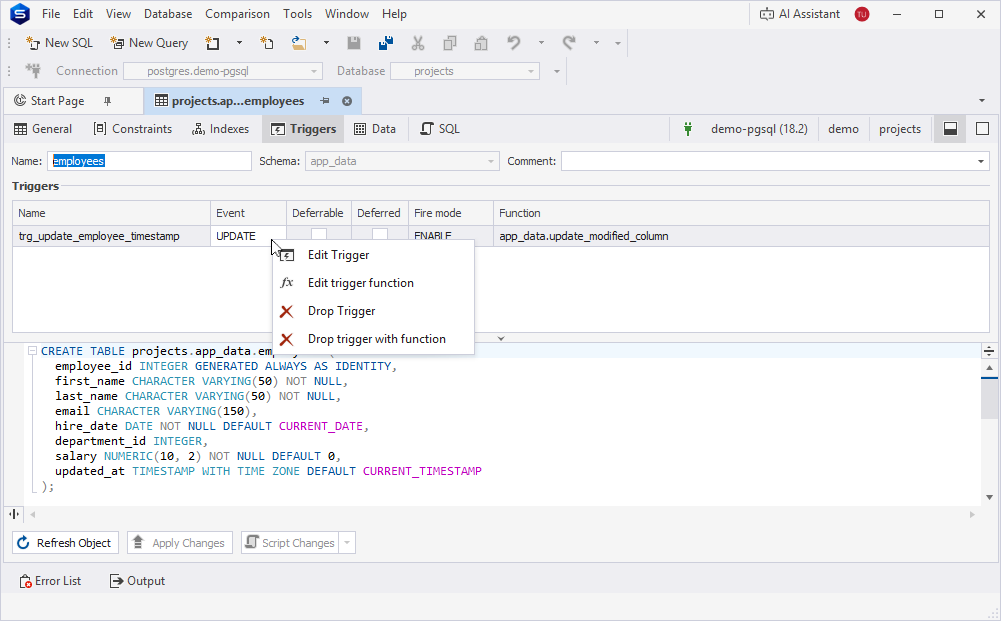
View trigger details
The grid displays the following trigger details:
- Name – Indicates a trigger name.
- Event – Displays the database event that activates the trigger.
- Deferrable – Indicates whether the trigger execution is deferred by default for each transaction.
- Deferred — Indicates whether the trigger is delayed by default at the start of each transaction.
- Fire mode – Specifies how the trigger function is executed relative to the triggering DML event. To change the fire mode, from the list, select one of the following options:
ENABLE,ENABLE REPLICA,ENABLE ALWAYS, andDISABLE. - Function – Displays the function that runs when the trigger fires.
Edit triggers and trigger functions
To edit a trigger, right-click the grid and select Edit Trigger. The generated CREATE statement for the selected trigger opens in a new SQL document, where you can edit and execute it.
To edit a trigger function, right-click the grid and select Edit trigger function. The generated CREATE statement for the selected trigger function opens in a new SQL document, where you can edit and execute it.
Remove triggers or trigger functions
To remove a trigger, select it in the grid, right-click the grid, then select Drop Trigger.
To remove a trigger function, select it in the grid, right-click the grid, then select Drop trigger with function.
Note
The shortcut menu options are unavailable if triggers aren’t defined on the table.
For more information on managing table data, see Table Editor - Data.