Create subqueries
A subquery is a SELECT query nested inside another SELECT, INSERT, or UPDATE statement. Subqueries let you filter, calculate, or retrieve intermediate results within a larger query.
You can use subqueries in various clauses, including WHERE, FROM, and SELECT.
This topic explains how to create subqueries by adding an unnamed query to the WHERE clause or by using the Wrap to Subquery command.
To illustrate the process, this topic includes scenarios based on two sample tables: dept and emp. The following script is used to create tables and populate them with data.
-- Drop tables if exist
DROP TABLE IF EXISTS emp;
DROP TABLE IF EXISTS dept;

-- Create dept table
CREATE TABLE dept (
  deptno NUMERIC(2, 0) PRIMARY KEY,
  dname VARCHAR(14),
  loc VARCHAR(13)
);

-- Create emp table
CREATE TABLE emp (
  empno NUMERIC(4, 0) PRIMARY KEY,
  ename VARCHAR(10),
  job VARCHAR(9),
  mgr NUMERIC(4, 0),
  hiredate DATE,
  sal NUMERIC(7, 2),
  comm NUMERIC(7, 2),
  deptno NUMERIC(2, 0),
  CONSTRAINT fk_emp_dept
  FOREIGN KEY (deptno)
  REFERENCES dept (deptno)
);

-- Insert departments
INSERT INTO dept
  VALUES (10, 'accounting', 'new york');
INSERT INTO dept
  VALUES (20, 'research', 'dallas');
INSERT INTO dept
  VALUES (30, 'sales', 'chicago');
INSERT INTO dept
  VALUES (40, 'operations', 'boston');

-- Insert employees
INSERT INTO emp
  VALUES (7369, 'smith', 'clerk', 7902, '1980-12-17', 800, NULL, 20);
INSERT INTO emp
  VALUES (7499, 'allen', 'salesman', 7698, '1981-02-20', 1600, 300, 30);
INSERT INTO emp
  VALUES (7521, 'ward', 'salesman', 7698, '1981-02-22', 1250, 500, 30);
INSERT INTO emp
  VALUES (7566, 'jones', 'manager', 7839, '1981-04-02', 2975, NULL, 20);
INSERT INTO emp
  VALUES (7654, 'martin', 'salesman', 7698, '1981-09-28', 1250, 1400, 30);
INSERT INTO emp
  VALUES (7698, 'blake', 'manager', 7839, '1981-05-01', 2850, NULL, 30);
INSERT INTO emp
  VALUES (7782, 'clark', 'manager', 7839, '1981-06-09', 2450, NULL, 10);
INSERT INTO emp
  VALUES (7788, 'scott', 'analyst', 7566, '1987-07-13', 3000, NULL, 20);
INSERT INTO emp
  VALUES (7839, 'king', 'president', NULL, '1981-11-17', 5000, NULL, 10);
INSERT INTO emp
  VALUES (7844, 'turner', 'salesman', 7698, '1981-09-08', 1500, 0, 30);
INSERT INTO emp
  VALUES (7876, 'adams', 'clerk', 7788, '1987-07-13', 1100, NULL, 20);
INSERT INTO emp
  VALUES (7900, 'james', 'clerk', 7698, '1981-12-03', 950, NULL, 30);
INSERT INTO emp
  VALUES (7902, 'ford', 'analyst', 7566, '1981-12-03', 3000, NULL, 20);
INSERT INTO emp
  VALUES (7934, 'miller', 'clerk', 7782, '1982-01-23', 1300, NULL, 10);
Create a subquery as an unnamed query in the WHERE clause
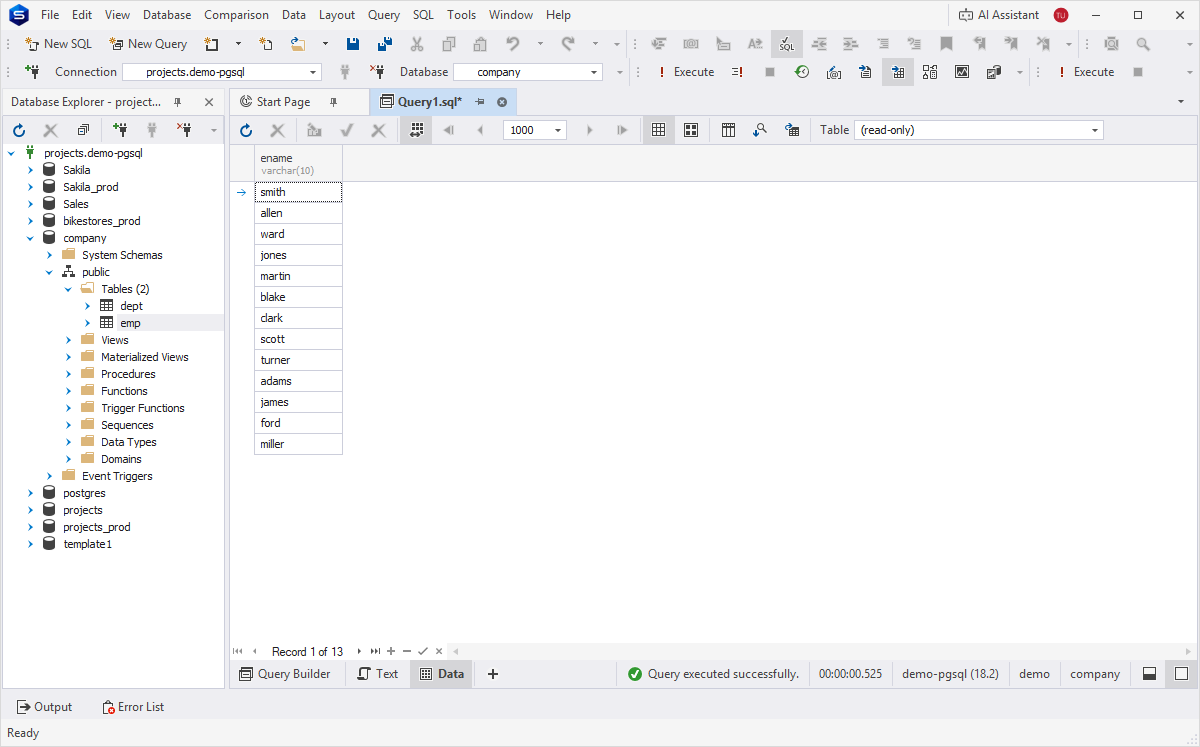
The scenario shows how to retrieve the names of middle managers from the emp table.
To create a subquery in a WHERE clause:
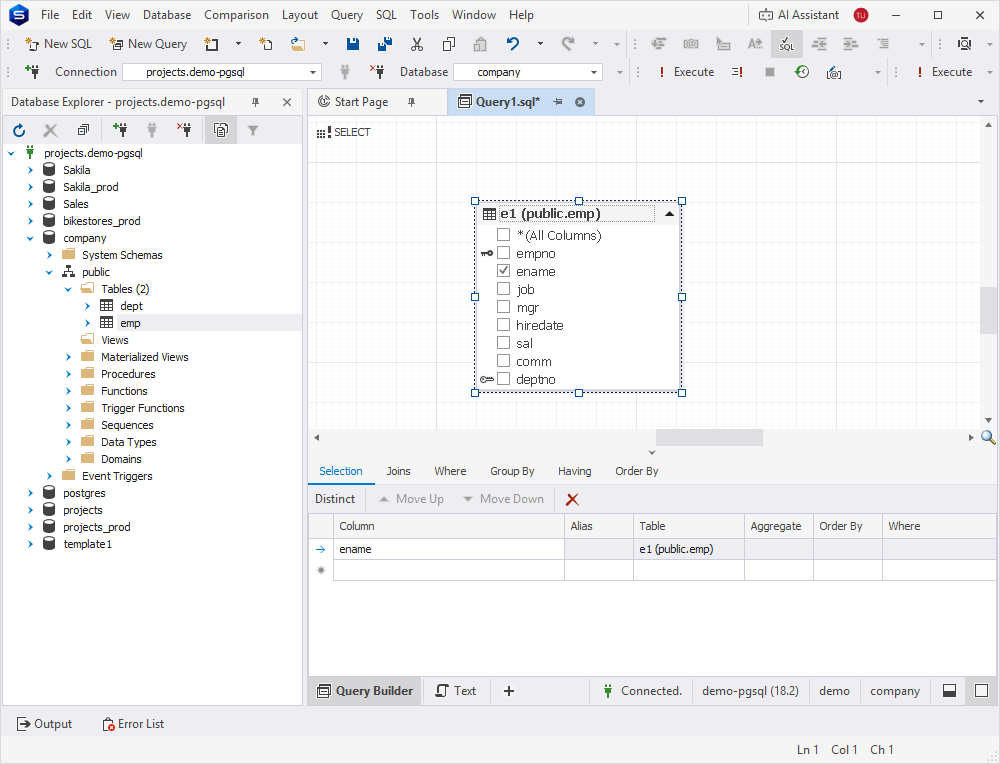
1. In Database Explorer, right-click the emp table and select Send to > Query Builder.
2. Rename the table alias to e1.
3. Select the checkbox for the ename column.
The ename column appears on the Selection tab.
4. Switch to the Where tab to specify the filter condition.
4.1. Click  .
.
4.2. Click the leftmost <enter a value> placeholder, then select the mgr column from the e1 table.
4.3. Select the IN operator.
4.4. Click the rightmost <enter a value> placeholder, then click  to define a subquery as a filter.
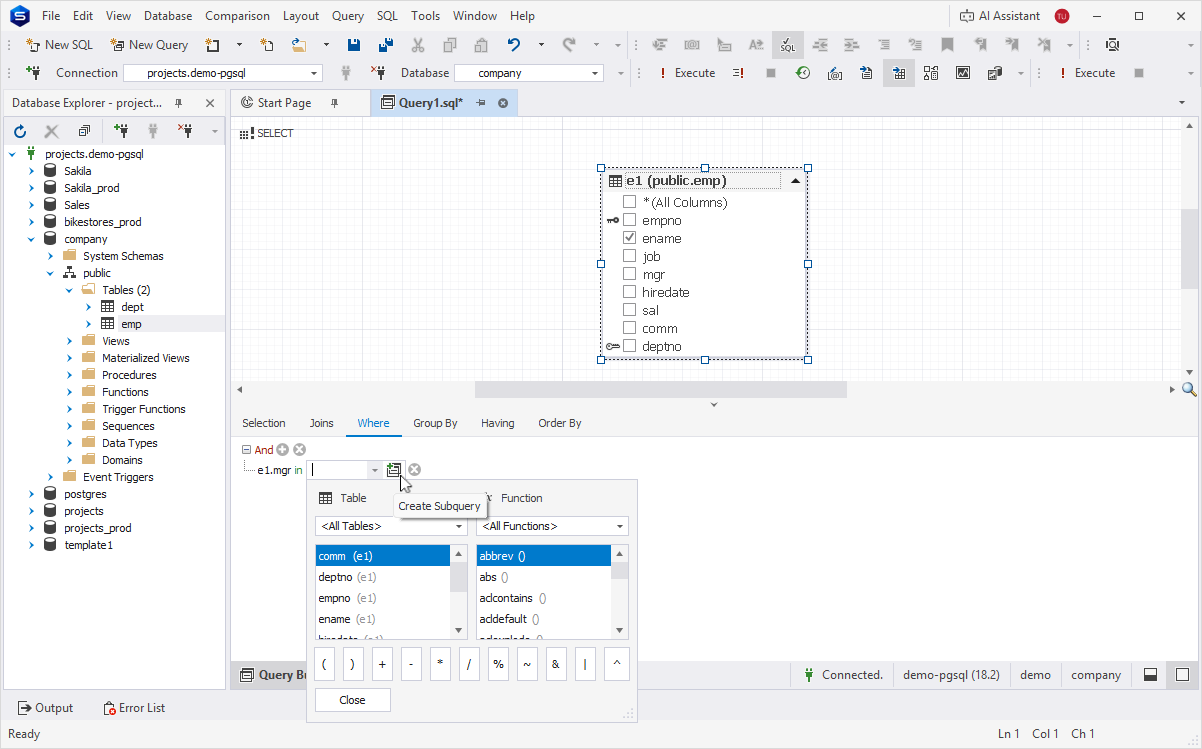
The Query Builder diagram now displays two tabs:
-
Root Query – Represents the main query.
-
Unnamed Query – Represents the subquery.
5. On the Unnamed Query tab:
5.1. From Database Explorer, drag the emp table to the diagram.
5.2. Rename the table alias to e2.
5.3. Select the checkbox for the mgr column.
Note
Clear the checkbox for the empno column. Subqueries that are not introduced with
EXISTSmust return only one column. Otherwise, the database engine returns the following error:Subquery has too many columns.
6. Optional: To preview the query, in the bottom panel, click Text.
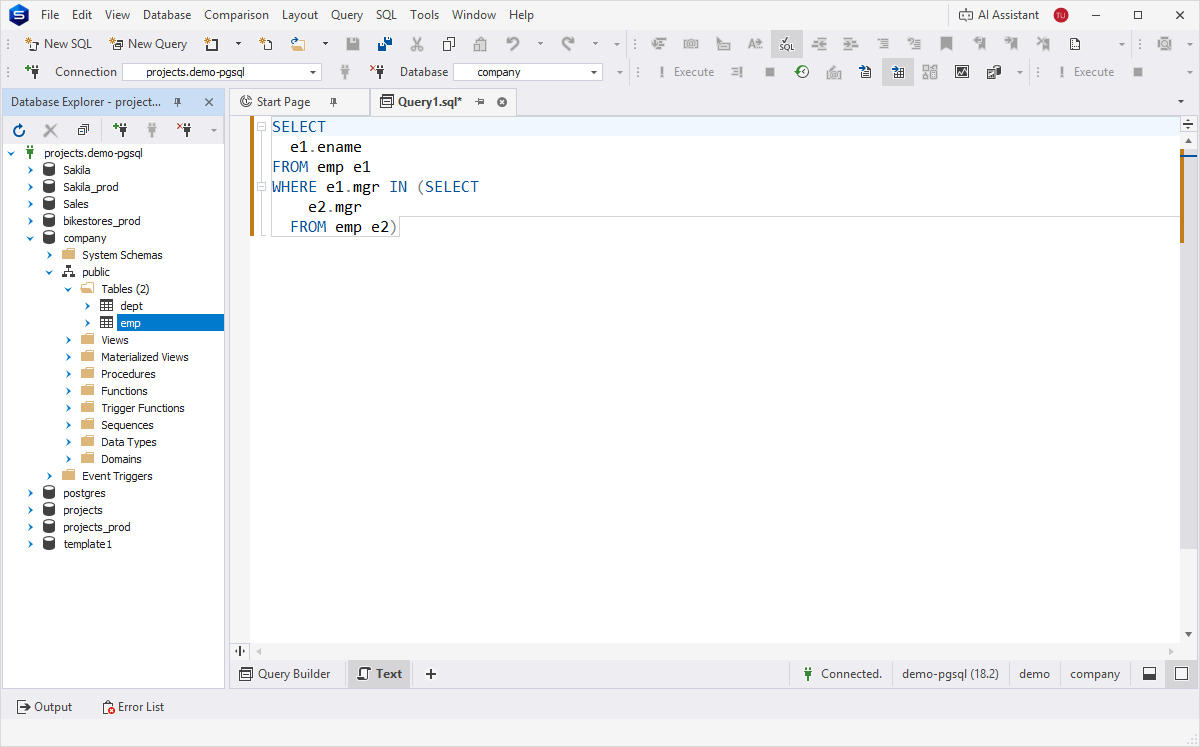
7. Click Execute or press F5 to run the query.
Create a subquery using Wrap to Subquery
You can use the Wrap to Subquery command to include a table along with its JOINs, conditions, and subqueries into a subquery. Before getting started, ensure you select the entire diagram area, not just an individual table.
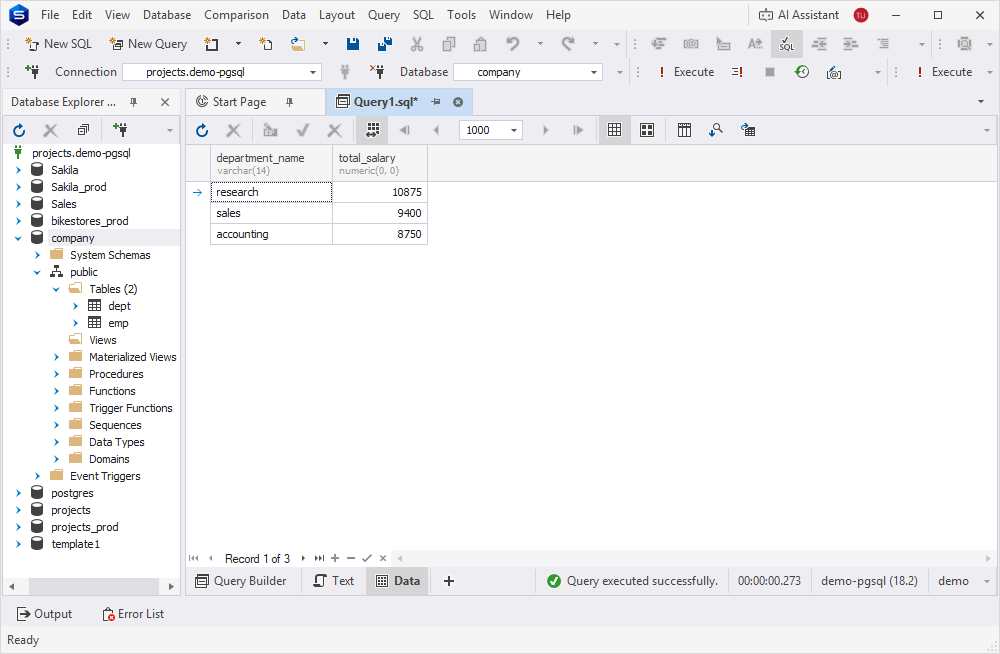
The following scenario shows how to calculate the total salary for each department, filter for departments where the total exceeds 8,000, and sort the results in descending order. The output should include the department name and the total salary.
For the scenario, use a subquery in the FROM clause. The subquery should include JOIN, GROUP BY, HAVING, and ORDER BY clauses.
To create a subquery:
1. In Database Explorer, press and hold Ctrl, then select the dept and emp tables.
2. Right-click the selection and select Send to > Query Builder.
3. In the Query Builder diagram:
3.1. Rename the table aliases:
-
For the emp table, enter e.
-
For the dept table, enter d.
3.2. Select the checkboxes for the following columns:
-
d.dname (department name)
-
e.sal (salary)
The selected columns appear on the Selection tab.
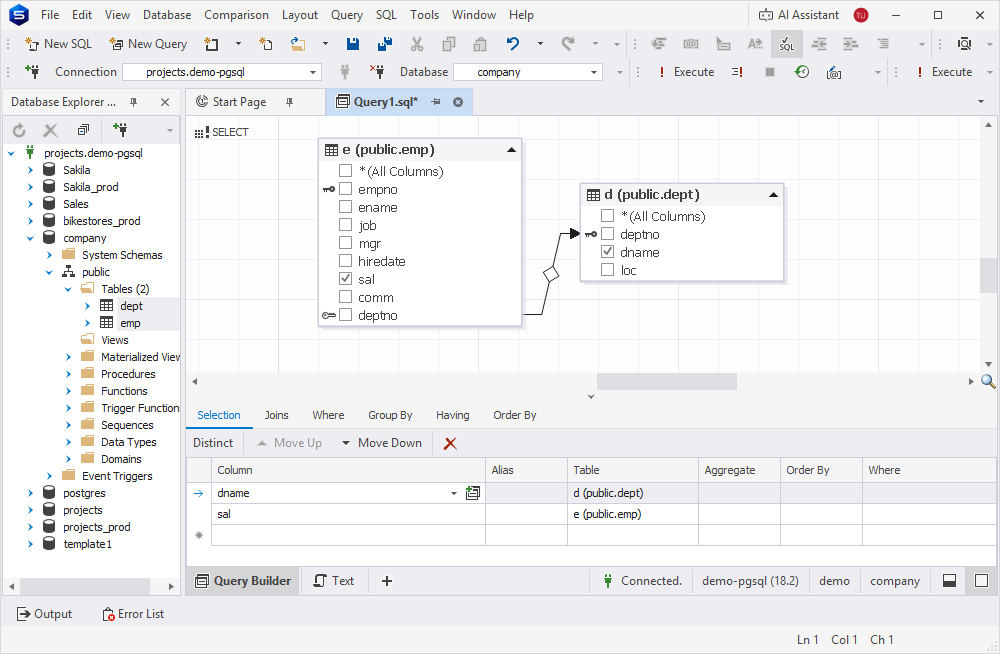
4. On the Query Builder toolbar, click  to convert the diagram into a subquery.
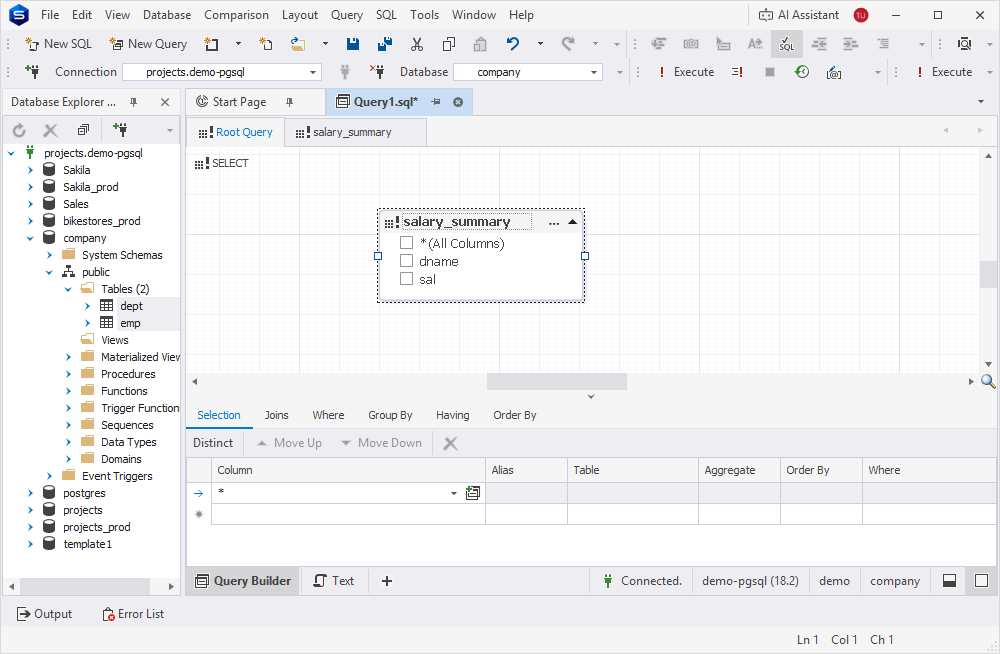
Query Builder now displays two tabs:
- Root Query – Represents the main query.
- SubQuery – Represents the subquery.
On the Root Query tab, the icon on the table header will change to  indicating that the subquery was added to the query.
5. On the Root Query tab:
5.1. Double-click the subquery header and rename the alias (for example, salary_summary).
5.2. Select the checkboxes for the dname and sal columns.
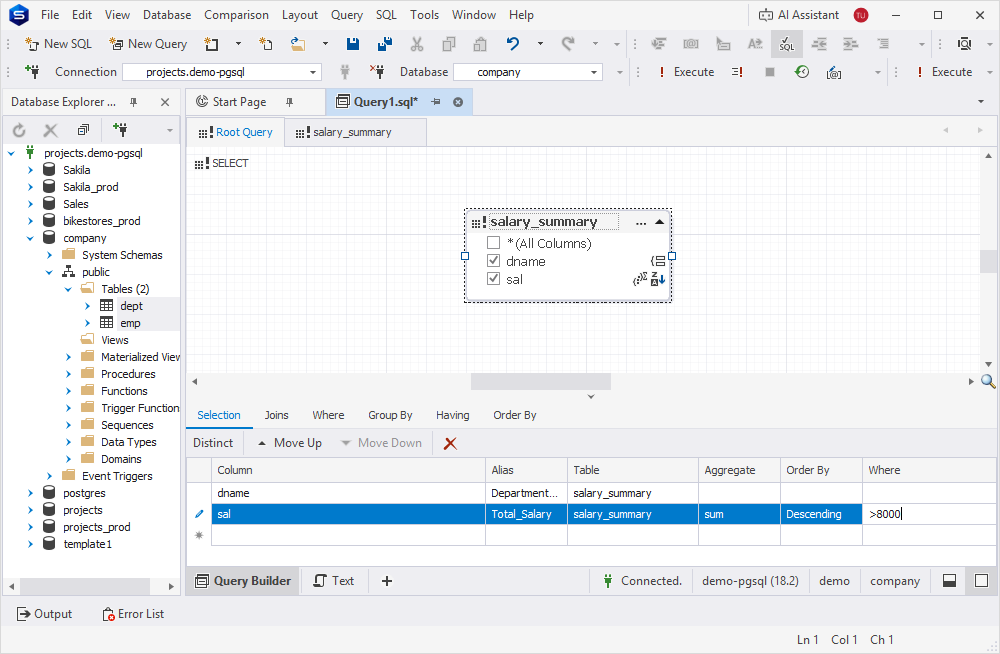
6. On the Selection tab:
6.1. For the dname column, double-click the Alias field and enter Department_Name.
6.2. For the sal column:
-
Double-click the Alias column and enter Total_Salary.
-
Double-click the Aggregate column and select sum.
-
Double-click the Order By column and select Descending.
-
Double-click the Where column and enter >8000.
These settings are also reflected on the diagram.
7. Optional: To preview the query, in the bottom panel, click Text.
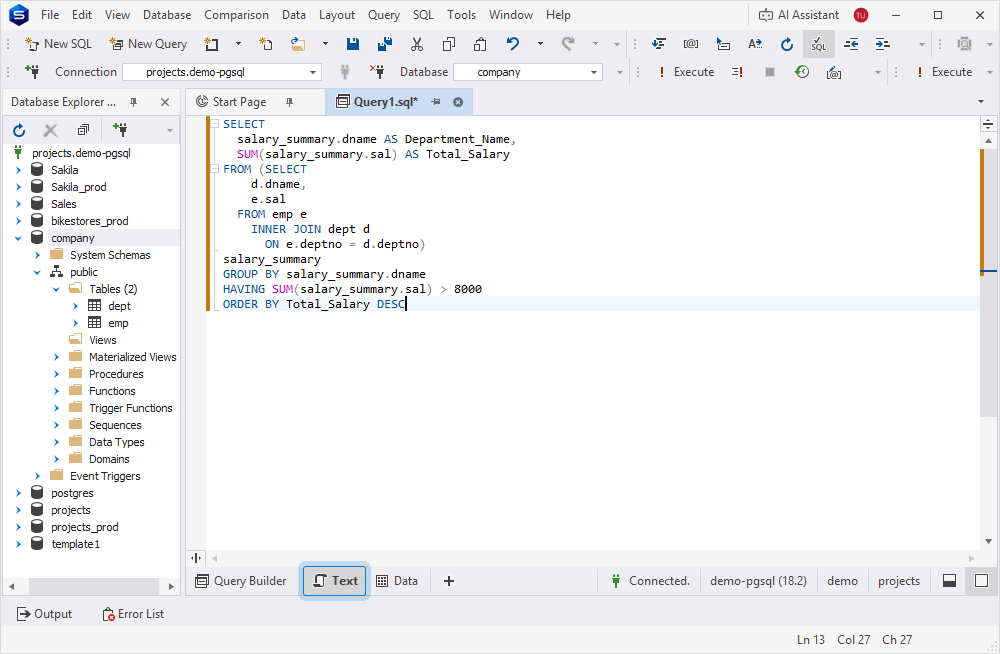
8. Click Execute or press F5 to run the query.
The query retrieves data about departments where the total salary is higher than 8,000 and sorts it in descending order.