Qualify object names
The Qualify object names feature automatically adds or updates the qualification of object names, including tables, views, and columns, in SQL code according to the editor settings.
How the feature works
You can apply the feature to:
- The entire SQL document.
- A selected SQL code block.
The feature analyzes SQL code and identifies database objects in SQL expressions, including tables, views, materialized views, table-valued functions, and columns.
Note
The Qualify object names feature doesn’t apply to:
- Comments (
--,/* */)- String literals
- Variable names
- Parameter names
- Text in dynamic SQL statements
- Database object names referenced in queries
- CTE names
- Table aliases
- Column aliases
- Columns that are already qualified according to the current settings
The following options in Tools > Options > Text Editor > Code Completion > Advanced control how column names are qualified:
- Qualify column name using table alias
- Qualify column name without table alias
For column names without a table alias, the following options determine the qualification format:
- Use object name only
- Use schema and object name
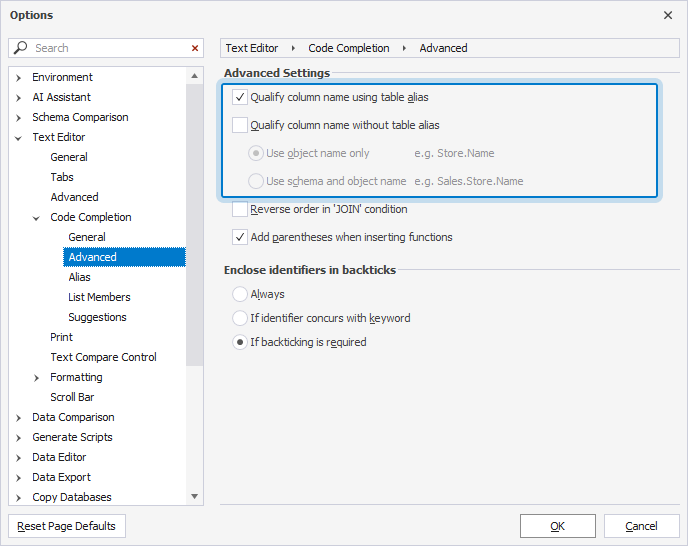
Column names are qualified as follows:
- If an alias is defined, and Qualify column name using table alias is enabled, the alias is added to the column name.
- If no alias is defined, and Qualify column name without table alias is enabled, the column name is qualified according to the selected qualification format.
Warning
If a SQL document contains syntax errors, dbForge Studio for MySQL can’t identify references to objects. The following error occurs:
The text contains error(s). Please fix it before performing refactoring.
Qualify object names
1. Open the SQL document you want to modify, or enter the SQL code in SQL Editor.
2. To configure the qualification options:
2.1. On the menu bar, select Tools > Options.
2.2. In the Options dialog, select Text Editor > Code Completion > Advanced.
2.3. Select the required qualification options.
2.4. Click OK.
3. In SQL Editor, optionally select the code block you want to modify, then qualify object names in one of these ways:
- On the menu bar, select Edit > Advanced > Qualify object names.
-
Right-click the selected code block or anywhere in a SQL document and select Refactoring > Qualify object names.
- Press Ctrl+K, Ctrl+Q.
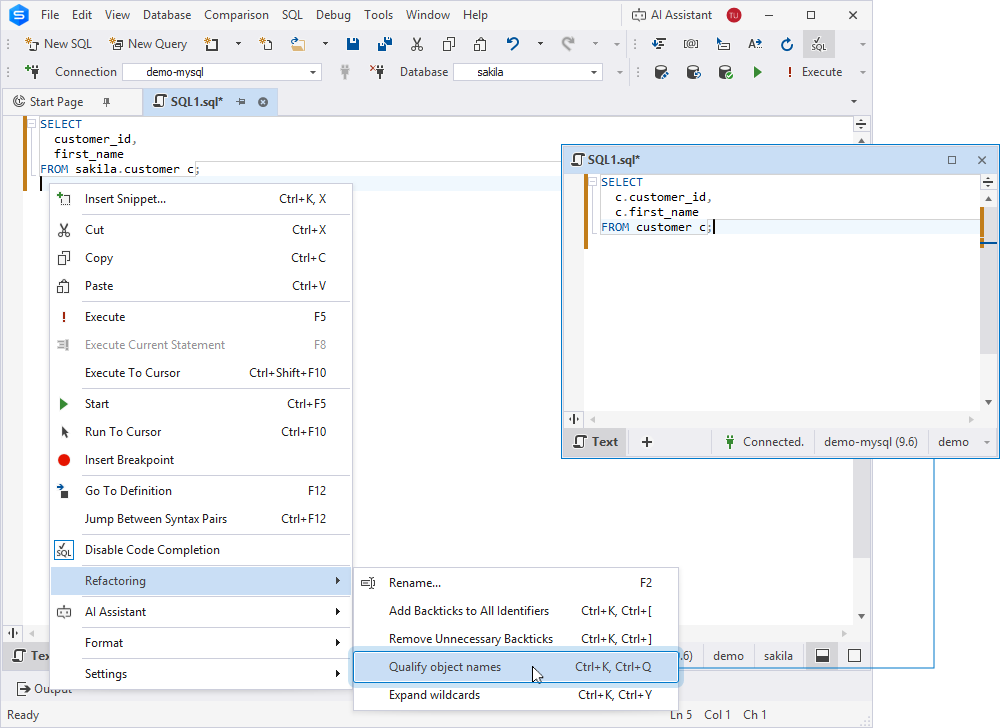
Tip
To undo the change, press Ctrl+Z.
Qualify column name using table alias
When Qualify column name using table alias is enabled, column names are prefixed with the alias of the corresponding table, view, or table-valued function if an alias is defined. If no alias is defined, column names remain unchanged.
The following table provides examples of how this option works.
| Scenario | Statement before | Statement after |
|---|---|---|
| No alias | SELECT customer_id, first_name FROM sales.customers; |
SELECT customer_id, first_name FROM sales.customers; |
| Defined alias | SELECT customer_id, first_name FROM sales.customers c; |
SELECT c.customer_id, c.first_name FROM sales.customers c; |
| Defined alias | INSERT INTO sales.customers (customer_id, first_name) SELECT customer_id, first_name FROM sales.customers c; |
INSERT INTO sales.customers (customer_id, first_name) SELECT c.customer_id, c.first_name FROM sales.customers c; |
Qualify column name without table alias
Use object name only
When Use object name only is enabled, column names are prefixed with the name of the corresponding table, view, or table-valued function, without the schema name.
The following table provides an example of how this option works.
| Scenario | Statement before | Statement after |
|---|---|---|
| No alias | SELECT customer_id, first_name FROM sales.customers; |
SELECT customers.customer_id, customers.first_name FROM sales.customers; |
Use schema and object name
When Use schema and object name is enabled, column names are prefixed using the schema name and object name.
The following table provides an example of how this option works.
| Scenario | Statement before | Statement after |
|---|---|---|
| No alias | SELECT customer_id, first_name FROM sales.customers; |
SELECT sales.customers.customer_id, sales.customers.first_name FROM sales.customers; |