Use the Express license
The Express license is free and is automatically included with dbForge AI Assistant.
Express license features
The Express license:
- Supports all models available in AI Assistant.
- Has a limit of 200,000 tokens per month.
- Keeps chat history for 14 days.
- Is available for an expired trial or subscription.
To start using the Express license, you need to activate it.
Note
If you have at least one active subscription, the Express license is unavailable, even if other subscriptions have expired. You can continue using AI Assistant with your active subscription.
Activate the Express license
1. Sign in to dbForge AI Assistant.
2. In the Select license dialog, select the expired subscription or trial for which you want to activate the Express license, then click Use Express.
Note
If you have multiple expired subscriptions, Use Express is unavailable until you select a subscription.
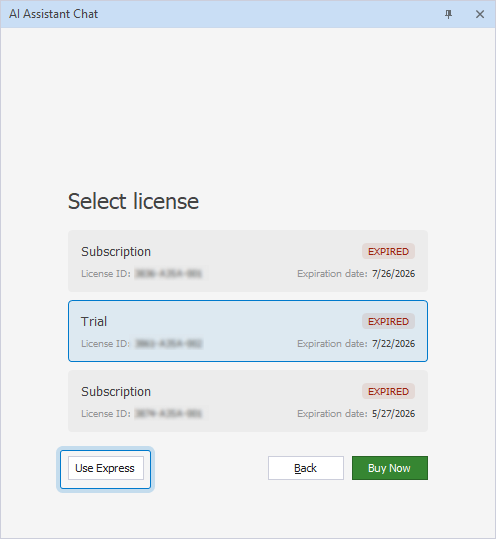
The Express license of dbForge AI Assistant is activated, and you can start using AI Assistant.
What happens when tokens run out
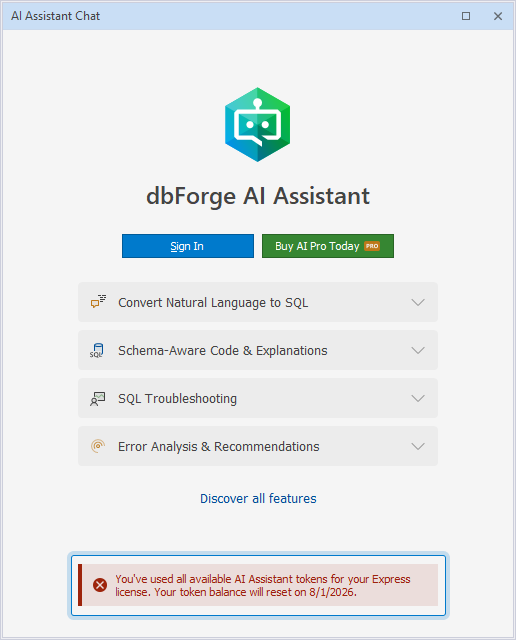
When tokens on the Express license run out, you’re automatically signed out, and the following message appears: You've used all available AI Assistant tokens for your Express license. Your token balance will reset on <date>.
In this case, you can wait for your quota to reset or upgrade your license.
Upgrade your license
You can upgrade from the Express license in one of these ways:
- In the AI Assistant Chat dialog, click Buy AI Pro Today.
- Navigate to your Customer Portal, select the required license, then click Buy now for an expired trial or Renew now for an expired subscription.
The license switches to the one you purchased.