Enable or disable usage data collection on macOS
Usage data collection is enabled by default when you install the driver. You can disable it in the installation wizard or later using a console application.
Disable usage data collection in the installation wizard
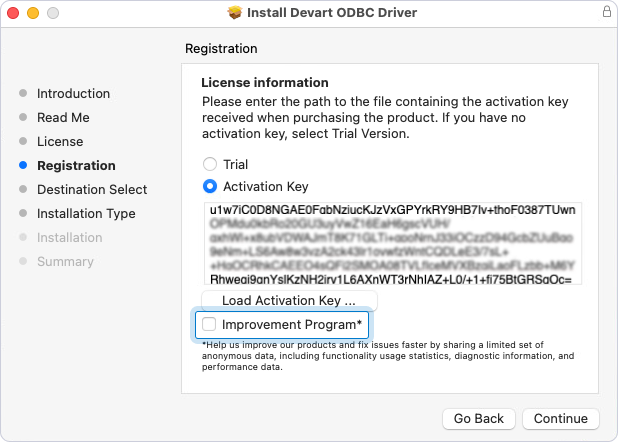
To disable usage data collection in the installation wizard, on the Registration page, clear the Improvement Program checkbox.
Enable or disable usage data collection in a console application
To enable or disable usage data collection using a console application:
1. In the console, go to the folder where the driver was installed. The default installation path for the driver is /Library/ODBC/Devart/SQLite.
2. Run the activation command with superuser privileges using the -u option. Set the value to false to disable usage data collection or true to enable it.
-
To disable usage data collection:
sudo ./sqliteodbcactivator -u false -
To enable usage data collection:
sudo ./sqliteodbcactivator -u true