Windows DSN Configuration
After installing the driver, create a DSN for Snowflake in the ODBC Data Source Administrator.
-
Open the ODBC Data Source Administrator in one of the following ways:
- In the Windows search box, enter
ODBC Data Sources, then choose the application that matches the bitness of the third-party application (32-bit or 64-bit).
- In Control Panel, select System and Security > Windows Tools, then double-click ODBC Data Sources (32-bit) or ODBC Data Sources (64-bit). Note that before Windows 8, the icon was named Data Sources (ODBC).
- Run
C:\Windows\SysWOW64\odbcad32.exe to create a 32-bit DSN or C:\Windows\System32\odbcad32.exe to create a 64-bit DSN.
- Select the User DSN or System DSN tab. Most applications work with both types, yet some applications require a specific type of DSN.
- Click Add. The Create New Data Source dialog opens.
- Select Devart ODBC Driver for Snowflake, then click Finish. The driver configuration dialog opens.
- Enter a data source name and an optional description.
- In Domain, enter the URL of your Snowflake account.
-
In Authentication, select the authentication method to use when connecting to Snowflake:
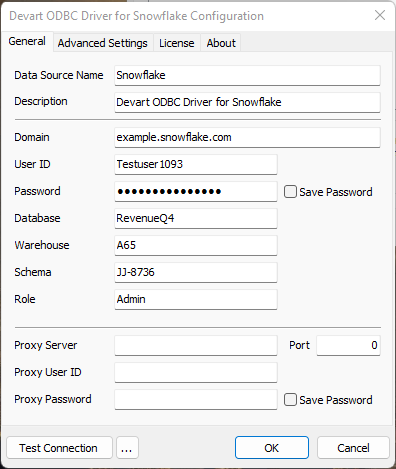
- Basic: Enter your Snowflake user ID and password. Select Save Password to save the password for future connections.
-
OAuth 2.0: Enter the client ID and client secret, then click Sign in to Snowflake. For instructions on obtaining the client ID and client secret, see Obtaining Credentials for OAuth 2.0 Authentication.
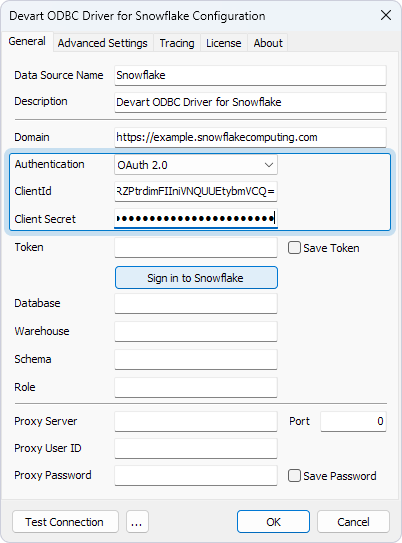
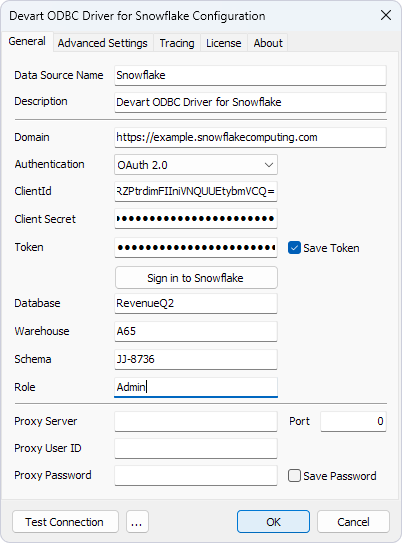
After you sign in to Snowflake, Token is filled in automatically. Select Save Token to save the token for future connections.
-
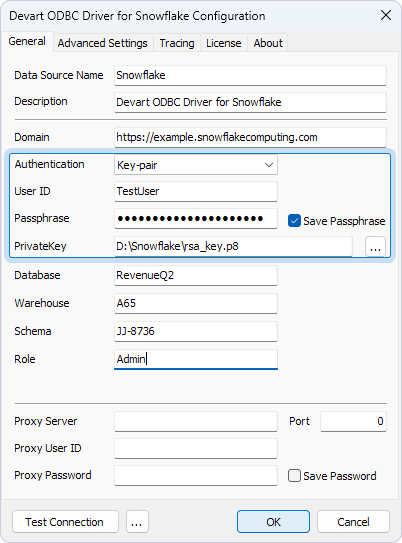
Key-pair: Enter your user ID, the passphrase for your private key (if it is encrypted), and the path to the private key file. For instructions on obtaining the private key, see Obtaining Credentials for Key Pair Authentication.
- In Database, enter the database to connect to.
- Optional: Enter the warehouse, schema, and role to use.
- Optional: Click Test Connection to verify the connection settings.
- Click OK.
See Also
Connection String Parameters