Advanced connection options
ODBC Driver for Zoho CRM provides advanced options to customize connection behavior and query processing.
You can configure these custom settings when creating a new Windows DSN or modifying an existing DSN.
To configure advanced connection options:
1. Open the ODBC Data Source Administrator.
2. Navigate to the User DSN or System DSN tab, depending on where the DSN for Zoho CRM is configured.
3. Select your Zoho CRM data source, then click Configure.
4. On the Advanced Settings tab, configure the available options, then click OK.
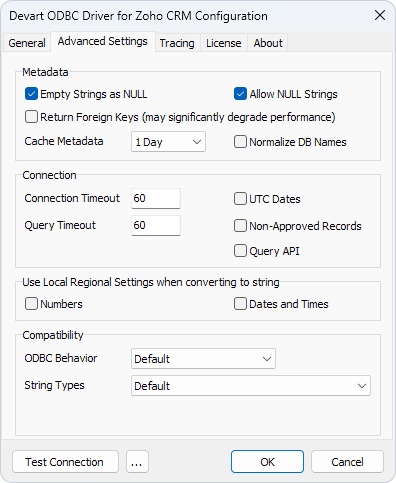
Available options
Metadata section
Empty Strings as NULL – Select this option to treat empty strings as NULL values when interacting with Zoho CRM data.
Allow NULL Strings – Select this option to permit NULL string values in the dataset.
Return Foreign Keys – Select this option to retrieve foreign key relationships. Depending on the query and dataset, turning on this option may significantly degrade performance.
Cache Metadata – Configure how long metadata is cached:
- False – No caching.
- 1 Hour – Caches metadata for one hour.
- 1 Day – Caches metadata for one day.
- 1 Month – Caches metadata for one month.
- True (Infinite) – Caches metadata indefinitely.
Normalize DB Names – Select this option to replace . characters in column names with _ for compatibility with third-party tools that don’t support dots in column names.
Connection section
Connection Timeout – Set the maximum time (in seconds) before the driver stops attempting to establish a connection. Useful for preventing hangs in unstable environments.
Query Timeout – Set the maximum time (in seconds) to wait for a query to execute. Helps manage long-running operations.
UTC Dates – Select this option to ensure all date and time values are returned in Coordinated Universal Time (UTC).
Non-Approved Records – Select this option to include non-approved records in query results.
Query API – Select this option to query Zoho CRM data using COQL (CRM Object Query Language). This can improve the performance of queries and operations that use filters. However, COQL doesn’t support all fields in SELECT and WHERE clauses, and other COQL limitations also apply.
Use Local Regional Settings when converting to string section
Numbers – Select this option to format numbers according to the local regional settings of the system.
Dates and Times – Select this option to format dates and times based on the system’s local regional settings.
Compatibility section
ODBC Behavior – Select the ODBC behavior:
-
Default – Uses the default behavior of the driver.
-
Ver 2.x – Emulates ODBC 2.x behavior for compatibility with older applications.
-
Ver 3.x – Emulates ODBC 3.x behavior for compatibility with newer standards.
String Types – Select the string type for data exchange:
-
Default – Uses the driver’s default string type.
-
Ansi – Returns all string types as
SQL_CHAR,SQL_VARCHAR, andSQL_LONGVARCHAR. -
Unicode – Returns all string types as
SQL_WVARCHARandSQL_WLONGVARCHAR.