Connection options
Devart ODBC Driver for SQLite provides multiple connection options to ensure flexibility, security, and integration with various applications and environments. Connection options for the driver depend on the chosen connection mode: Direct or Client Library.
Direct mode connection
The Direct mode connects directly to an SQLite database without requiring the SQLite3 client library.
To enable this mode, select Direct and specify the parameters in the driver configuration dialog:
-
Database – The path to the SQLite database file.
-
Encryption Key (optional) – The encryption key for connecting to an encrypted database.
-
Encrypt Algorithm (optional) – The encryption algorithm for connecting to an encrypted database. Available values:
TripleDES,Blowfish,AES128,AES192,AES256,Cast128, orRC4. For more information, see Database Encryption.

Sample connection strings:
DRIVER={Devart ODBC Driver for SQLite};Database=myDatabase
DRIVER={Devart ODBC Driver for SQLite};Direct=True;Database=myDatabase;Encryption Algorithm=TripleDES;Encryption Key=myEncryptionKey
Note
Curly braces around a parameter value are optional. Use them when the value contains a semicolon (
;) or an equal sign (=), as these characters are used as separators in connection strings.
Connection using the client library
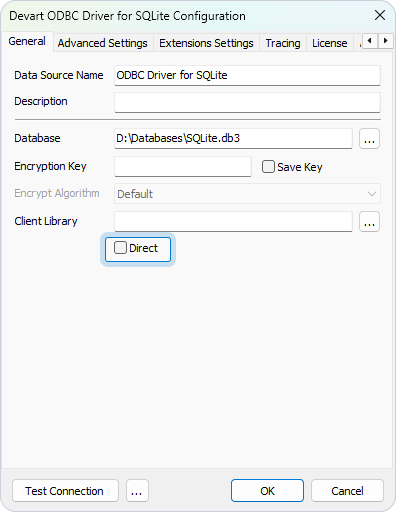
To connect using the SQLite3 client library, clear Direct and specify the parameters in the driver configuration dialog:
-
Database – The path to the SQLite database file.
-
Encryption Key (optional) – The encryption key for connecting to an encrypted database.
-
Client Library – The path to the SQLite3 client library.
Sample connection string:
DRIVER={Devart ODBC Driver for SQLite};Direct=False;Database=myDatabase;Client Library=myClientLibrary