Advanced connection options
Devart ODBC Driver for SQLite provides advanced connection options that allow you to customize settings to suit your specific needs.
You can configure these custom settings when creating a new Windows DSN or modifying an existing DSN.
1. Open the ODBC Data Source Administrator.
2. Navigate to the User DSN or System DSN tab, depending on where the DSN for SQLite is configured.
3. Select the SQLite data source, then click Configure.
4. In the Devart ODBC Driver for SQLite Configuration dialog that opens, navigate to the Advanced Settings tab.
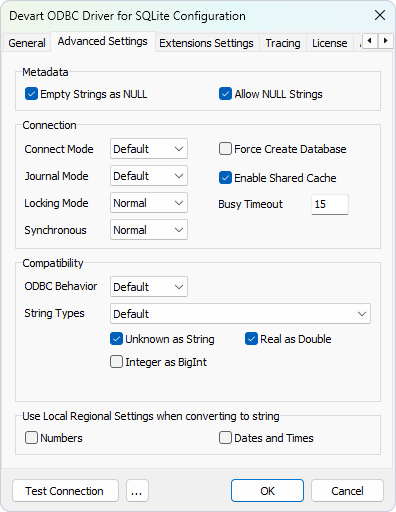
5. Configure the required settings, then click OK to save and apply the changes.
Available options
Metadata section
Empty Strings as NULL – Enable this option to treat empty strings as NULL values when interacting with SQLite data.
Allow NULL Strings – Enable this option to permit NULL string values in the dataset.
Connection section
Connect Mode – Specify the connection mode:
- Default – Opens the database in default mode.
- ReadWrite – Opens the database in read/write mode.
- ReadOnly – Opens the database in read-only mode.
Journal Mode – Define the journal mode:
- Delete
- Truncate
- Persist
- Memory
- WAL
- Off
- Default
Locking Mode – Specify the locking mode:
- Exclusive
- Normal
Synchronous – Choose the synchronization mode:
- Off
- Normal
- Full
- Extra
Force Create Database – Enable this option to create the database automatically before opening a connection if it doesn’t already exist.
Enable Shared Cache – Disable this option to prevent multiple connections to the same database from sharing a single data and schema cache.
Busy Timeout – Set the busy timeout duration in milliseconds.
Compatibility section
ODBC Behavior – Select the ODBC behavior:
-
Default – Uses the default behavior of the driver.
-
Ver 2.x – Emulates ODBC 2.x behavior for compatibility with older applications.
-
Ver 3.x – Emulates ODBC 3.x behavior for compatibility with newer standards.
String Types – Select the string type for data exchange:
-
Default – Uses the driver’s default string type.
-
Ansi – Uses ANSI encoding for string data.
-
Unicode – Uses Unicode encoding for string data.
Unknown as String – Disable this option to avoid mapping unknown data types to SQL_LONGVARCHAR.
Integer as BigInt – Enable this option to map INTEGER fields to SQL_BIGINT.
Real as Double – Define how REAL (floating-point) values are handled or stored—specifically, whether they should be treated as DOUBLE PRECISION instead of the standard REAL type.
Use Local Regional Settings when converting to string section
Numbers – Enable this option to format numbers according to the system’s local regional settings.
Dates and Times – Enable this option to format dates and times based on the system’s local regional settings.