Connect to a sandbox
A Salesforce Sandbox is a replication of your production organization, used for testing, development, or training. Sandboxes are isolated, meaning any changes made in the Sandbox do not affect the production environment. Types of sandboxes include Developer, Developer Pro, Partial Copy, and Full Copy.
Configure a connection to a Sandbox
1. Open ODBC Data Source Administrator to configure a Data Source Name (DSN).
2. In the Connection dropdown list, select Sandbox.
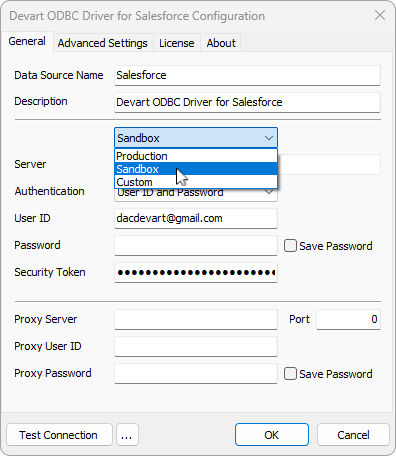
3. Ensure the server URL points to the sandbox environment (https://test.salesforce.com).
4. Select the authentication method and enter the corresponding credentials based on your selection.
5. Optional: Select Test Connection to validate the configuration.
Once the DSN is configured, use your preferred tools (for example, R, Excel, or SQL-based applications) to query or analyze the sandbox data.
Example: Connect to a sandbox in R
library(odbc)

# Connect to the Salesforce sandbox using the configured DSN
con <- dbConnect(odbc::odbc(),
                 dsn = "SalesforceSandboxDSN",
                 uid = "YourSandboxUsername",
                 pwd = "YourSandboxPassword")

# Query sandbox data
result <- dbGetQuery(con, "SELECT Id, Name FROM Account LIMIT 10")
print(result)

# Disconnect after use
dbDisconnect(con)