Advanced connection options
Devart ODBC Driver for MySQL provides advanced connection options, allowing you to customize settings to suit your specific needs.
You can configure these custom settings when creating a new Windows DSN or modifying an existing DSN.
1. Open the ODBC Data Source Administrator.
2. Navigate to the User DSN or System DSN tab, depending on where the DSN for MySQL is configured.
3. Select the MySQL data source, then click Configure.
4. In the Devart ODBC Driver for MySQL Configuration dialog that opens, navigate to the Advanced Settings tab.
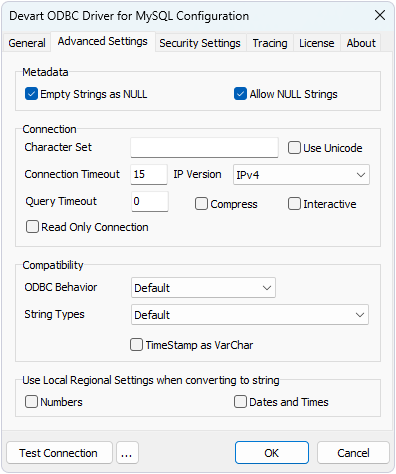
5. Configure the required settings, then click OK to save and apply the changes.
Available options
Metadata section
Empty Strings as NULL – Enable this option to treat empty strings as NULL values when interacting with MySQL data.
Allow NULL Strings – Enable this option to permit NULL string values in the dataset.
Connection section
Character Set – Specify the character set for the driver to use when reading and writing character data.
Use Unicode – Enable this option to permit Unicode support.
Connection Timeout – Set the maximum time (in seconds) the driver will wait for a connection attempt before stopping. The default is 15 seconds.
IP Version – Specify the Internet Protocol version to use:
-
IPv4 – Uses Internet Protocol version 4 (IPv4).
-
IPv6 – Uses Internet Protocol version 6 (IPv6).
-
IPv4 + IPv6 – Uses either Internet Protocol version 6 (IPv6) or version 4 (IPv4). If IPv6 is enabled in the operating system, a connection is attempted via IPv6. If the connection attempt fails, a new connection attempt is made via IPv4.
Query Timeout – Specify how many seconds a SQL query may execute before being terminated. A value of 0 disables the timeout. Default value: 0.
Compress – Enable this option to compress data sent between the driver and the server. This can improve performance on slow connections with large result sets. Note that each row is compressed separately, and in some cases compression may reduce fetch performance instead of improving it.
Interactive – Enables the use of the MySQL interactive_timeout value instead of wait_timeout. When this option is enabled, the server sets the session wait_timeout to the interactive_timeout value, allowing a longer period of inactivity before the server closes the connection.
Read Only Connection – Enable this option to prevent data modification.
Ansi_Quotes Mode – Specifies how the ANSI_QUOTES value is handled in the sql_mode variable:
-
Default – Uses the
ANSI_QUOTESvalue from thesql_modevariable on the server. -
Allow – Forcefully includes the
ANSI_QUOTESvalue in thesql_modevariable regardless of the server setting. -
Denied – Forcefully excludes the
ANSI_QUOTESvalue from thesql_modevariable regardless of the server setting.
Compatibility section
ODBC Behavior – Select the ODBC behavior:
-
Default – Uses the default behavior of the driver.
-
Ver 2.x – Emulates ODBC 2.x behavior for compatibility with older applications.
-
Ver 3.x – Emulates ODBC 3.x behavior for compatibility with newer standards.
String Types – Select the string type for data exchange:
-
Default – Uses the driver’s default string type.
-
Ansi – Returns all string types as
SQL_CHAR,SQL_VARCHAR, andSQL_LONGVARCHAR. -
Unicode – Returns all string types as
SQL_WVARCHARandSQL_WLONGVARCHAR.
Use Local Regional Settings when converting to string section
Numbers – Enable this option to format numbers according to the system’s local regional settings.
Dates and Times – Enable this option to format dates and times based on the system’s local regional settings.