Connection options
Devart ODBC Driver for Dynamics 365 provides multiple connection options to ensure flexibility, security, and integration with various applications and environments. Connection options for the driver depend on the chosen connection type and authentication method.
OAuth 2.0 authentication
OAuth 2.0 provides a secure way to connect without storing credentials in the connection settings.
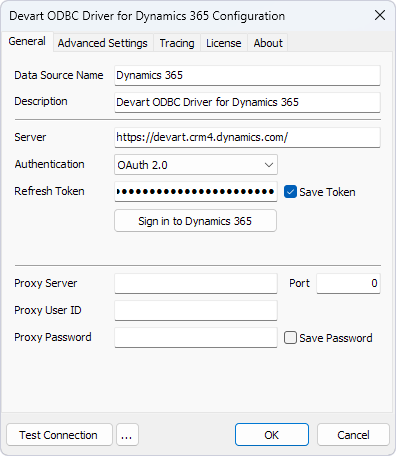
Required parameters:
Server: The Dynamics 365 instance (for example, https://dynamicsaccount.crm.dynamics.com).
Authentication: OAuth 2.0.
Refresh Token: The Dynamics 365 OAuth 2.0 token. To generate it, click Sign in to Dynamics 365, enter your credentials, and grant the requested permissions.
Example connection string:
DRIVER={Devart ODBC Driver for Dynamics 365};Server=https://dynamicsaccount.crm.dynamics.com;Authentication=OAuth;Refresh Token=a6Lgob979LW4anxfbhtDgtukr
Username & password authentication
This is a basic authentication method that uses Dynamics 365 credentials.
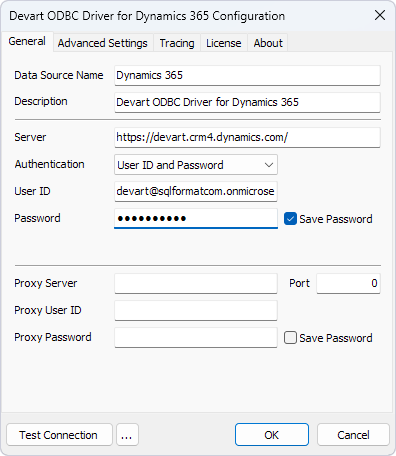
Required parameters:
Server: The Dynamics 365 instance (for example, https://dynamicsaccount.crm.dynamics.com).
Authentication: User ID and Password.
User ID: The Dynamics 365 username.
Password: The Dynamics 365 password.
Example connection string:
DRIVER={Devart ODBC Driver for Dynamics 365};Server=https://dynamicsaccount.crm.dynamics.com;User ID=your_username;Password=your_password
Connection via proxy server
Devart ODBC Driver for Dynamics 365 supports proxy connections, enabling users to route their connection through a proxy server for enhanced network security and access control.
Required parameters:
Server: The Dynamics 365 instance (for example, https://dynamicsaccount.crm.dynamics.com).
Proxy Server: The proxy server address.
Port: The port number used for the proxy connection.
Proxy User ID: The username for proxy authentication.
Proxy Password: The password for proxy authentication.
Example connection string:
DRIVER=Devart ODBC Driver for Dynamics 365;Description=Devart ODBC Driver for Dynamics 365;Server=https://dynamicsaccount.crm.dynamics.com;User ID=your_username;Proxy Server=your_proxy_server;Proxy Port=8080;Proxy User=your_proxy_username;Proxy Password=your_proxy_password