Overview
This article provides an overview of Devart MCP Server, describes its role in enabling secure AI-driven data access, and explains the architecture of connecting AI tools to databases and cloud platforms through ODBC.
What is Devart MCP Server?
An MCP (Model Context Protocol) server is a secure middleware component that connects AI tools, such as Claude, Codex, Cursor, Visual Studio Code, and others, to data sources such as databases and cloud platforms.
Its primary function is to help AI tools translate natural-language prompts into structured queries, execute those queries against data sources, and return clean, structured results back to the AI.
Devart MCP Server for a specific data source is optimized to work with that database or cloud platform through the corresponding Devart ODBC Driver, which ensures correct SQL translation, reliable metadata handling, and predictable behavior with AI tools.
The following table lists the data sources for which individual Devart MCP Servers are available.
| Database sources | Cloud sources |
|---|---|
| ASE | Dynamics 365 |
| Firebird | Dynamics 365 Business Central |
| Microsoft Access | HubSpot |
| MySQL | NetSuite |
| Oracle | QuickBooks Online |
| PostgreSQL | Salesforce |
| SQLite | Salesforce Marketing Cloud |
| SQL Server | Snowflake |
| xBase | Zoho CRM |
| Zoho Desk |
With on-premises deployment, Devart MCP Server helps organizations to:
- Keep all data inside their own infrastructure.
- Avoid transmitting sensitive information through third‑party cloud SaaS solutions.
- Minimize the risk of unauthorized access or data leakage.
Architecture
Devart MCP Server architecture enables AI tools to retrieve data from databases and cloud systems through ODBC drivers. The process includes the following steps, as shown in the diagram.
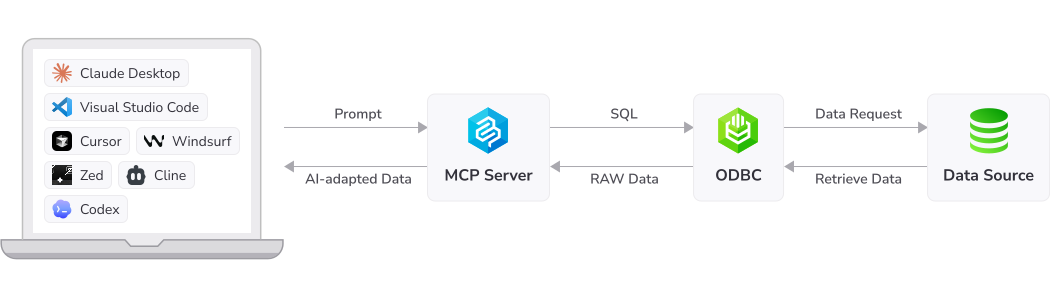
1. Prompt submission – An AI tool sends a natural‑language prompt to the MCP server. This prompt represents the user’s request to retrieve or analyze data.
2. Prompt processing and SQL generation – The MCP server interprets the prompt and generates a SQL query based on the requested information. The generated SQL is then forwarded to the ODBC driver.
3. ODBC query execution – The ODBC driver receives the SQL query and converts it into the appropriate request format for the target data source. Depending on the system, this may involve translating SQL into HTTPS API requests.
4. Request to the data source – The ODBC driver sends the generated request to the data source. The data source processes the request and returns the requested data.
5. Retrieval of raw data – The ODBC driver receives the raw data returned by the data source.
6. Data processing by the MCP server – The raw data is sent back to the MCP server, and the MCP server transforms it into output suitable for AI processing.
7. Response to the AI tool – The MCP server returns the processed data to the AI tool in a clean, consistent format for further analysis, decision-making, or code generation.