Table per concrete type
The Table Per Concrete (TPC) inheritance (also called Horizontal inheritance in Telerik Data Access terminology) is used when the database contains two or more tables with sets of identical columns.
Example (Database-First approach)
Suppose the database contains TPC_Horse and TPC_Dog tables. Both tables contain identical columns: BirthDate and Genus.
1. Move the TPC_Horse and TPC_Dog tables onto the design surface to create classes with the same respective names.
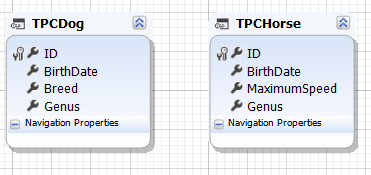
2. Move identical properties (BirthDate and Genus) from one of the classes onto the diagram surface. Note that the ID property cannot be moved because in Telerik Data Access the derived classes must have primary keys in a Horizontal inheritance hierarchy.
The Model Refactoring dialog opens.
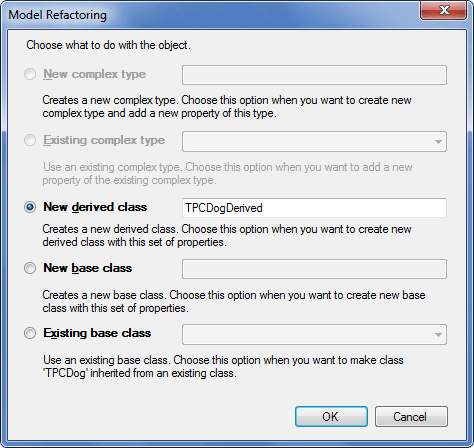
3. Select New base class and enter a name for the abstract class (for example, TPCBaseEntity) and click OK.
4. Open the Inheritance Editor dialog for the created inheritance.
5. In Type, select Table Per Concrete Type.
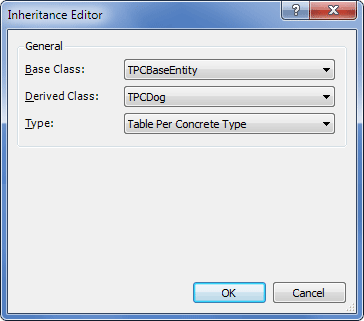
At this stage, TPC inheritance is established between the class from which the common properties were moved and the TPCBaseEntity class. The model looks as follows.
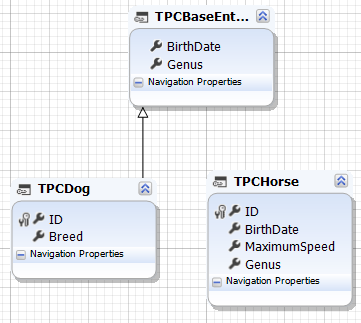
6. In the Properties window of the TPCBaseEntity class, set Abstract to True.
7. Move the identical properties from the other class onto the diagram surface.
The Model Refactoring dialog opens.
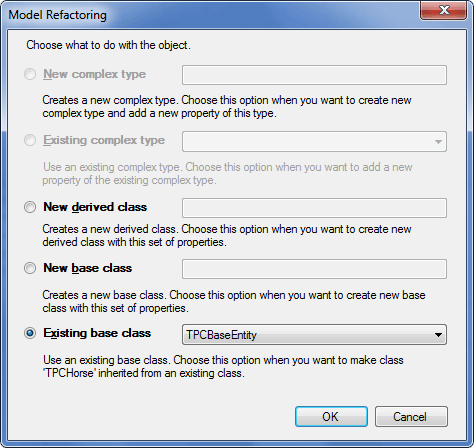
8. If the parameters are not selected automatically, select Existing base class and select the TPCBaseEntity class from the dropdown list.
9. Click OK to complete the inheritance setup.
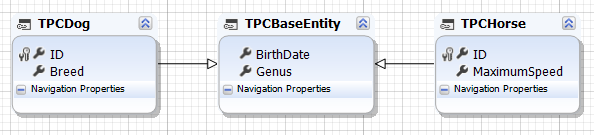
The final version of the model with correctly configured inheritance looks as follows.