Overview
Entity Developer supports three hierarchy types for managing inheritance relationships. On the diagram, inheritance relationships are represented as solid line connections with white arrows.
Hierarchy types
Table per hierarchy (flat inheritance)
In Table Per Hierarchy inheritance, all hierarchy classes are mapped to the same table, containing columns for all the properties of the hierarchy and additional discriminator columns that distinguish objects of one class from another.
When creating a Table Per Hierarchy hierarchy from an autogenerated database model:
- The autogenerated table class becomes a base class.
- Drag child class properties out of the parent class.
- In the Model Refactoring dialog, select New derived class.
- Delete properties corresponding to discriminator columns.
- Repeat for all hierarchy classes.
- Set a mapping condition for the classes.
Table per type (vertical inheritance)
In Table Per Type inheritance, each hierarchy class is mapped to one table. Every table provides additional details that describe a new type based on another table, which is that table’s parent.
Table per concrete type (horizontal inheritance)
In Table Per Concrete Type inheritance, each non-abstract hierarchy class is mapped to one table.
To establish this relationship in a model autogenerated from a database:
- Drag properties belonging to the parent class from one generated class.
- In the Model Refactoring dialog, select New base class and enter the base class name.
- Drag corresponding properties from other generated hierarchy classes.
- Select Existing base class in the Model Refactoring dialog.
- Set the base class inheritance modifier to Abstract.
- Set the inheritance type to Table Per Concrete Type.
Creating and editing inheritances
To create an inheritance, use one of these methods:
- Click the New Inheritance
 button on the Model toolbar or Model Explorer toolbar.
 - Right-click the diagram or class and select New Inheritance from the Add submenu.
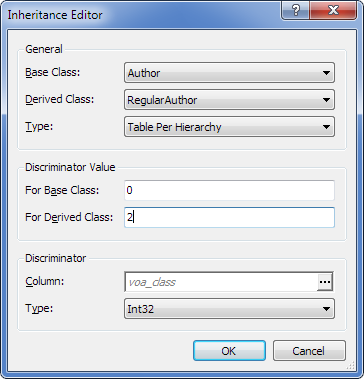
The Inheritance Editor dialog opens, where you can:
- Set the base and derived classes.
- Select a hierarchy type.
Note
The Discriminator options are available only for Table Per Hierarchy (TPH) inheritance.