Mapping an entity to several tables
This topic describes how to use join tables in Entity Developer for Telerik Data Access. Join tables allow you to map properties of a single class to multiple tables when the tables have a one-to-one relationship.
Joining tables in Entity Developer
In this example, create a database that contains the Orders and OrderDetails tables linked by a one-to-one relationship.
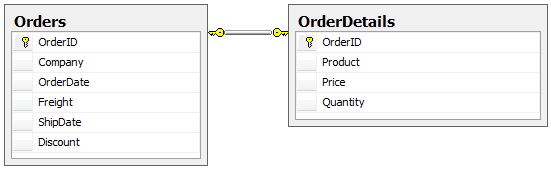
Perform the following steps.
- Create a Telerik Data Access model.
-
Add the Orders and OrderDetails tables to the model.
Before you add the tables, make sure that the Detect Table Per Type Inheritances checkbox in the Model Settings dialog is cleared.
Before you join table properties into a single class, the model looks like this:
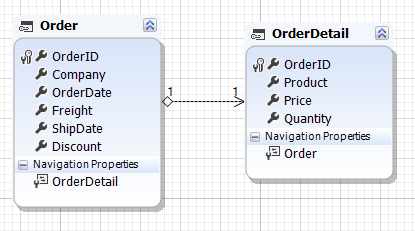
Select the Product, Price, and Quantity properties of the OrderDetail entity and drag them to the Order entity.
Then select the Order entity. In the Properties window, locate Join Tables, and click the three-dot button.
The Join Tables Editor dialog opens. Click Add to add a join table.
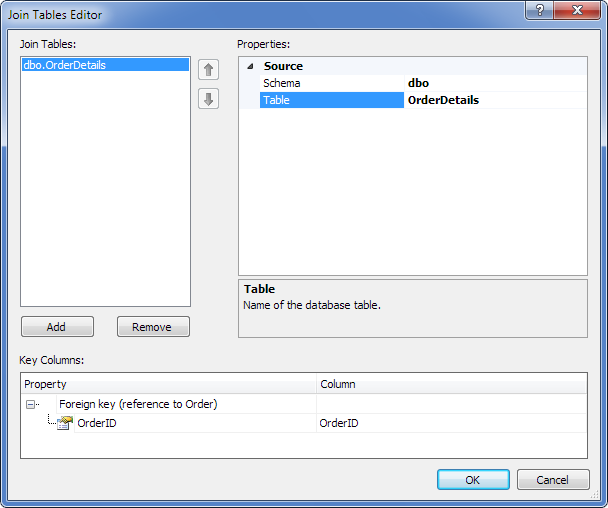
In the dialog:
- Set Schema to
dbo. - Set Table to
OrderDetails. - In the Key Columns area, set Column to the primary key column of the OrderDetails table (
OrderID).
To complete the mapping:
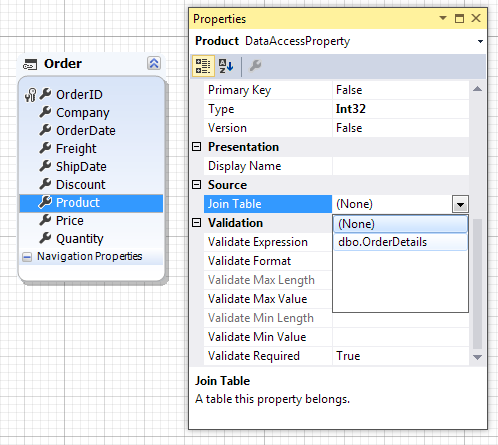
- Select the Product, Price, and Quantity properties of the Order entity.
- In the Join Table list in the Properties window, select
dbo.OrderDetailsfor each property.
Then delete the OrderDetail entity from the model.
As a result, the model contains a single Order class with some of its properties mapped to the join table.