Property Editor
This dialog box allows you to create and edit properties.
To call Property Editor, use one of the following options:
-
In the Model Explorer window or in the diagram right-click the required class or complex type to call its context menu, and in the Add submenu select New Property.
-
In the Model Explorer window or in the diagram select the required class or complex type and press ALT+P.
-
In the Model Explorer window or in the diagram right-click an existing property and in its context menu select Edit.
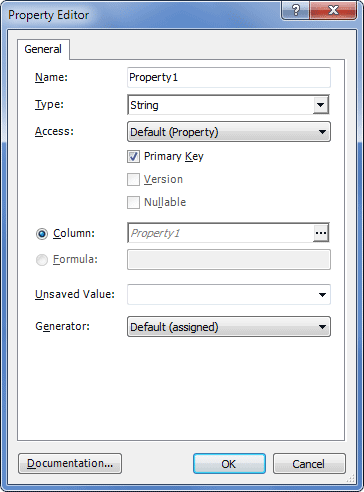
The following options are available:
Name – Set the property name here.
Type – Set the property type.
Access – Select a type of access. Can accept the following values: Property, Default, Field, Nosetter.
Primary Key – Specifies that this property is a primary key.
Version – Specifies that this property holds the row version.
Nullable – Specifies whether this property value is nullable.
Column – Specifies the name of the mapped database table column.
Formula – Specifies an SQL expression that defines the value for a computed property.
Unsaved value – This property is available only for Primary Key properties or for properties with Version=True.
It is a property value which indicates that an instance is newly instantiated (unsaved), distinguishing it from detached instances that were saved or loaded in a previous session.
The allowed values of unsaved value are:
-
any – Always save.
-
none – Always update.
-
null – Save when identifier is null.
-
valid identifier value – Save when identifier is null or equals the user-defined value.
-
undefined – If set for version or timestamp, then identifier check is used.
Generator – Specifies the strategy to be used when generating unique IDs for each row. Can accept the following values: assigned (the generator set for the whole model), foreign, guid, guid.comb, guid.native, hilo, identity, increment, native, select, seqhilo, sequence, sequence-identity, uuid.hex, uuid.string and custom.
Generated – (available for non-key properties) Specifies whether this property value as actually generated by the database. Can accept the following values: Never, Insert, or Always.
Insert – (available for non-key properties) Specifies that the mapped columns should be included into an SQL INSERT statement. Can accept the following values: True or False.
Update – (available for non-key properties) Specifies that the mapped columns should be included into an SQL UPDATE statement. Can accept the following values: True or False.
Optimistic lock – (available for non-key properties) Specifies whether updates to this property require acquisition of the optimistic lock. Can accept the following values: True or False.