Properties
Properties are basic elements that compose model objects, which describe presentation of high level architecture such as fields and tables of a database. Properties can be divided into scalar, complex type, enum and navigation properties. Scalar properties are properties of a model object that map to a database table column and have one of the predefined LinqConnect types. Complex type properties are mapped to several columns of a database table. Enum properties are mapped to a database table column, that can accept a certain set of values and then these values are defined in the model as an enum object. Scalar and complex type properties, and enum members are listed inside the upper part of an object on the diagram area. Navigation properties are properties of a model object that describe navigation from one end of an association to the other end. They are listed inside the collapsible Navigation Properties node of an object presented on the diagram area.
The following procedure shows how to create scalar and complex type properties.
Creating a property
To create a new property within a class, use one of the following options:
- In the Model Explorer window or in the diagram area right-click the required class to call its context menu, and in the Add submenu select New Property, or select the required class and press ALT+P, this will call the Property Editor dialog.
- In the Class Editor dialog press INSERT, or right-click the Class Properties grid and select Add Property in the context menu.
- Select the required class and press INSERT.
To create a new property within a complex type, use one of the following options:
- In the Model Explorer window or in the diagram area right-click the required complex type to call its context menu, and in the Add submenu select New Property, or select the required class and press ALT+P, this will call the Property Editor dialog.
- In the Type Editor dialog press INSERT, or right-click the Properties grid and select Add Property in the context menu.
- Select the required complex type and press INSERT.
The Property Editor dialog is displayed:
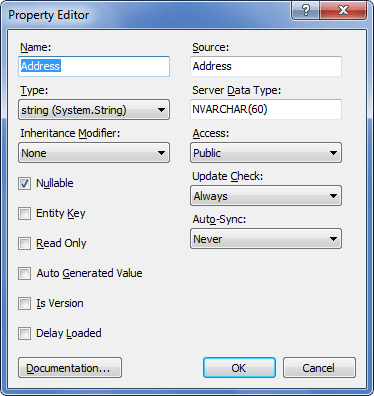
Specify the required settings and click OK.
The new property is created.
Editing a property
To edit a property within a class, use one of the following options:
- In the Model Explorer window or in the diagram area right-click the required property and in its context menu select Edit.
- In the Class Editor dialog right-click the required property in the Class Properties grid and select Edit Property in the context menu.
To edit a property within a complex type, use one of the following options:
- In the Model Explorer window or in the diagram area right-click the required property and in its context menu select Edit.
- In the Type Editor dialog right-click the required property in the Properties grid and select Edit Property in the context menu.
The Property Editor dialog is displayed.
Change the required settings and click OK.
Note
Not all of the properties of a property can be set in the Property Editor dialog. Additional properties can be set in the Properties docking window.
Deleting a property
To delete a property use one of the following options:
- right-click the required property on the diagram area or in the Model Explorer, and select Delete in the context menu;
- select the required property and press the DELETE key.