Association Editor
Use this editor to define relationships between other model objects like classes and complex types.
To call the Association Editor dialog box, use one of the following options:
-
Use the New Association
 button on the Model toolbar or on the Model Explorer toolbar.
 -
Alternatively, you can right-click the diagram or a class and select New Association from the Add submenu of the shortcut menu.
-
Right-click an existing association on the diagram and select Edit in the context menu.
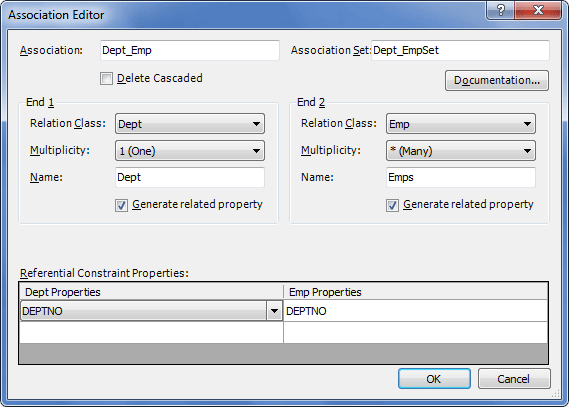
The following options are available:
Association – specifies the name of the association here.
Association Set – specifies the association set that contains the association.
Delete Cascaded – determines whether the cascade deleting will be performed when the parent entity having child entities is deleted.
Documentation – click to open the Documentation Editor dialog box.
Relation Class – specifies the name of the class taking part in the association.
Multiplicity – specifies the number of instances of a class that can participate in the relationship. Can accept the following values: 1 (One), 0..1 (Zero or One), * (Many).
Name – specifies the name of the member property of an association.
Generate related property – select this checkbox to generate the related property in the class. Can accept the following values: True, or False.
Referential Constraint Properties – select the referential constraint columns here.