Complex Type Editor
This dialog box allows you to create and edit complex types.
To display Type Editor, double-click the complex type on the diagram or in the Model Explorer, or select Edit from the complex type shortcut menu.
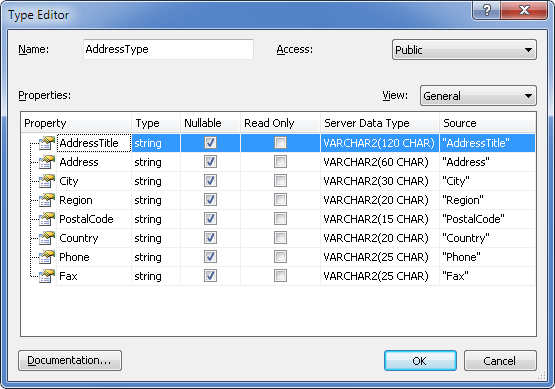
The following options are available:
Name – set the complex type name here.
Access – set the accessibility level here. Acceptable values are Public and Internal.
View – Selecting a view allows you to view and edit specific parameters for class or type properties inside the Class Editor without opening Property Editor. The following views are available.
- General – Allows you to edit main property parameters, such as its type, server data type, corresponding column name, nullability, whether it is a part of Entity Key, whether it is read-only.
- Facets – Allows you to edit property column facets, such as max length, unicode and fixed length settings for string data type, or precision and scale for numeric data types.
- Presentation – Allows you to edit property display name.
- Validation – Allows you to edit property validation settings - whether its value must be set, its format, min and max length for string data types, min and max value for numeric data types.
Properties – displays complex type properties and their parameters.
Documentation – click to open the Documentation Editor dialog box and enter a description of the complex type.