
dotConnect for MongoDB Documentation
This tutorial describes how to connect to MongoDB.
To connect to MongoDB, you need to have access to a MongoDB server (a standalone server, a replica set, a sharded cluster, or a cloud cluster), dotConnect for MongoDB installed, and the IDE running. You also need to know the connection parameters described below.
To establish a connection to the server, you have to provide the connection parameters to dotConnect for MongoDB. The MongoDBConnection component uses them to connect to MongoDB. The parameters are represented as a connection string. You can compose the connection string manually or have dotConnect for MongoDB construct it for you.
No connection string parameter is mandatory. Host is localhost by default, and User Id and Password are needed only if authentication is enabled on the server. The following connection strings are typical examples:
Host=localhost;Port=27017;Database=sample;User Id=user;Password=pwd;License Key=*** Url=mongodb+srv://user:[email protected]/sample;License Key=*** Host=db1;Additional Servers=db2:27017,db3:27017;Replica Set=rs0;Database=sample;License Key=*** |
The following table describes the connection string parameters.
| Parameter | Default value | Description |
|---|---|---|
Host (Data Source, Server) | localhost | Specifies the server name. |
Port | 27017 | Specifies the port number for the connection. |
Database | Specifies the database used by the connection. If empty, it is taken from Url. | |
Url | Specifies a MongoDB URI, mongodb:// or mongodb+srv://. Explicit parameters override its parts; other parameters add options. | |
Connection Format | Standard | Specifies the URI format: Standard – mongodb://; DnsSeedList – mongodb+srv://, servers come from the DNS SRV record of Host. |
Additional Servers | Specifies more servers of a replica set or a sharded cluster as host[:port],host[:port]. Can't be used with DnsSeedList. | |
Replica Set | Specifies the replica set name. | |
Connection Options | Specifies extra URI options, name=value&name=value. They take precedence over the parameters below. | |
User Id | Specifies the user name for authentication. | |
Password | Specifies the password of the user. | |
Auth Database (Auth Source) | admin | Specifies the database that holds the user. |
Persist Security Info | false | Specifies whether security-sensitive information, such as the password, is kept in the connection string after the connection is opened. |
SSL Mode | Disable | Specifies whether to use SSL: Disable or Require. The other SSL parameters apply only with Require. |
Trust Server Certificate | false | Accepts any server certificate and host name. |
SSL Cert | Specifies the PEM file with the client certificate and key. On Windows, an unencrypted PKCS#1 RSA key. | |
SSL CA Cert | Specifies the file with the CA certificate. Not supported on Windows; the CA comes from the Windows certificate store. | |
SSL Password | Specifies the password of the client certificate key. Not supported on Windows. | |
Connection Timeout | 30 | Sets the total time in seconds that Open() waits, including server selection. |
Socket Connect Timeout | 10 | Sets the time in seconds for one attempt to connect a socket, at most Connection Timeout. 0 means the driver default. |
Pooling | true | Enables connection pooling. |
Min Pool Size | 0 | Specifies the minimum number of connections kept in the pool. |
Max Pool Size | 100 | Specifies the maximum number of connections in the pool. |
Connection Lifetime | 0 | Specifies the time in seconds after which a connection returned to the pool is destroyed. 0 means no limit. |
Transactions | IfSupported | Defines the behavior on a standalone server, which has no transactions: IfSupported runs the commands at once; Required raises an error. |
Enlist | true | Enlists the connection in the current TransactionScope. |
License Key | Specifies the license key. See Activation. | |
Sql Engine | true | Selects the working mode: true – SQL over collections; false – MongoDB commands in JSON. |
Reader Type | Default | Specifies how the reader returns data in native mode only: Default – a column per field; Document – the whole document as one value. |
Describe Amount | 100 | Specifies the number of documents read to describe the fields of a collection. |
Complex As String | false | Returns every embedded document or array as one JSON column in SQL mode. |
Json Fields | Returns only the listed fields as JSON columns in SQL mode, collection.field;collection.field. | |
Allow Add Fields | true | Lets INSERT, UPDATE and MongoDBLoader write a field that the collection or the document doesn't have in SQL mode. false raises an error. |
Create Collection On Insert | false | Creates the target collection if it doesn't exist when an INSERT or MongoDBLoader writes to it, in both modes. false raises an error. |
Schema Validation | Off | Specifies how CREATE TABLE and EF Core EnsureCreated set the schema of a collection: Off keeps the column list without checking documents; Warn logs a warning on the server for a document that doesn't match; Error rejects such documents for every client. |
Decimal128 Mapping | String | Specifies how Decimal128 values are mapped: String, Decimal or Double. |
DateTime Kind | Utc | Specifies the kind of read dates (Utc or Local). A DateTime of Unspecified kind is written as this kind. |
Guid Format | Uuid | Specifies how Guid values are stored: Uuid (binary subtype 4), Subtype3Rfc, Subtype3Guid, Subtype3Reversed or String. |
DateTimeOffset Format | DateTime | Specifies how DateTimeOffset values are stored: DateTime (the offset is lost), Document, Array or String. |
Native Library Path | Specifies the folder with libmongoc-1.0.dll, libbson-1.0.dll, sqlite3.dll, and vcruntime140.dll, directly or in its Native\win-<arch>, runtimes\win-<arch>\native, or <arch> subfolder. Here <arch> is x86, x64, or arm64, depending on the process. |
Design-time creation
This procedure assumes that the IDE is running and a form is open in the designer.
"Host=localhost;Port=27017;Database=sample;User Id=user;Password=pwd;".Run-time creation
You can configure a connection at run time by setting its ConnectionString property. Note that you must add references to the Devart.Data.MongoDB.dll and Devart.Data.dll assemblies.
Using a connection string builder
If you decide to set up the connection by assigning values to several properties, consider using the MongoDBConnectionStringBuilder class. It provides a property for each connection string parameter, which lets you configure every aspect of the connection.
In this example we used the MongoDBConnection constructor that accepts a connection string as an argument.
For information on the parameters you can use in the connection string, see the description of the MongoDBConnection.ConnectionString property.
Creating a connection in Server Explorer
To create a Server Explorer connection:
localhost) and the Port (defaults to 27017).mongodb+srv:// address, select Use DNS seed list: the servers are then taken from the DNS SRV record of the host.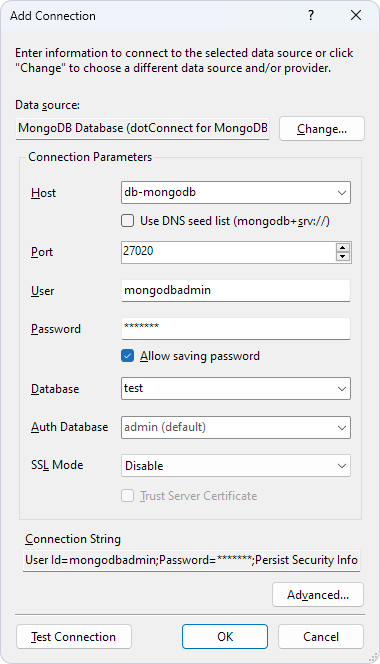
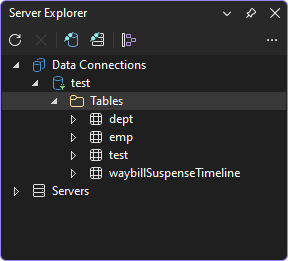
After this, you can browse MongoDB objects in Server Explorer.
To open a connection, call the Open method.
The mongoDBConnection1 object must have a valid connection string assigned earlier. When you call Open, dotConnect for MongoDB tries to find the host and connect to MongoDB. If any problem occurs, it raises an exception with a brief explanation of what is wrong. If no problem is encountered, dotConnect for MongoDB tries to establish the connection within the Connection Timeout interval. When the connection is established, the Open method returns and the State property changes to Open.
To connect to the server at design time:
mongodb+srv:// address, select Use DNS seed list.
Alternatively, set the State property to Open in the Properties dialog to establish a connection using the current connection string.
To close a connection, call its Close method or set its State property to Closed. At design time, right-click the connection object in the designer and select Disconnect.
The following example summarizes the preceding information and shows how to create, set up, open, use, and then close a connection.
The sample code connects to the server, shows its version (the version of the MongoDB server, for example "8.0.0"), and then closes the connection. This is a rare usage, because in real applications connections are used by other objects such as MongoDBCommand, MongoDBDataReader, and others. For more information, see the corresponding tutorials or the reference documentation.
You can modify a connection by changing the properties of the MongoDBConnection object. Keep in mind that while some of the properties can be altered freely, most of them close the connection when a new value is assigned.