Git Integration
To use Code Compare with Git, add the following lines to the .gitconfig file:
[difftool "codecompare"]
cmd = \"C:\\Program Files\\Devart\\Code Compare\\CodeCompare.exe\" -W \"$LOCAL\" \"$REMOTE\"
renames = true

[diff]
tool = codecompare
guitool = codecompare

[mergetool "codecompare"]
cmd = \"C:\\Program Files\\Devart\\Code Compare\\CodeMerge.exe\" -MF \"$LOCAL\" -TF \"$REMOTE\" -BF \"$BASE\" -RF \"$MERGED\"
trustExitCode = true

[mergetool]
keepBackup = false

[merge]
tool = codecompare
guitool = codecompare
Note
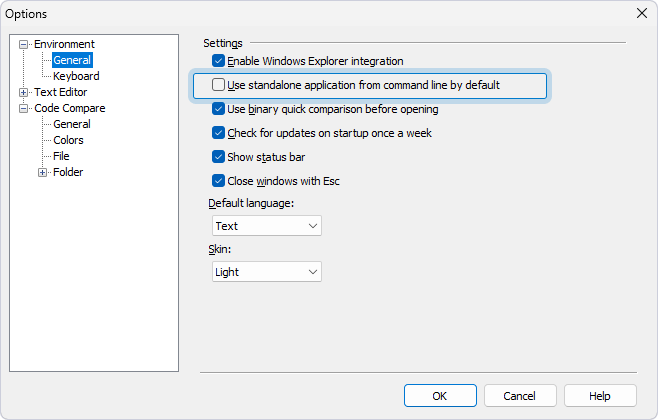
By default, Code Compare runs as a standalone application. To use it as an integrated tool in Visual Studio:
1. Open Code Compare.
2. In the top menu, select Tools > Options.
3. Go to Environment > General.
4. Clear the Use standalone application from command line by default checkbox.
5. Click OK to save the changes.